You're grading at night, half-reading with one eye open, when a paragraph stops you cold. The sentence rhythm is polished. The transitions are smooth. The vocabulary sounds like a student who suddenly became ten years older and weirdly fond of words like “multifaceted” and “nuanced.”
Most teachers now know that feeling.
The problem isn't just whether a chat gpt student used AI. It's that suspicion alone doesn't help you teach better tomorrow. If every strong paragraph becomes a courtroom exhibit, class turns into a guessing game. Students get defensive, teachers get cynical, and nobody learns much.
That's why I've stopped treating ChatGPT as a pure discipline problem. It's a classroom design problem. Students are already using it at scale, and in some cases openly. One widely cited summary of global student behavior reports that 89% of students globally have admitted to using ChatGPT for homework in its first wave of adoption, which tells you why a detection-only strategy is too small for the moment (Browsercat's ChatGPT usage roundup).
What works better is a practical approach: set boundaries, teach acceptable use, build assignments that value process, and use AI yourself where it saves time.
That "Too Perfect" Paragraph Your Student Just Turned In
A “too perfect” paragraph usually triggers the same internal script. This doesn't sound like them. The syntax is cleaner than their in-class writing. The ideas are organized, but a little generic. You can feel the mismatch, even when you can't prove it.
That instinct matters. But it's only useful if it leads to a better response than panic.

What the moment usually means
Sometimes the student used ChatGPT to write the whole thing. Sometimes they pasted in their draft and asked for cleanup. Sometimes they used it to brainstorm and then over-edited until the voice disappeared. And sometimes the student wrote better than you expected.
That's why I don't begin with accusation. I begin with curiosity and evidence from my own classroom records: prior writing samples, in-class quick writes, revision history, and a short conversation.
If you want a plain-English overview of what AI-generated writing often looks like, this AI detection guide for professionals is useful as a pattern-recognition resource. It's more helpful as a discussion starter than as a verdict machine.
Practical rule: If your only evidence is “it sounds like AI,” you don't have enough yet.
The better pivot
The shift is this. Stop asking only, “Did they use AI?” Start asking, “What kind of assignment design made this the easiest path?”
That question is more productive because it gives you something you can control tomorrow morning. If the task rewards polished output but ignores thinking, notes, revision, and discussion, AI will slide right into the gap.
A strong response sounds more like this:
- Ask for the process: “Show me how you got from notes to final draft.”
- Check transfer: “Summarize your own argument out loud.”
- Re-anchor to class: “Connect your paragraph to yesterday's discussion.”
- Require a next step: “Revise one section by hand and explain your choices.”
That's the move. Less detective work, more instructional design.
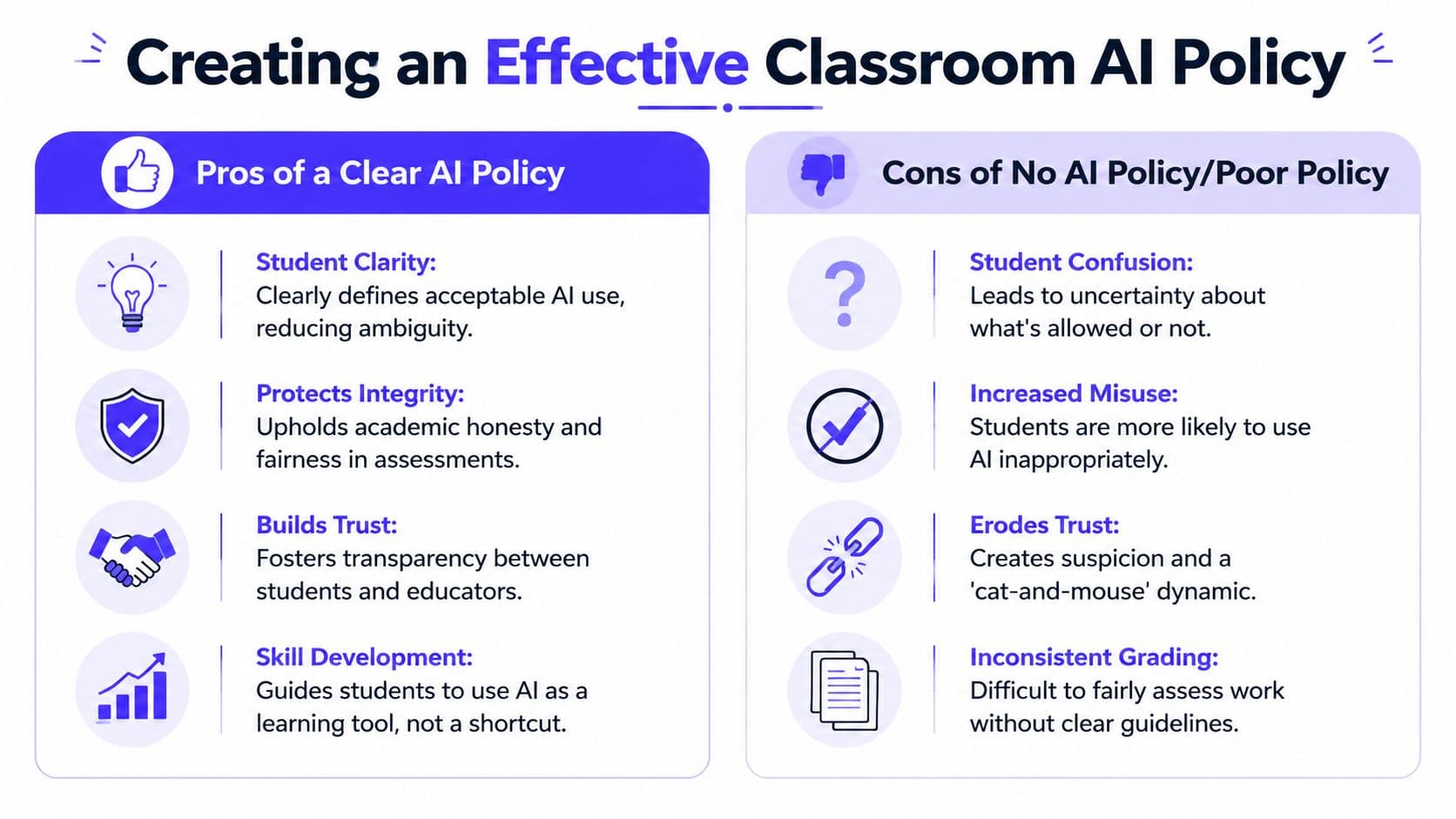
Creating a Classroom AI Policy That Actually Works
Most AI policies fail for one reason. They sound like legal disclaimers instead of classroom expectations.
Students don't need a six-paragraph statement hidden in the syllabus. They need a simple system they can remember while working. I've found the most usable model is Red Light, Yellow Light, Green Light.
Red light tasks
These are AI-free tasks. No brainstorming, no editing, no prompting.
Use this category for work where you need direct evidence of student thinking:
- In-class writing: timed responses, reading checks, on-demand paragraphs
- Tests and quizzes: unless you explicitly build AI into the task
- Skill checks: fluency, recall, and first-draft proficiency
- Personal reflection: especially when tied to lived experience or class discussion
The language can stay simple: No AI tools allowed at any stage of this task.
Yellow light tasks
Most classroom work should probably align with these principles. AI is allowed for limited support, but not for replacing thinking.
Examples:
- Brainstorming topics for an essay
- Generating practice questions before a test
- Checking grammar after the student has drafted
- Explaining a concept in simpler language
- Creating a study guide outline the student then verifies
The policy line matters here: You may use AI for support, but you must do the core thinking, verify the output, and disclose how you used it.
That disclosure can be one sentence at the bottom of the assignment: “I used ChatGPT to generate three possible thesis ideas, then chose and rewrote one.”
Green light tasks
This category is where students actively work with AI because the learning goal includes critique, evaluation, revision, or comparison.
Good green light assignments include:
| Task | What students do |
|---|---|
| AI summary critique | Find what the summary gets right, misses, or distorts |
| Source verification | Fact-check an AI explanation against class materials |
| Style revision | Turn a flat AI paragraph into a voice-driven one |
| Debate prep | Ask AI for both sides, then identify weak reasoning |
A good green light task asks students to examine AI output, not worship it.
Keep the policy visible
Put the model on a slide, on the wall, and in assignment directions. Repetition beats complexity.
This teacher-facing gap matters because, as noted in The Core Collaborative's discussion of AI and educational equity, existing student-focused ChatGPT guidance often overlooks how teachers can design differentiated instruction at scale.
If you want examples of how postsecondary instructors are framing these boundaries, this AI in higher education guide offers language you can adapt downward for secondary classrooms. For a K-12-specific planning angle, I'd also look at this practical guide to AI for teachers and classrooms.
Productive Prompts for Every Grade and Subject
The difference between cheating and learning often sits inside the prompt.
A bad prompt outsources thought. A productive prompt creates friction, comparison, revision, or explanation. That matters even more now that teen use has grown. By 2025, ChatGPT use for schoolwork had doubled among U.S. teens since 2023, and usage varies by grade, with 31% of 11th and 12th graders using it for schoolwork compared with 20% of 7th and 8th graders, according to Pew Research Center.
Elementary prompts that support language and thinking
At this level, I want prompts that build vocabulary, sequencing, and explanation.
Weak prompt:
Write my paragraph about the water cycle.
Better prompt:
Explain the water cycle in kid-friendly language using only words a 4th grader would know. Then give me three quiz questions I should be able to answer after reading it.
Weak prompt:
Do my reading questions.
Better prompt:
I read this story. Ask me five questions that get harder each time, and wait for my answers one at a time.
Good elementary use keeps the student in the loop. They respond, revise, and explain.
Middle school prompts that build comparison and analysis
Middle school students need structure. They also need prompts that stop them from pressing “generate” and copying the result.
Try these:
- ELA prompt: Compare these two character choices. Give me one similarity and two differences, but leave space for me to add text evidence.
- Science prompt: Explain photosynthesis in simple language, then explain it again using formal science vocabulary. I need to see what changes.
- Social studies prompt: Give me a short argument for and against this historical decision. Then list what evidence would make each side stronger.
- Math prompt: Don't solve the whole problem. Show me the first step, explain why that step matters, and give me a similar problem to try.
If the prompt asks the AI to leave blanks, ask questions, or create contrast, the student still has to think.
High school prompts that demand judgment
Older students can handle stronger prompt design, but they also need more guardrails because they know how to get polished output fast.
Weak prompt:
Write my Hamlet essay.
Better prompt:
Give me three arguable claims about Hamlet's hesitation. For each claim, explain what kind of evidence from the play would support it and what counterargument a teacher might raise.
Weak prompt:
Summarize this article.
Better prompt:
Summarize this article in five bullets, then identify two possible biases or blind spots in the summary itself.
Weak prompt:
Answer these chemistry questions.
Better prompt:
Act like a tutor. Ask me what I already know, identify where I'm confused, and then explain the concept in smaller steps.
One simple before-and-after rule
Here's the shortcut I give colleagues:
| If your prompt says... | Change it to... |
|---|---|
| “write” | “compare,” “question,” “critique,” or “explain why” |
| “answer” | “coach me through” |
| “summarize” | “summarize, then identify what was left out” |
| “solve” | “show the first step and ask me to continue” |
If you're building lessons around this kind of prompt design, this guide on using AI for lesson planning has a useful teacher workflow for turning broad ideas into classroom-ready activities.
How to Integrate ChatGPT into Your Lessons and Assessments
The cleanest way to reduce misuse is to bring AI into the assignment on your terms.
When teachers use ChatGPT as part of instruction rather than treating it as a shadow tool, the conversation changes. A MIT study reported that when teachers used ChatGPT to analyze student discussions and generate customized follow-up questions, student engagement increased by 40% and the system showed 85% accuracy in identifying comprehension gaps in math and science (MIT study summary).
Three lesson structures that work
AI as the flawed first draft
This works well in history, science, and ELA.
- Ask ChatGPT for an explanation, summary, or argument.
- Give students a verification tool such as notes, a textbook, or primary sources.
- Have them mark what's accurate, incomplete, misleading, or unsupported.
- End with a short reflection on what made the AI output sound convincing.
Students learn skepticism without you needing a lecture on “AI bad.”
AI as differentiation support
This is the part many teachers need most and find least explained. We don't just need student rules. We need faster ways to create multiple entry points for one lesson.
That's where a teacher tool can help. Kuraplan can generate standards-aligned lessons, create differentiated worksheets from those lessons, and give you a built-in AI chat for brainstorming modifications, checks for understanding, and rubric ideas through its AI chat feature for teachers. In practice, that means you can build one lesson objective, then produce different versions for support, on-level work, and extension without rewriting everything from scratch.
AI as a revision partner
This works better than AI as a drafting tool.
Ask students to submit:
- Original draft
- AI feedback prompt they used
- Revised draft
- Short reflection on which suggestion they accepted or rejected
That structure keeps the student as author and makes the AI visible.
Prompt engineering matters for teachers too
A lot of classroom frustration comes from weak teacher prompts, not just weak student prompts. If you've ever asked for a worksheet and gotten something unusable, that's usually a prompt design issue.
This what is prompt engineering guide is a decent primer on how to make AI outputs more specific and constrained. In school terms, that often means adding grade level, standard, misconception to address, output format, and what not to include.
Better teacher prompt: “Create three discussion questions for 8th grade science on ecosystems. One should target a common misconception, one should require evidence from the reading, and one should be accessible to English learners.”
That level of specificity is where AI starts becoming useful instead of noisy.
Beyond AI Detectors Fostering True Academic Integrity
If your AI plan begins and ends with detection, you're signing up for a miserable year.
Students will keep experimenting. Detection tools will keep making claims. You'll keep spending energy on uncertainty. Meanwhile, the essential work of teaching gets pushed aside.

Why the policing model breaks down
The scale alone should tell us this. If 89% of students globally have admitted to using ChatGPT for homework according to the earlier-cited Browsercat roundup, then trying to win with enforcement alone is like trying to empty a pool with a cup.
Academic integrity holds up better when assignments make student thinking visible.
That means shifting some of your grading weight toward:
- Process notes that show how ideas changed
- In-class writing that gives you a voice baseline
- Annotated sources where students explain why each source matters
- Revision commentary that names choices and tradeoffs
- Live discussion or presentation where students must defend claims
Design assessments AI handles poorly
AI is strong at producing plausible language. It is weaker at being your student in your room, with your class discussion, your examples, and your sequence of instruction.
Build toward that.
A better essay prompt isn't “Analyze the theme of resilience.” It's “Using our class discussion of chapters 3 and 4, explain which moment most changed your interpretation of the main character, then defend that claim with one quotation and one counterpoint you considered but rejected.”
That prompt ties the work to lived classroom experience.
Here's a useful classroom explainer to share with colleagues or even older students during advisory.
What to reward instead of polish
I'd rather grade a rough draft with clear thinking than a perfect paragraph the student can't explain.
Consider weighting your rubric toward:
| Value this more | Value this less |
|---|---|
| Evidence of reasoning | Surface fluency alone |
| Revision choices | One-shot polished output |
| Specific class connections | Generic summary |
| Oral defense of ideas | Unexplained final answers |
Students usually rise to the level of the rubric. If the rubric rewards visible thinking, many shortcuts stop looking useful.
Troubleshooting Common ChatGPT Student Misuses
Even with a clear policy, you'll still run into trouble. The goal isn't to eliminate every misuse. It's to respond in a way that teaches something.
When a student submits a clearly AI-written essay
The automatic zero feels satisfying for about five minutes. After that, you still haven't addressed the underlying problem.
Try a short conference first. Ask the student to walk through the paragraph, explain the thesis, and describe how they chose their evidence. If they can't, require a supervised redo or a process-based rewrite. You're still holding the line, but you're tying the consequence to learning.
When the AI output includes false information
This is one of the easiest teachable moments because it proves your point for you. In educational contexts, AI can over-generalize and produce inaccurate results. One report from Virginia Tech noted a 22% rate of false positives in niche educational themes before prompts were refined, which is a useful reminder that teacher validation still matters (Virginia Tech beneficial use cases report).
Have the student identify the error, find a reliable correction, and write a brief note on how they should have verified the claim.
When parents say “But they use AI in the real world”
That's true, and it's also incomplete. In practice, people are expected to verify, revise, explain, and take responsibility for errors.
So the classroom answer is simple: yes, students can learn to use AI. No, they can't outsource judgment.
FAQs from the Teacher's Lounge
Won't ChatGPT make students lazy?
It can, if the task invites passivity. It can also function like guided support when the assignment requires students to question, verify, and revise. The issue isn't the tool by itself. It's whether the classroom routine still demands human thinking.
I'm not a tech expert. How am I supposed to keep up?
You don't need to out-tech your students. You need a clear policy, a few solid prompt patterns, and assessments that value process over polish. Teachers already know how to design for learning. This is the same skill set, just applied to a new tool.
What about equity?
This concern is real. If an assignment requires AI access, students need a fair way to complete it in class or an equivalent non-AI path. Otherwise “innovation” becomes a homework access problem.
Should I ban it completely?
For some tasks, yes. Red light assignments still matter. But a total ban across everything is hard to enforce and often misses the bigger opportunity, which is teaching students how to use tools without surrendering judgment.
What's the biggest mistake teachers make?
Treating AI as only a discipline issue. The stronger move is to treat it as a planning issue, a literacy issue, and an assessment design issue.
If you want a faster way to turn that approach into actual classroom materials, Kuraplan is built for K-12 teachers who need standards-aligned lessons, differentiated worksheets, visuals, and AI-assisted planning without spending all weekend formatting documents.