You can make free rubrics by using editable online templates or free rubric-generator tools to do the heavy lifting. The smart way to do it is to nail down your core learning goals first, then use these tools to quickly build out the criteria and performance levels. It'll save you from that painful stare-down with a blank document.
Stop Spending Weekends Building Rubrics From Scratch
Let's be real—creating a good rubric from a blank page can eat up an entire planning period, if not more. You're trying to figure out the perfect criteria, write crystal-clear descriptions for each performance level, and make sure it all aligns with your standards. It’s an essential task that almost always bleeds into your personal time.
This guide is for teachers who want to create high-quality, free rubrics without the usual headache. This isn't dry educational theory; it's about giving you practical methods to reclaim your time so you can focus more on teaching and less on paperwork.
The True Cost of Manual Rubric Creation
The time sink is real. In K–12 education, teachers spend an average of 5–7 hours per week on lesson planning and creating assessments. Rubrics often take up a huge chunk of that time, with 68% of U.S. teachers reporting that rubric design is a major time drain. It’s no wonder burnout rates have hit 44% in some districts.
That cycle of spending hours on a single assessment tool just isn't sustainable.
A well-designed rubric is more than a grading tool; it’s a roadmap for student success. But when building that roadmap takes longer than the actual journey, it’s time for a better map.
The goal isn't to work harder; it's to work smarter. By shifting from a tangled, manual process to a more efficient workflow, you can produce better rubrics in a fraction of the time.
This flowchart shows the difference between the old, time-consuming method and a more modern, streamlined approach.
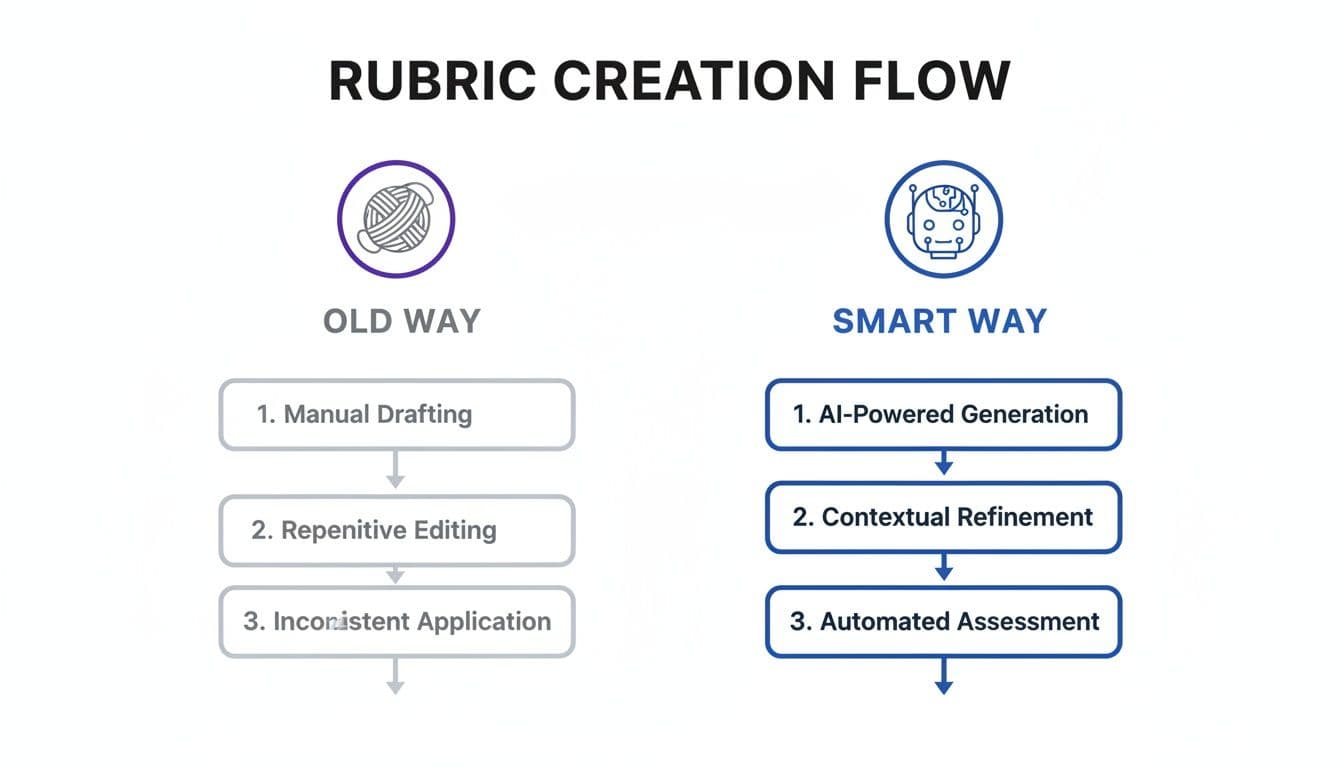
It’s pretty clear: using the right tools turns rubric creation from a complex chore into a quick, manageable task. That means you can invest your energy where it matters most—with your students.
To put it in perspective, let's break down the difference in effort between the traditional way and a smarter, tool-assisted workflow.
The Old Way vs. The Smart Way to Create Rubrics
| Task | The Old Way (Manual Creation) | The Smart Way (Using Free Tools & AI) |
|---|---|---|
| Defining Criteria | Brainstorming from scratch, often in isolation. Can take 30-60 minutes. | Auto-generated based on learning objectives and standards. Instant. |
| Writing Descriptors | Writing unique descriptions for 3-5 levels across multiple criteria. The biggest time sink. | AI generates clear, differentiated descriptors for all levels. Takes a few minutes. |
| Aligning Standards | Manually searching and mapping standards to each criterion. Tedious and error-prone. | Automated mapping to state or national standards. Accurate and fast. |
| Formatting | Fighting with table layouts in a word processor. | Clean, editable templates are ready to go. No formatting fuss. |
| Total Time | 1-2+ hours per rubric. | 5-15 minutes per rubric. |
The contrast is stark. Moving to a more efficient process doesn't just save you an hour or two; it frees up significant time over the course of a school year, preventing burnout and giving you more room to breathe.
Defining What Really Matters in Your Rubric

Before you even think about templates or tables, every great rubric begins with one clarifying question: What must students know or be able to do to really nail this assignment?
This is your foundation. Get this part right, and everything else falls into place.
A vague rubric is about as helpful as a cold cup of coffee on a Monday morning. To avoid that trap, you need to anchor your rubric in the core learning objectives of the assignment. Think of these as the absolute non-negotiables. If you're grading a persuasive essay, what matters most? Is it the strength of the argument, the use of evidence, or the clarity of the writing?
Narrowing Down to What Counts
Here’s a common mistake I’ve made more times than I can count: trying to assess everything at once. A rubric with a dozen different criteria is a nightmare for you to grade and just plain confusing for your students.
Instead, aim for the sweet spot: three to five meaningful criteria.
This forces you to be ruthless and prioritize what truly demonstrates mastery. To get there, try asking yourself these questions:
- What is the absolute point of this assignment?
- What's the difference between a project that “nailed it” and one that was just a “nice try”?
- If a student could only master one thing, what should it be?
Answering these helps you cut through the noise. For a history diorama project, for example, you might land on "Historical Accuracy," "Creative Representation," and "Written Explanation" as your core three. Everything else is just details.
Getting the criteria right is 80% of the battle. When you focus on a few essential skills, the descriptions for each performance level practically write themselves. It transforms the rubric from a boring checklist into a genuine learning tool.
From Jargon to Clarity
Once you've got your core criteria, the next step is to phrase them in kid-friendly language. It’s a small tweak that makes a huge difference. Ditch the formal, standards-based language and translate it into something a student can actually understand and use as a guide.
For example, a standard like "Demonstrates synthesis of multiple sources" becomes much clearer as "Uses Evidence from Different Sources to Support Ideas." This simple change makes the expectation crystal clear. You want students to look at the rubric before they even start and know exactly what the target is.
For more on this, our guide on what performance-based assessments are dives deeper into designing tasks with clear, student-focused outcomes.
This initial work of defining and refining your criteria is the most important part of the process. If you want to make free rubrics that actually work, this is where you need to spend your time. Of course, if you're short on time, AI tools like Kuraplan can be a lifesaver here, instantly suggesting standards-aligned criteria based on your assignment description to help you pinpoint what matters most.
Writing Descriptions That Guide Student Growth
Once you have your core criteria locked in, you get to the real heart of the rubric: the descriptions. This is where a simple grading checklist transforms into a genuine teaching tool.
Labels like 'Good' or 'Needs Improvement' are feedback dead-ends. They tell a student what score they got, but not why they got it or—more importantly—how to do better next time. The goal is to write specific, observable language for each performance level. Instead of judging, you're just describing what you see. This tiny shift in language moves the focus from a grade to a conversation about growth.
Use Parallel Language to Show the Path Forward
The most effective rubrics I've seen all use parallel language across performance levels. This just means the description for each level uses similar phrasing, which makes it incredibly easy for students to see the exact difference between 'Proficient' and 'Exemplary.' It literally shows them what the next step up the ladder looks like.
Take a criterion like "Use of Evidence" in a research paper, for example.
- Developing: Uses evidence from one source to support the main argument.
- Proficient: Uses evidence from multiple sources to support the main argument.
- Exemplary: Skillfully integrates evidence from a variety of credible sources to build and strengthen the main argument.
The core skill—using evidence—is the same, but the language clearly shows the progression. This structure is a game-changer for student self-assessment and goal-setting. For more ideas on framing feedback, you can check out these formative assessment examples that also focus on guiding learning.
The secret to great descriptors is to describe what you see, not what you think. Replace subjective words like "creative" or "interesting" with observable actions like "includes sensory details" or "connects ideas in a unique way."
Bringing Descriptions to Life with Examples
Let's walk through a real-world classroom scenario. Imagine a 4th-grade narrative writing assignment where one of your criteria is "Character Development."
Vague Descriptors (What to Avoid):
- Exemplary: Excellent character development.
- Proficient: Good character development.
- Developing: Weak character development.
These descriptions don't help a student understand how to improve. They just label the work.
Specific, Action-Oriented Descriptors (The Goal):
- Exemplary: The main character's feelings, actions, and words are detailed and change believably in response to events in the story.
- Proficient: The main character's feelings, actions, and words are described, showing a clear personality.
- Developing: The main character is named, but their feelings or actions are not clearly described.
This version gives students a clear picture of what success looks like at each stage and provides a roadmap for revision. In the same way that a good rubric guides student work, knowing how to make study guides that boost your grades can give students a clear structure for their own learning—both rely on clarity and actionable steps.
Of course, writing these detailed, parallel descriptions for every criterion takes a lot of time. This is another spot where AI can be a huge help. A tool like Kuraplan can instantly generate this kind of specific, growth-oriented language based on your assignment, helping you make free rubrics that are both high-quality and created in a fraction of the time.
Finding the Best Free Tools and Templates for Teachers

You don't need to reinvent the wheel every time you need a new rubric. The internet is filled with incredible resources that can save you hours of work, and most of them won't cost you a dime. It's all about finding the right tool to work smarter, not harder.
The easiest place to start is with templates. A quick search for Google Docs or Sheets rubric templates will give you dozens of options you can copy and customize in minutes. These are perfect when you just need a solid, no-fuss grid to plug your own criteria and descriptions into.
Dedicated Free Rubric Makers
When you want a bit more functionality than a basic template, dedicated online rubric makers are the logical next step. These tools are built specifically for teachers and often come with features that a simple spreadsheet can't offer.
Many of these free tools provide:
- Pre-built criteria libraries you can borrow from.
- Easy point calculation and scoring options.
- Shareable links to send rubrics to students or colleagues.
- Simple interfaces that guide you through the creation process.
These platforms are great for creating polished, professional-looking rubrics without wrestling with table formatting. However, while they simplify the layout, you're still doing the heavy lifting of writing the descriptions and aligning everything to your standards.
Top Free Rubric-Making Tools for Teachers
Choosing the right tool can feel overwhelming, but it really comes down to what fits your style and how much time you have. Here’s a quick comparison of some popular free options to help you decide.
| Tool | Best For | Key Feature | Learning Curve |
|---|---|---|---|
| Google Docs/Sheets | Quick, basic rubrics and total customization. | Universal access and easy sharing. | Low |
| Canva | Visually appealing, well-designed rubrics. | Design templates and graphic elements. | Low |
| RubiStar | Pre-built templates for common assignments. | Template library for various subjects. | Low to Medium |
| Forall Rubrics | Collaboration and sharing with colleagues. | Team features and feedback options. | Medium |
Ultimately, the best tool is the one that gets the job done without adding to your workload. Each of these options is a solid starting point for moving beyond creating rubrics from scratch.
The best tool is the one that fits your workflow. For some, a simple template is enough. For others, a dedicated maker is a welcome upgrade. And for those ready to truly reclaim their time, AI is the next logical step.
The AI Advantage in Rubric Creation
For those ready to truly speed up their workflow, AI-powered tools are a complete game-changer. This is where you move from simply finding a template to having a rubric built for you in seconds.
The integration of AI into lesson planning has already had a huge impact on K–12 education. Statistics show a 40% reduction in assessment preparation time for teachers using these tools. A platform like Kuraplan, trusted by over 30,000 teachers, perfectly illustrates this by auto-generating rubrics with differentiated criteria, cutting the formatting hassles that plague 72% of educators.
Instead of just giving you a blank table, an AI tool like Kuraplan asks for your assignment details and then generates a complete, standards-aligned rubric. It writes the criteria, fills in the descriptive language for each performance level, and ensures it all connects back to your core learning objectives. It removes the copy-paste marathon entirely.
If you're looking for more ways to speed up this process, check out our guide on finding a great free rubric creator.
And remember, beyond digital tools, teachers can actively seek out financial aid for classroom resources. Exploring specific funding opportunities through programs like the Walmart Teacher Grants can help you get the support you need.
Ensuring Your Rubric Is Fair for Every Student
A rubric is only as good as its ability to be understood by every single student in your classroom. If the language is too complex or the expectations are unclear, it stops being a helpful guide and becomes another barrier. That’s why making your assessments equitable and accessible is such a critical step when you make free rubrics.
This means looking at your rubric through the eyes of all your learners—your English language learners, students with diverse learning needs, and even those who are ready for a bigger challenge. A fair rubric creates a clear and empowering path to success for everyone.
Differentiating for Diverse Learners
Differentiation doesn't mean you have to create a dozen different rubrics. It's about building one flexible rubric that works for everyone. Small, intentional adjustments can make a world of difference.
Here are a few simple but powerful techniques I’ve used:
- Use Visuals: Adding simple icons or images next to each performance level (like a star for 'Exemplary' or a magnifying glass for 'Developing') gives a quick visual cue that supports all readers.
- Simplify Academic Language: Swap out jargon for straightforward terms. Instead of "synthesizes evidence," you could try "connects ideas from sources." The rigor is still there, but the language is more accessible.
- Offer Choice: Where you can, build choice into the assignment itself. Let students show their knowledge in different ways—a written report, a presentation, or a video—while using the same core rubric to assess the essential skills.
These strategies help ensure your rubric is evaluating a student's mastery of the content, not just their ability to decode complicated instructions.
Reviewing for Hidden Bias
Even with the best intentions, our rubrics can sometimes contain hidden biases. This often shows up in the language we choose or the criteria we prioritize. For instance, a rubric that values only one "correct" way of presenting information might unintentionally penalize students from different cultural or linguistic backgrounds.
A truly equitable rubric is a promise to your students: "I see your strengths, I understand your needs, and here is a clear, fair path for you to show what you know." It shifts the focus from compliance to genuine learning and growth.
Assessment rubrics are essential in K-12, but 55% of teachers worldwide say they are the biggest bottleneck in planning. Interestingly, in places with high AI adoption, AI-generated rubrics have been shown to improve grading equity by 28% by helping reduce bias in diverse classrooms. For principals and coaches, this can lead to 20% better alignment in team plans, especially when a tool like Kuraplan’s AI assistant provides tips for diverse learners right alongside the rubric. You can explore more about these global education trends to see the impact.
Ultimately, taking a few extra minutes to review your rubric for clarity, accessibility, and fairness is one of the most important things you can do. It ensures that the tool you’ve worked so hard to create genuinely supports every learner on their journey.
Common Questions About Making Free Rubrics
Even with the best templates in hand, a few questions always seem to pop up when you start to make free rubrics. I get these all the time from other teachers, so I’ve put together some quick answers to clear up the common sticking points.
What Is the Fastest Way to Make a Free Rubric?
The absolute quickest way is to use an AI-powered lesson planner that does the heavy lifting for you. A tool like Kuraplan can generate a complete, standards-aligned rubric for your assignment in seconds. It handles the criteria, descriptions, and alignment all at once.
If you’d rather do it yourself, your next best bet is to grab a pre-made template from Google Docs or Sheets. Find one that’s close to what you need, make a copy, and just tweak the existing text. This still saves you the headache of building the table from scratch.
How Many Criteria Should a Good Rubric Have?
Honestly, less is more. I always recommend sticking to three to five core criteria that hit the most important learning goals for the assignment.
When a rubric has too many categories, it's easy for both you and your students to get overwhelmed. The feedback gets messy, and the whole point of the assignment can get lost in a sea of checkboxes. Focusing on the essentials makes the feedback clearer and way more impactful.
Think of your rubric's criteria as the non-negotiables. If a student nails these few things, they’ve understood the heart of the lesson. Everything else is just details.
Is It Okay to Reuse Rubrics for Different Assignments?
Absolutely! This is one of the smartest time-savers in any teacher’s toolkit. It’s incredibly efficient to create a “master” rubric for the types of assignments you give all year—think essays, lab reports, or presentations.
You can then copy and slightly modify this base rubric for specific tasks. The trick is to always give it a quick once-over before you hand it out. Make sure the language and expectations still perfectly match the new assignment’s goals. That little check keeps the rubric relevant and useful every single time.
How Can I Make My Rubric Easier for Students to Understand?
Drop the jargon and use student-friendly language. But the most powerful thing you can do? Review the rubric with your students before they even start the project.
Go through it together, line by line. Ask them to explain the criteria back to you in their own words. This is a fantastic comprehension check and clears up any confusion right from the get-go. For younger students or visual learners, adding simple icons for each performance level can also make a world of difference.
Ready to stop building from scratch and start creating high-quality assessments in minutes? Kuraplan uses AI to instantly generate standards-aligned lesson plans complete with differentiated activities and ready-to-use rubrics. Reclaim your planning time and discover a smarter way to teach by visiting https://kuraplan.com.