Monday morning, the lesson plan is due, Wednesday's PLC is already crowded, and someone wants to know which standards were “covered” last year. You open the pacing guide, then the gradebook, then a shared spreadsheet that nobody has updated since October. The standard appears in three places, but you still can't tell whether students learned it thoroughly, whether another grade taught the same skill twice, or whether your class ran out of time before the assessment.
That's the problem curriculum mapping tools should solve. A useful platform connects intended curriculum with actual instruction, assessment evidence, pacing, and collaboration. A weak one merely gives teachers another place to enter the same information.
What Teachers Actually Need from Curriculum Mapping Tools
After a year of mapping, teachers usually don't complain that they need more colors, templates, or menu options. They complain about duplicate data entry between pacing guides and gradebooks, planning alone in a silo, and being asked to prove vertical alignment without another planning period.
A Grade 5 team might agree that fractions belong in the spring, then discover that the science pacing calendar has already absorbed the available instructional time. A department chair may see a standard tagged in every course and assume it's secure, even though each teacher interpreted “covered” differently. The map looks complete, while the classroom record tells a less comfortable story.
This article evaluates software against real classroom workflows and collaboration needs. It doesn't treat curriculum mapping as a static standards checklist, and it doesn't reward platforms just for having the longest feature list.
Four tests that matter every week
A usable tool should help teachers answer four practical questions:
- Does it save time in weekly planning? Teachers should be able to reuse unit structures, find standards quickly, and adjust pacing without rebuilding a map.
- Can colleagues see the right information? Grade-level and cross-grade teams need shared visibility without scheduling another meeting for every alignment question.
- Does it record implementation accurately? The system should distinguish what was planned from what was taught, postponed, abbreviated, or revisited.
- Can it produce a clear answer quickly? Administrators, families, and teachers may ask what students were expected to learn, when it was taught, and how mastery was checked.
Practical rule: If teachers must maintain the map, pacing guide, lesson plan book, and gradebook separately, the software hasn't solved the workflow.
The strongest curriculum mapping tools expose standards coverage, objective-to-course traceability, and gaps across the scope and sequence. One independent comparison weighted those alignment functions at 40%, workflow friction at 30%, and committee-review value at 30%, reflecting the needs of large districts that review maps repeatedly rather than creating them once (independent curriculum mapping software comparison).
I use those priorities throughout the comparison below. The question isn't which platform has the most features. It's which one gives teachers a more truthful, shared view of instruction without adding another administrative burden.
How Curriculum Mapping Works and What Good Tools Do
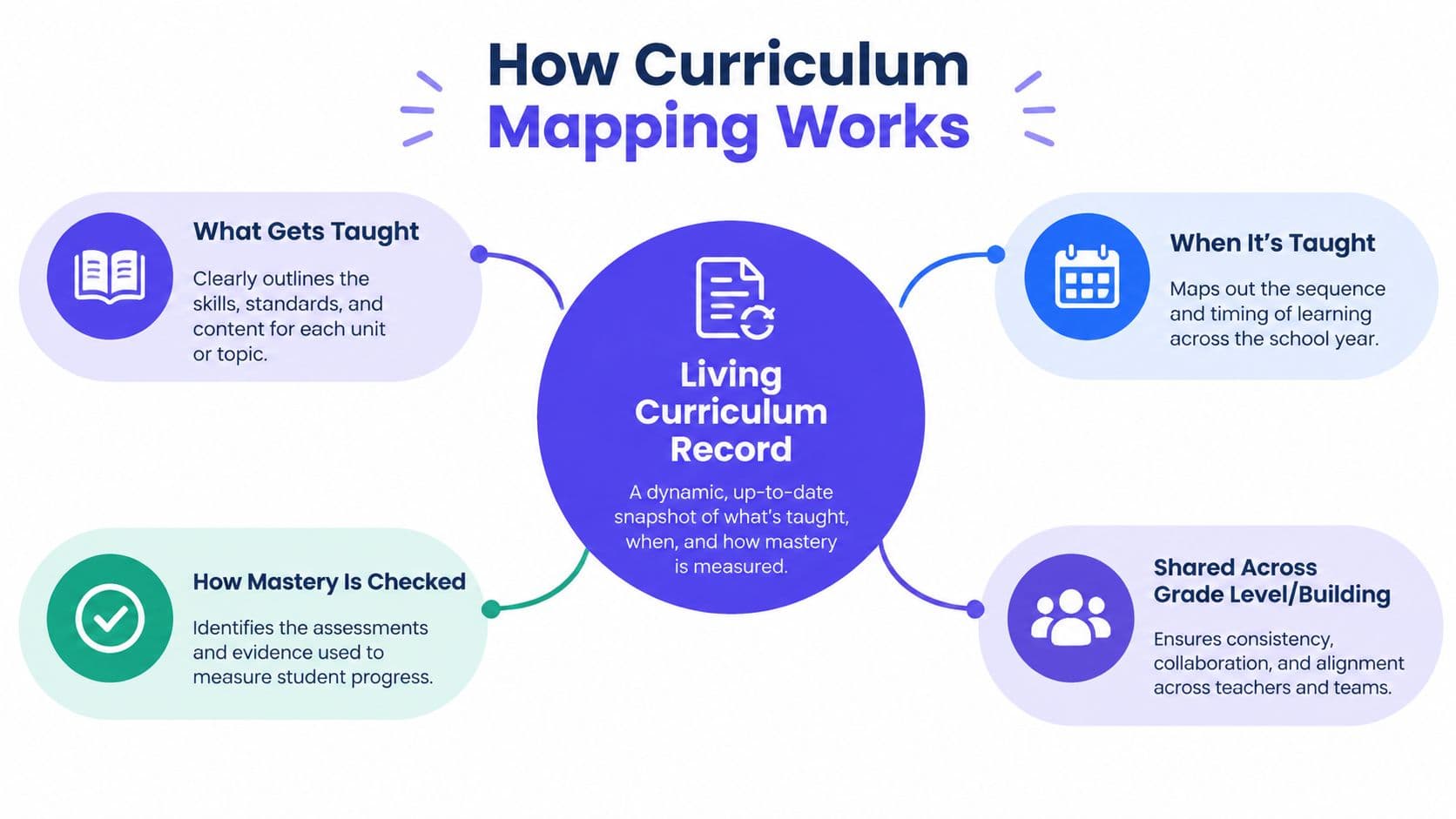
In classroom language, a curriculum map is a living record of what gets taught, when it gets taught, and how students' mastery is checked across a course, grade level, or school. It's more detailed than a broad curriculum plan because it connects units, skills, standards, resources, assessments, and pacing.
Curriculum mapping became a formalized educational practice in the mid-1990s, when Heidi Hayes Jacobs advanced a teacher-driven approach for documenting the operational curriculum. Her ASCD books in 1997 and 2004 helped popularize the model in K–12 schools, and by the early 2000s, paper scope-and-sequence charts had developed into digital systems that could search records, store maps in calendar-based databases, and connect curriculum, assessment, and instruction (curriculum mapping history).
What separates a platform from a spreadsheet
A spreadsheet can list units and standards. A workable mapping platform should also help a team maintain the map when the schedule changes, a new teacher joins, or an assessment reveals that students need more time.
Look for these capabilities:
- Shared unit templates: Teachers can build from an agreed structure while still adapting instruction.
- Granular standard tagging: A lesson, task, or assessment can connect to the specific objective it addresses.
- Flexible pacing calendars: Teams can move a unit without losing its relationships to standards, resources, and assessments.
- Visible review workflows: Coordinators can identify gaps, overlaps, and unresolved questions before testing pressure arrives.
New York State's curriculum mapping review tool evaluates developmental coherence and alignment across PreK-2, 3-5, 6-8, and 9-12, using six research-based criteria (New York State curriculum mapping review tool). That cross-grade perspective matters. A map that works beautifully for one course may still fail to show whether a skill develops logically from elementary school through secondary school.
My comparison criteria are therefore consistent: standards alignment depth, collaboration and version control, LMS and gradebook integration, administrator and parent reporting, and realistic pricing for public and private schools. I also look for evidence that the tool supports implementation, not just projected plans.
Comparing the Leading Curriculum Mapping Tools
The market includes established mapping platforms, instructional planning systems, and newer AI-assisted products. Their differences become clearer when you compare the workflow rather than the sales page.
| Tool | Standards Alignment | Collaboration | LMS/Gradebook Integration | Reporting | AI Features | Starting Price | Best Fit |
|---|---|---|---|---|---|---|---|
| Atlas | Strong cross-grade and vertical alignment | Strong shared maps and review workflows | Verify local integrations | Strong district visibility | Limited or varies by configuration | Contact vendor | Districts prioritizing vertical alignment |
| Curriculum Mapper | Strong scope-and-sequence mapping | Useful collaborative planning | Verify local integrations | Useful pacing and curriculum views | Limited or varies by configuration | Contact vendor | Schools building structured curriculum maps |
| Edficiency | Good pacing and scheduling controls | Practical team coordination | Verify local integrations | Useful pacing oversight | Limited or varies by configuration | Contact vendor | Teams focused on instructional pacing |
| Empower | Curriculum-first design | Structured collaboration | Verify local integrations | Strong curriculum-centered views | Limited or varies by configuration | Contact vendor | Schools wanting a controlled curriculum model |
| JumpRope | Standards and competency-oriented workflows | Useful for shared assessment practices | Verify local integrations | Strong standards and progress views | Limited or varies by configuration | Contact vendor | Competency-focused schools |
| Kognity | Strong subject content alignment | Collaboration depends on implementation | Verify local integrations | Course and progress reporting | AI availability varies | Contact vendor | Schools using its digital subject content |
| Planboard | Practical planning and calendar workflow | Basic sharing and team planning | Verify local integrations | More limited curriculum reporting | Limited or varies by configuration | Contact vendor | Individual teachers and smaller teams |
| Newer AI-assisted tools | Can offer evidence-level alignment | Varies widely | Often developing | Varies widely | Pacing, mapping, and recommendations may be available | Varies by product | Teams willing to validate AI output |
Where each platform earns its keep
Atlas is a strong candidate when the central problem is vertical alignment. Its public-schools offering describes connections among units, lessons, assessments, and district goals, while preserving curriculum knowledge for future staff (Atlas for Public Schools). The trade-off is that a highly structured system can require more onboarding, especially when teams have inconsistent mapping habits.
Curriculum Mapper fits schools that need a clear scope and sequence. Its workflow includes selecting a grade level, subject, and standards framework, then customizing term length and unit duration before generating a pacing guide (TeachQuill Curriculum Mapper). That structure helps teams begin, but teachers who frequently remix units may find preset pacing less natural.
Edficiency earns attention for pacing control. It's a sensible choice when the main issue is schedule visibility, though teams should check whether its standards library and evidence tracking are deep enough for their review process.
A curriculum-first approach can support consistency across classrooms, but it may feel rigid to teachers who adapt heavily for intervention groups, project-based learning, or local priorities.
JumpRope is worth examining for competency-oriented schools, Kognity for schools already using its digital subject content, and Planboard for teachers who need a straightforward planning calendar. None should be selected solely from a demo. Ask each vendor to show how a teacher records a delayed unit, links formative evidence, and reports the change to a coordinator.
No single tool wins every category. The decisive question is whether your team needs a district review system, a daily planning companion, or a bridge between the two.
AI Features and Cross-Grade Skills Most Reviews Miss
Most product comparisons ask whether a platform can tag a lesson to a standard. That's necessary, but it doesn't answer the harder question: Was the standard taught well enough, at the right time, with enough reinforcement?
A static map may show a Grade 3 fractions standard as covered and a Grade 4 fractions expectation as covered. It may not show that Grade 3 teachers compressed the unit, students struggled on formative checks, or Grade 4 teachers had to reteach prerequisite concepts. Implementation tracking closes part of that gap by recording changes to sequence, instructional time, assessment results, and follow-up instruction.
From standards coverage to skill progression
Vertical alignment works best when the map follows a skill, not just a code. For example, a team should be able to trace how fraction concepts develop in Grade 3, what Grade 4 students are expected to do with them, and where teachers check readiness before introducing more complex applications.
Cross-subject mapping matters too. Argumentation, data analysis, digital literacy, inclusion, and AI literacy don't belong neatly to one course. UNESCO's mapping of government-endorsed K–12 AI curricula shows that education systems are formalizing AI learning goals, creating demand for tools that can trace skills across grades and subjects (UNESCO mapping of K–12 AI curricula).
| Tool | Implementation Tracking | Skill Progression View | Vertical Alignment | AI Planning Assistant |
|---|---|---|---|---|
| Atlas | Strong projected and review mapping, verify live implementation depth | Stronger at curriculum progression than daily evidence | Strong | Varies by configuration |
| Curriculum Mapper | Pacing updates are useful, verify evidence capture | Moderate | Moderate to strong | Limited or varies |
| Edficiency | Strong pacing visibility | More limited skill-history view | Moderate | Limited or varies |
| Empower | Structured curriculum evidence | Moderate | Strong within its curriculum model | Limited or varies |
| JumpRope | Stronger competency and progress orientation | Strong for outcomes and skills | Moderate to strong | Limited or varies |
| Kognity | Strong within linked subject content | Subject-focused | Moderate | Varies |
| Planboard | Useful planned-versus-calendar record | Limited | Limited to moderate | Limited |
| AI-assisted mapping tools | Depends on evidence workflow | Can be strong when skills are modeled explicitly | Potentially strong, requires review | Useful only when grounded in standards and assessment context |
Real assistant or chatbot label
An AI assistant deserves trust only when it works from the school's standards, existing units, pacing constraints, and formative evidence. Generic lesson generation may save drafting time, but it won't necessarily identify a missing prerequisite or recommend a defensible sequence.
OpenEduCat describes an alignment workflow that identifies standards addressed by a lesson, assessment, or activity, flags partial coverage, and lists gaps with recommendations. It also describes support for 40+ state and international frameworks and an alignment map that cites the specific lesson content connected to each standard (OpenEduCat AI Standards Alignment Tool).
That level of evidence is more useful than a chatbot that merely says a lesson “aligns.” For a broader look at responsible classroom use, see this guide to AI in schools. The teacher still needs to verify the recommendation, because automated suggestions can miss context, local curriculum decisions, or the difference between introducing a skill and developing mastery.
Matching Tools to Teachers, Coordinators, and Admins
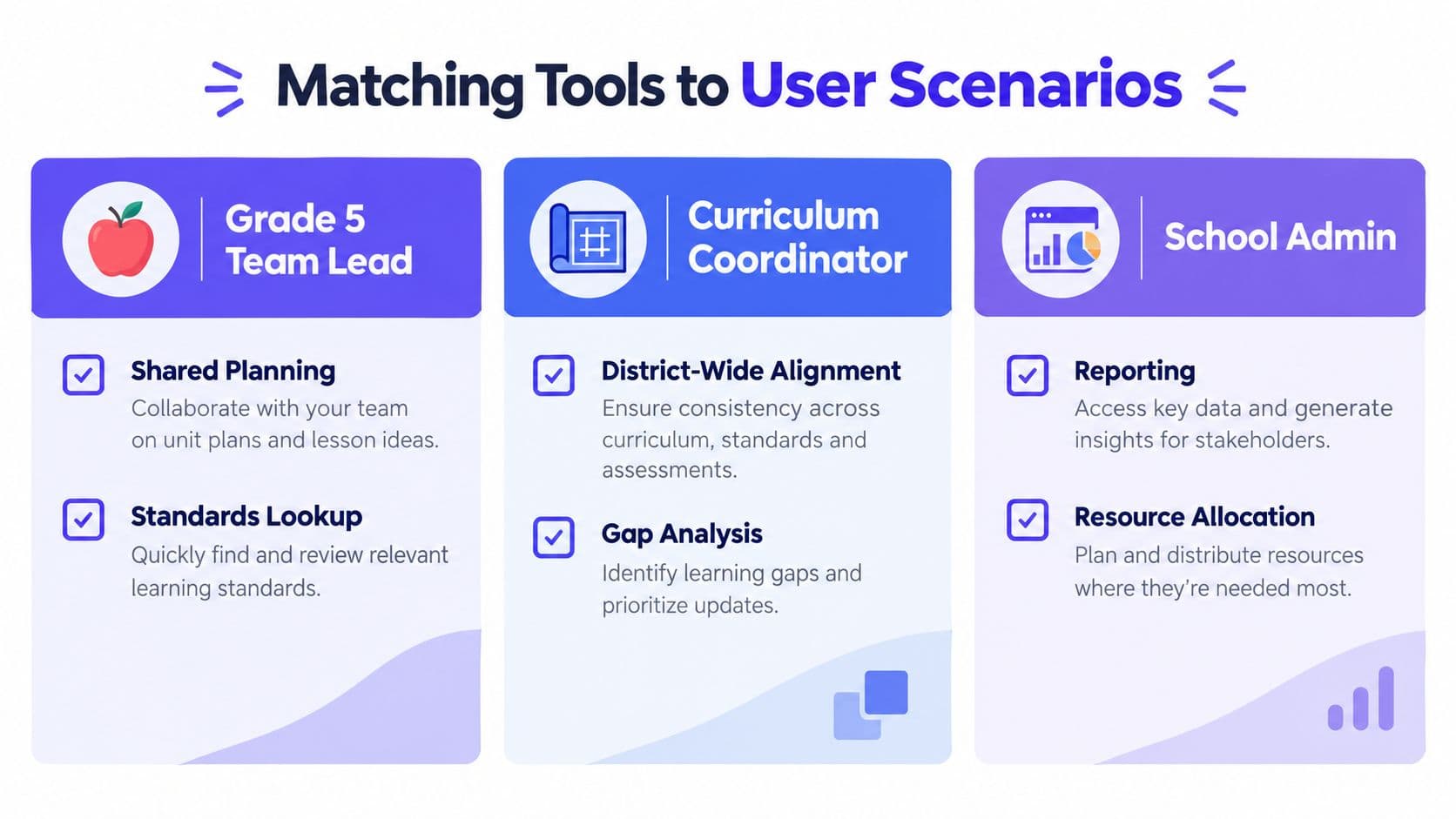
The right platform depends less on school size than on the work each person must complete. A Grade 5 team lead, district coordinator, and principal can use the same system differently, and each will notice different friction.
Scenario one, the Grade 5 team lead
The team needs shared unit planning, quick standards lookup, and a parent-friendly summary. Atlas is a reasonable fit when vertical alignment matters and the school is prepared to establish shared conventions. Teachers can work from common maps while the team lead checks how Grade 5 expectations connect with neighboring grades.
The friction remains real. Atlas may take more training than a simple planning calendar, and teachers who prefer informal notes may resist a structured review process. It also won't eliminate the need to decide what evidence counts as mastery.
Scenario two, the district curriculum coordinator
A K–12 coordinator juggling pacing guides, cross-building alignment, and board reporting needs a district-level view. Atlas is the clearest match when the priority is shared curriculum knowledge, cross-grade review, and reporting that supports repeated committee conversations. New York State's cross-grade review model reinforces why coordinators need more than course-level tagging (New York State's cross-grade curriculum review guidance).
The unresolved issue is adoption. A coordinator can build an elegant map that teachers don't update. Any district platform still needs protected collaboration time, clear ownership, and a process for recording changes during the year.
Scenario three, the building principal
A principal preparing for walkthroughs or accreditation visits needs an evidence trail that connects district expectations, units, instruction, and assessment. A structured platform such as Empower can provide a clean curriculum-centered record when the school wants consistent documentation across classrooms.
Its limitation is flexibility. Teachers who regularly redesign units may experience the system as a compliance layer unless leaders make room for professional judgment and local adaptation. The principal should ask to see not just the final map, but the revision history and the evidence behind a “covered” standard.
A Simple Framework for Choosing Your Fit
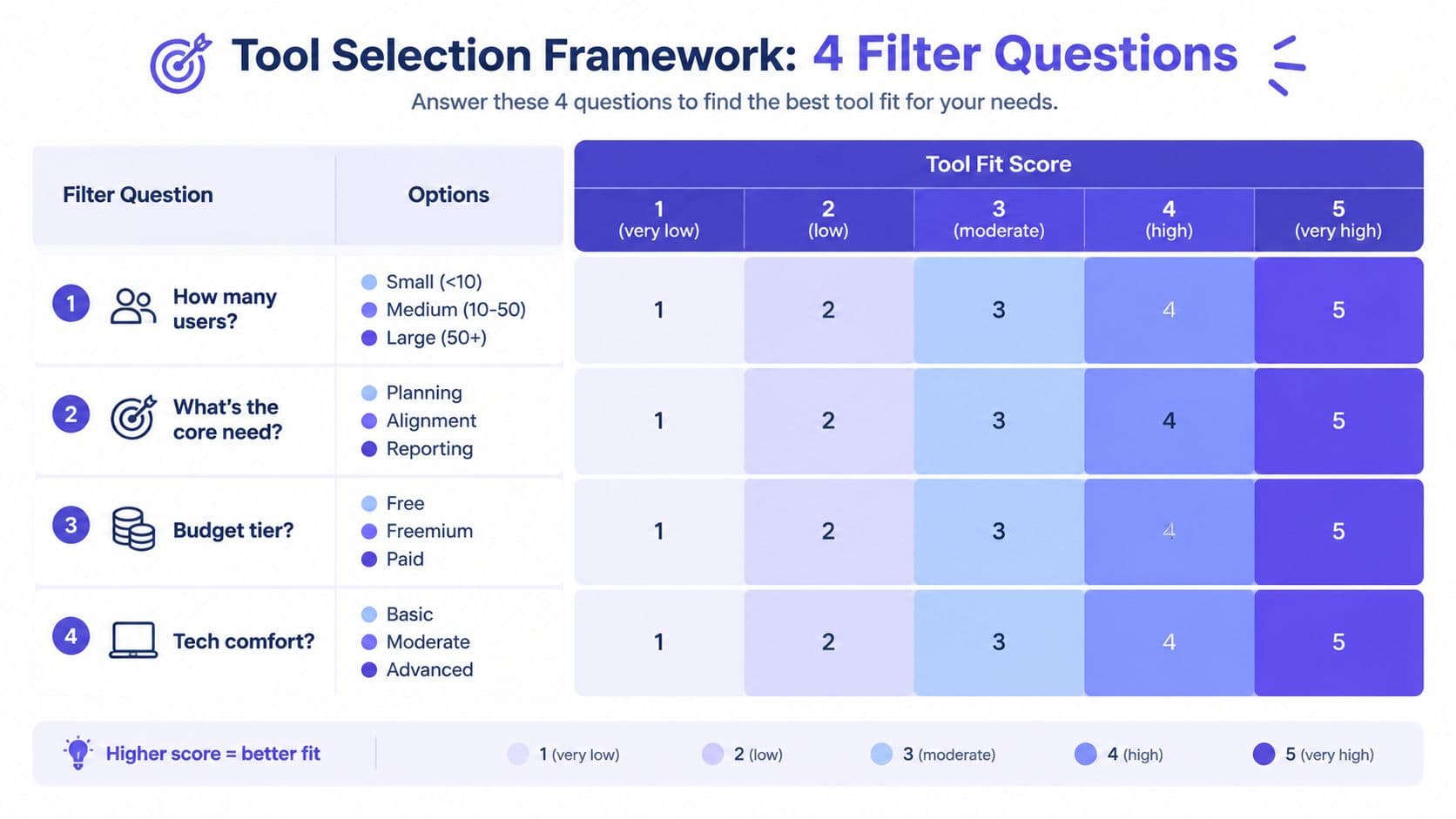
A coordinator can narrow the field quickly by asking four questions. The answers matter more than a polished demo.
How many users and grade levels need access?
A small team with a shared drive may not need a district platform. A school spanning several grades needs cross-grade visibility, and a district needs permissions, review workflows, and consistent reporting. Atlas becomes more compelling as alignment and institutional memory matter more, while Planboard or a structured spreadsheet may suit a small team with modest coordination needs.
What reporting obligations exist?
If leaders need board, accreditation, or parent-facing summaries, prioritize clear dashboards and exportable evidence. Atlas can fit a school that wants a controlled curriculum record, while also suiting broader district alignment. If reporting is informal, a lighter planning tool may avoid unnecessary administration.
How much curriculum data must move?
Clean, current data can be imported or rebuilt. Old spreadsheets with conflicting unit names and outdated standards need review before migration. Curriculum Mapper can help teams impose a pacing structure, but no platform can decide which legacy records are still trustworthy.
Is AI essential or simply helpful?
AI is useful when it connects standards, objectives, sequence, differentiation, and assessment. It's optional when the main problem is collaboration or reporting. A tool that generates attractive lessons but can't show implementation history won't solve the central gap between planned and taught curriculum.
Choose the smallest system that answers your most urgent alignment question and that teachers will actually open during a busy week.
A spreadsheet and shared drive can outperform paid software when the team is small, the map is simple, and one person can maintain naming conventions and review dates. Paid software earns its place when the school needs searchable standards, cross-building visibility, implementation evidence, permissions, and recurring reports. The best choice is not the most advanced platform. It's the one that fits the work already happening.
Rolling Out a Curriculum Mapping Tool Without Burning Out Your Team
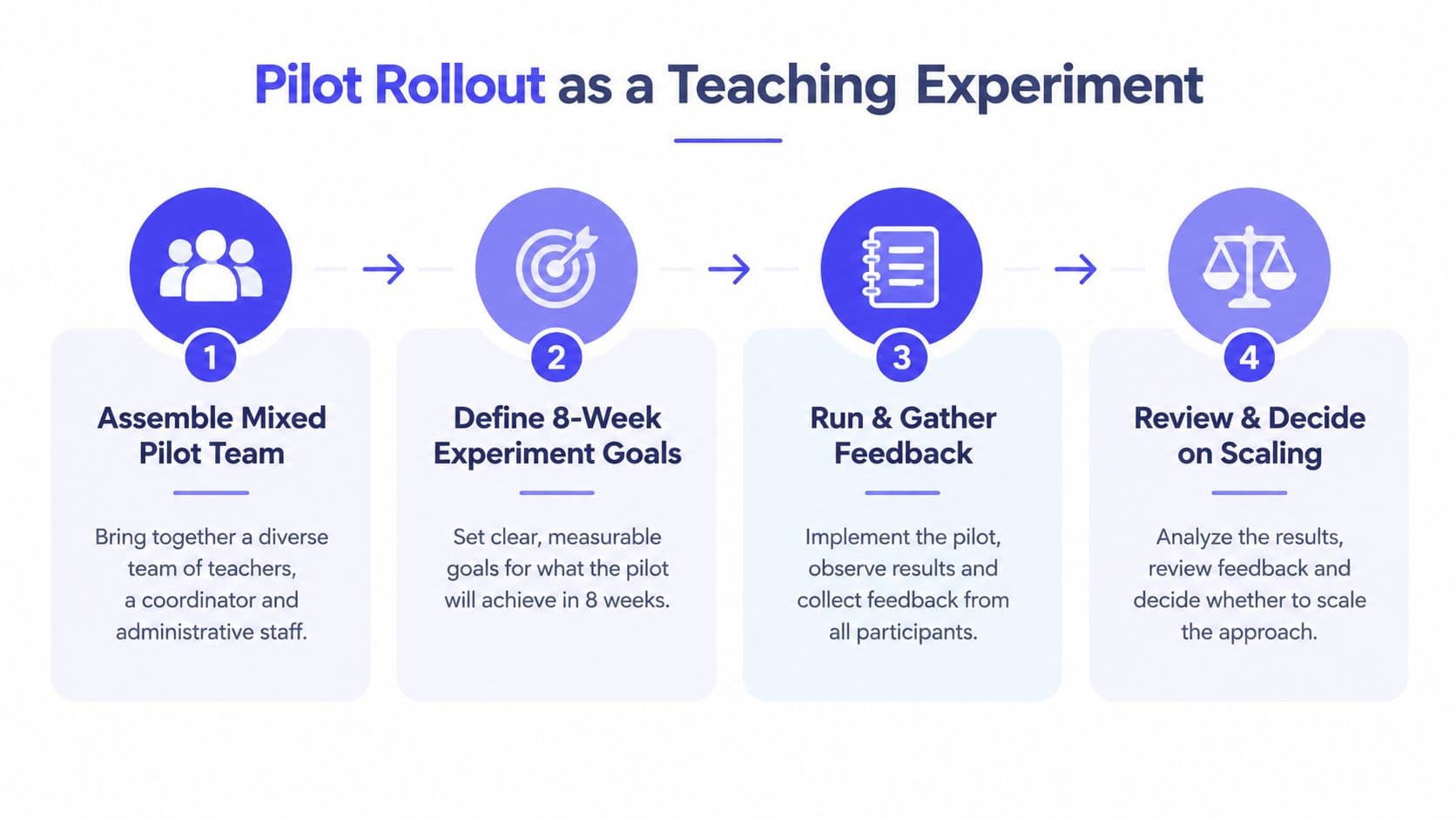
Treat implementation as a limited teaching experiment, not a district-wide migration. Start with a mixed pilot team that includes grade-level teachers, a curriculum coordinator, and an administrator or data specialist. Select one project with a clear purpose, such as documenting instructional sequence, locating standards gaps, or aligning a new initiative.
Before training begins, define what “done” means. Remove duplicate documents and outdated spreadsheets so teachers don't have to guess which file is authoritative.
Use a short training rhythm
One long workshop rarely changes habits. A better sequence is:
- Start with the essentials: Import standards, create a map, and practice shared editing.
- Work on a live project: Let teachers map an actual unit rather than completing sample exercises.
- Offer office hours: Support the first two mapping cycles while questions are still specific.
- Set team rules: Agree on naming conventions, ownership, review dates, and a simple approval process.
If the platform includes a weekly planning workflow, connect it to the team's existing routine through a weekly planner, rather than asking teachers to maintain a separate calendar without a clear purpose.
Track the pilot at 30, 60, and 90 days. These checkpoints should examine active users, standards mapped, time spent updating maps, unresolved gaps, review turnaround, and teacher feedback about planning value. The pilot succeeds when the system reduces duplicate work and improves instructional decisions, not when every checkbox is filled.
A final working session should decide what to keep, change, or stop. Expand gradually, preserve teacher input, and adjust the workflow before adding more schools, subjects, or integrations.
The rollout sequence is easier to explain in a short visual walkthrough:
Kuraplan supports standards-aligned lesson and unit planning, week-by-week sequencing, assessments, worksheets, and curriculum links, giving teachers a practical way to connect planned instruction with daily work. Visit Kuraplan to see whether its planning workflow can reduce duplicate mapping and help your team keep the curriculum record current.