You've probably had this moment. Students open a quiz, the room gets quiet, and within a minute you notice the side glances. One student finishes much faster than expected. Another keeps checking a neighbor's paper instead of their own screen. You spent real time writing questions that match what you taught, and now you're wondering whether the results will tell you anything useful.
That's why so many of us end up looking for ways to randomize multiple choice questions. Not because we want to make tests sneaky, and not because we want to punish kids. We want cleaner data, calmer test administration, and fewer headaches.
The good news is that shuffling questions and answer choices is usually easier than teachers expect. The better news is that it works in both digital and print-heavy classrooms. You don't need to be especially technical to use it well. You just need a solid question bank, a few platform settings, and a couple of guardrails so your quiz stays fair and accessible.
Why Shuffling Your Questions Matters
On quiz day, students don't need much to start pattern-matching. If every paper is identical, they can compare where they are, notice when a classmate pauses, or confirm that the answer to number six is “C.” Even when nobody is blatantly cheating, fixed order makes answer-sharing easier than it should be.
Shuffling changes that dynamic right away. When students see a different order of questions or choices, they have to focus on their own thinking. That alone can make the room feel more settled. Teachers spend less energy policing eyes and more energy monitoring understanding.
It protects the quality of the assessment
Randomization helps you test knowledge instead of pattern recognition. If the correct answer sits in the same place too often, students notice. If the questions always appear in the same sequence, students start anticipating structure instead of reading carefully.
That matters even more when you reuse quizzes for review, retakes, intervention groups, or different class sections. A shuffled version keeps the task familiar without making it identical.
Practical rule: Randomization works best when you treat it as an assessment design choice, not just an anti-cheating switch.
It can help classroom culture too
There's also a softer benefit. Students who are trying to do the right thing often hate sitting next to someone who wants to compare answers. A randomized quiz reduces that social pressure. It gives responsible students a little more breathing room.
In practice, that means:
- Less answer-sharing pressure: Students can't rely on “What did you get for number four?”
- Better independence: Each student has to read what's in front of them.
- Cleaner reteaching decisions: You can look at results with more confidence when planning the next lesson.
Randomizing multiple choice questions won't solve every assessment issue. But it's one of the simplest changes that improves integrity without adding much work once your system is in place.
Building a Reusable Question Bank
Before you shuffle anything, you need questions worth shuffling. A weak question bank stays weak even with perfect settings. A strong one saves you over and over again.
The most useful bank isn't a single finished test. It's a collection of solid questions on one topic, written so you can reuse them for practice, exit tickets, quizzes, reteach groups, and retakes.

Start with more questions than you need
If you usually give ten questions on a topic, write more than that for your bank. That gives you room to pull different combinations later. It also helps you spot which items are strong and which ones need revision after students use them.
Keep related questions together by standard, concept, or skill. That makes it much easier to build balanced versions later.
A practical structure looks like this:
- Pick one standard or lesson target.
- Write several question stems on that target.
- Tag each item by difficulty or misconception.
- Store the answer key separately from the display order.
Write distractors that sound believable
Most bad multiple choice questions fail on the wrong answers. If distractors are obviously silly, students can guess without understanding the content.
A better distractor reflects a real misconception. If you ask for the capital of Australia, Sydney is a stronger wrong answer than something random because students confuse it with the correct answer. That same principle works in math, science, grammar, and social studies. Good distractors come from mistakes you already see in class.
The best distractor is usually the answer a rushed student would choose for a real reason.
Use three options, not a crowded list
For many teachers, this is the most useful design tip in the whole process. Benchmark data indicates that using exactly three options (one correct answer plus two distractors) is statistically optimal for improving test reliability and content coverage, as adding more options typically results in implausible distractors that do little to improve item and test score statistics according to The eLearning Coach on rules for multiple choice questions.
That's freeing. You don't need to invent a fourth weak answer just because quizzes have always looked that way.
Build once, reuse often
When your bank is organized, randomization becomes practical instead of annoying. You can generate fresh versions without rewriting everything every time. If you want examples of how to structure strong stems and distractors, this multiple choice question guide is useful for planning cleaner items from the start.
A simple bank is enough. A spreadsheet, a document sorted by topic, or your LMS question bank can all work if you keep it tidy and review it after each use.
Randomizing Questions in Popular Digital Tools
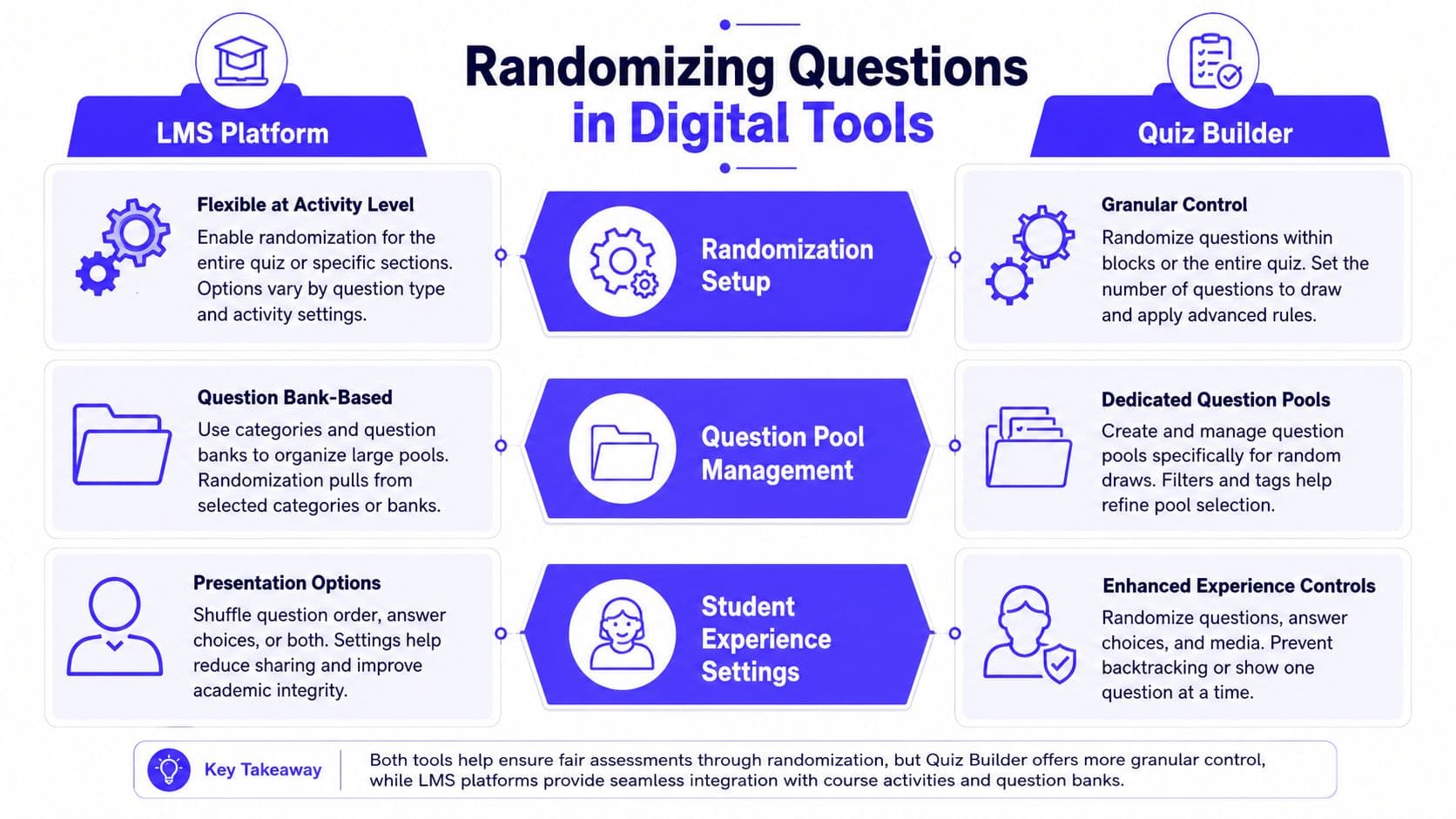
Most digital quiz tools already handle randomization. The challenge isn't finding the feature. It's knowing which setting does what, and when to use question shuffling versus answer shuffling versus pulling from a bank.
Start with the tool you already use. For many schools, that's Google Forms, Canvas, Schoology, Moodle, or a dedicated quiz builder.
Google Forms and similar quiz builders
Google Forms is often the fastest place to begin because the settings are easy to find. In your form, you can turn on Shuffle question order and, for individual items, shuffle the answer choices.
That gives you a basic level of protection without rebuilding the whole quiz. It's ideal for short checks, homework quizzes, and low-stakes review.
Use this setup when:
- You want speed: The form is already built and you just need a cleaner rollout.
- You're giving the same content to everyone: Students all answer the same questions, just not in the same order.
- You want automatic grading to stay simple: The platform still tracks the right answer behind the scenes.
Later in the workflow, if you want a more polished bank-based setup, a dedicated quiz maker for teachers can make versioning and question generation easier.
Here's a quick visual walkthrough if you want to see the setup in action:
LMS tools and question banks
Canvas, Moodle, and Schoology usually go further than simple shuffling. Instead of only scrambling order, they can pull a set of questions from a larger bank. That's the option to use when you want each student to receive a different version built from the same pool of standards-aligned items.
This is the setup many teachers use for unit quizzes, common assessments across sections, and retakes. You keep the learning target the same, but the exact path through the assessment changes.
A helpful way to think about the difference is this:
| Tool behavior | What students see | Best use |
|---|---|---|
| Shuffle question order | Same questions, different sequence | Fast classroom quizzes |
| Shuffle answer order | Same question, choices move around | Reducing answer-pattern guessing |
| Pull from a question bank | Different question combinations | Retakes, larger classes, shared assessments |
What the tech is doing in the background
You don't need to code this, but it helps to know why digital randomization usually grades correctly. The technical implementation relies on seeding a pseudo-random number generator with the current time. This ensures that the sequence of randomized items changes for every quiz session, but the system stores the shuffled order for each student to maintain scoring accuracy even if the page is refreshed, as explained in this technical discussion of quiz randomization logic.
That stored order is the important part. Without it, students could refresh and see different positions, which would create scoring problems and confusion.
If a tool shuffles the display but keeps each answer tied to its original ID, grading stays stable even when the page reloads.
For teachers, the takeaway is simple. If your platform has a built-in randomization setting, use that instead of trying to fake randomization by manually copying and pasting separate versions.
Creating Randomized Print Worksheets
Not every classroom is fully digital. Some schools still rely on paper tests, and plenty of teachers prefer printed quizzes for focus, pacing, or accommodation reasons. You can still randomize multiple choice questions without turning your prep period into a formatting marathon.
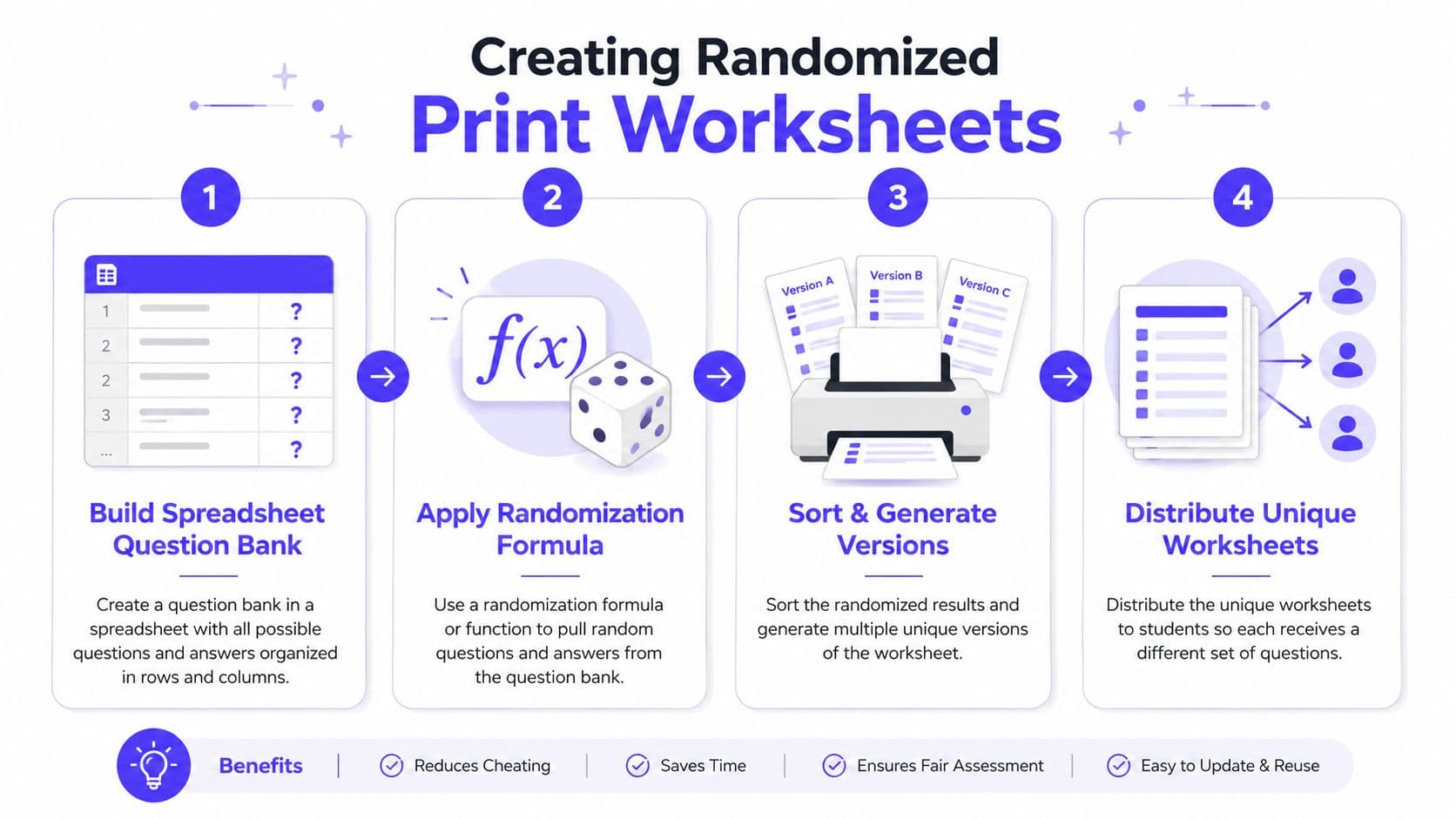
The easiest method uses a spreadsheet.
A simple spreadsheet workflow
Put your questions in Column A. In Column B, add a random-number formula such as =RAND() in Google Sheets or Excel. Then sort the sheet based on Column B.
That instantly gives you a new order. Copy the shuffled questions into your worksheet document, label it Version A, and repeat the sort if you want Version B or Version C.
This works well because it's low-tech and flexible. You can keep one master bank and generate fresh print versions whenever you need them.
Keep the answer key manageable
The biggest mistake with printed randomized quizzes is losing control of the key. Don't grade from memory, and don't assume you'll remember which version had which order.
A cleaner routine is:
- Keep one master sheet: Leave the original question bank untouched.
- Create separate versions: Export each shuffled set as its own document.
- Label clearly: Put Version A, B, or C in the top corner.
- Store matching keys: Save each answer key with the same version label.
When print randomization is especially useful
Paper versions are worth the effort in a few situations:
- Testing in rows or tight seating: Side-by-side students won't have matching number sequences.
- Sub plans or make-up work: You can hand out alternate versions without rewriting.
- Small-group accommodations: Students can work on equivalent but different copies.
A print quiz doesn't need fancy software to be secure. It just needs a repeatable system you'll actually use.
If you also want to shuffle answer choices on paper, you can do that manually for your strongest reusable items. Just be careful to update the key every time. For most teachers, changing the order of questions across versions gives enough variation without creating a grading mess.
Fairness Integrity and Accessibility Tips
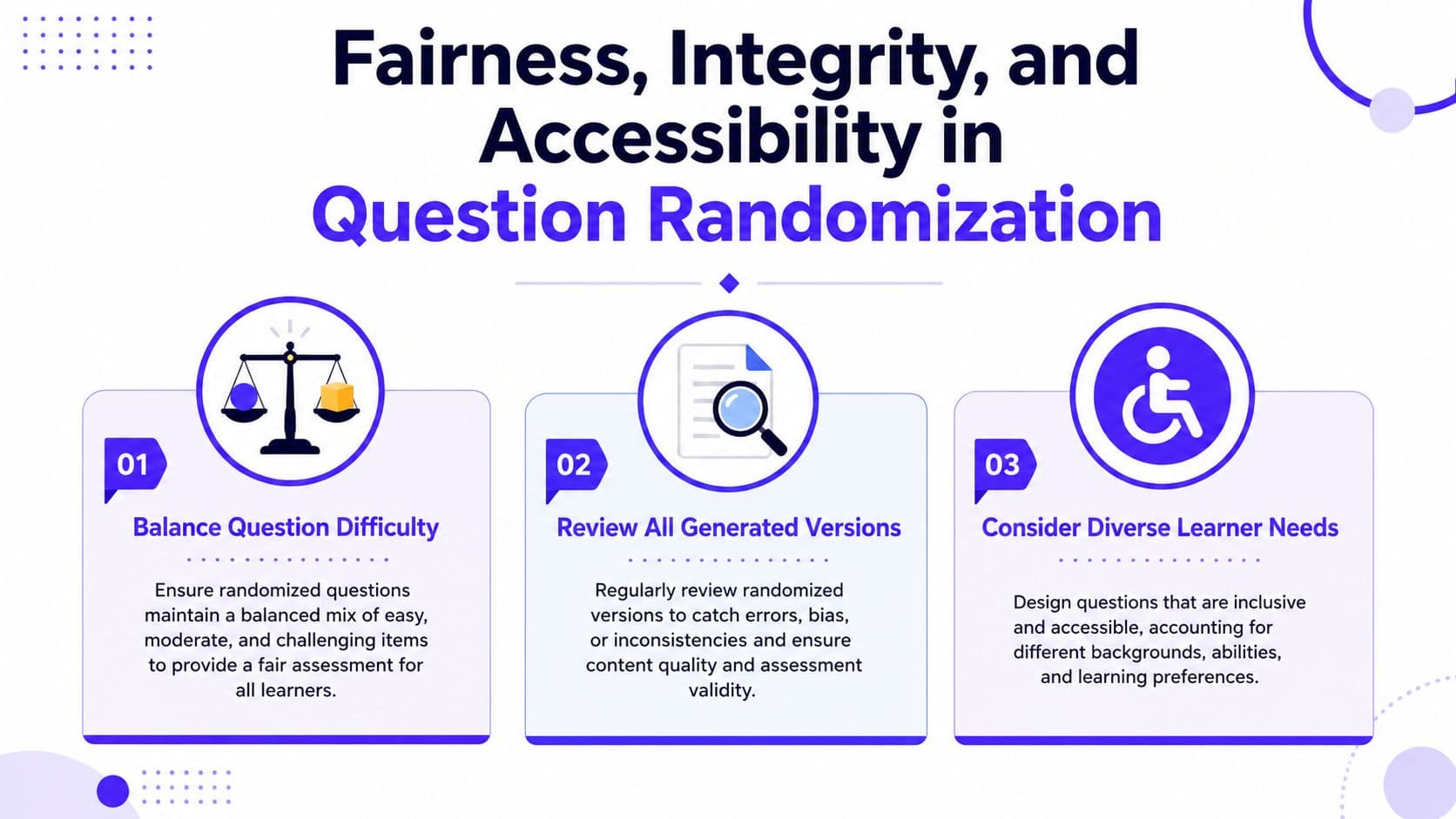
Randomization helps, but it isn't automatically fair just because the software says “shuffle.” The quality of the experience still depends on what you put into the system, how balanced your versions are, and whether the quiz still works for every learner after items move around.
Shuffling doesn't make a test harder
One myth comes up all the time. Teachers worry that randomizing order will somehow raise the difficulty level or hurt performance.
The research doesn't support that concern. Empirical research on randomized multiple-choice examinations has found that randomizing the order of questions and answer options produces no statistically significant effect on student performance. This reinforces that its primary value lies in mitigating answer-sharing, not altering cognitive performance, based on research from the University of Western Ontario on multiple-choice randomization.
That's useful because it gives teachers permission to use randomization for integrity without feeling like they're making an arbitrary change to the test.
Watch for item types that break when shuffled
Some question formats don't survive answer randomization very well. If a choice says “All of the above,” or “A and C are correct,” the logic can fall apart as soon as the options move.
The same problem shows up in branching forms or accessibility tools if the system ties meaning to the visual position of an option rather than to the option itself. This practical guide to randomizing multiple choice questions safely explains why storing and scoring by answer identity matters more than screen position.
A good editing pass catches most of these problems. Remove fragile wording before you shuffle.
AI-generated quizzes need a quick bias check
If you use AI to draft quiz items, review where the correct answers land. Some AI-generated sets don't distribute correct positions very naturally unless you explicitly prompt for it. That can create answer-position patterns students may notice over time.
Try checking for these issues before assigning:
- Repeated correct positions: Too many answers in one spot makes guessing easier.
- Weak distractors: AI often writes one strong wrong answer and one obvious throwaway.
- Uneven difficulty: One version may end up easier if you don't review the bank.
If you work with curriculum teams or district assessment design, this guide for L&D teams is a useful companion read because it connects assessment design decisions to real implementation choices, not just theory.
Accessibility needs a final review
Randomization should help integrity without creating barriers. Before you publish, preview the quiz as a student would. Check readability, screen-reader flow, keyboard navigation, and whether instructions still make sense when order changes.
For teachers building more inclusive digital materials, this accessibility resource for educators is worth bookmarking. It's especially helpful when you're trying to balance efficiency with accommodations that hold up in a busy classroom.
Review at least one randomized version yourself from start to finish before students ever see it.
That last step catches more problems than any setting menu.
A Simple Tool for Better Assessments
Randomizing multiple choice questions is one of those small moves that yields significant improvements. It reduces answer-sharing opportunities, helps students rely on their own thinking, and gives you a cleaner picture of their true knowledge.
It also scales well. You can do it with a spreadsheet and a printer, with Google Forms, or with a full LMS question bank. If you want help generating draft items before you clean and organize them, a tool like an Automated quiz maker can speed up the first pass, especially when you're building practice sets from reading passages or class notes. You still need teacher judgment, but it can cut down the blank-page problem.
The main thing is to keep the goal clear. Randomization isn't about catching students. It's about designing assessments that are more dependable and easier to manage.
The next time you build a quiz, take the extra minute to shuffle the order, check the answer choices, and save a reusable bank. That one habit can make your assessments feel calmer, fairer, and more useful.
If you want a faster way to build standards-aligned quizzes, worksheets, and lesson materials without spending your evening formatting, Kuraplan is worth a look. It helps teachers turn topics and objectives into classroom-ready resources quickly, including multiple choice items you can adapt for digital or print use.