It's 8:40 on Sunday night, your lesson for tomorrow is solid, and you're still fighting with text boxes. If that sounds familiar, you're not looking for a shortcut. You're looking for a way to build materials that match what you taught, give students feedback while it still helps, and don't eat your weekend.
The Sunday Night Worksheet Problem
You know the version of this story. You download something that looks close enough, then spend twenty minutes deleting questions you didn't teach, renumbering what's left, and wondering why the answer key doesn't match either version. Monday arrives, half the class finishes in four minutes, three students are stuck on question one because the vocabulary is wrong for them, and you learn almost nothing from the pile you collect.
I've been there with a stack of printed fraction pages that looked fine on screen. In the room, the diagrams were too small, the first question assumed a skill we hadn't covered yet, and my students who needed to draw their thinking had nowhere to draw. The worksheet wasn't bad. It just wasn't built for my lesson or my kids.
What Changes When the Page Can Respond
An interactive format changes the job of that page. Students can select, type, match, label, or move something, then get immediate feedback instead of waiting until you've marked thirty copies. You get item-level information while there's still time to reteach a misconception tomorrow, not next week.
That flexibility matters for differentiation, too. The same learning target can appear with a worked example for one group, sentence stems for another, and an open extension for students who are ready. You're not making three unrelated worksheets from scratch. You're adjusting one well-aimed activity.
I also send students toward science-backed study routines for 2026 when homework keeps turning into a late-night scramble, because a better worksheet only helps if students have a workable routine for using it. The material and the habit have to support each other.
A tool earns its place when it gives you back Sunday night and gives students better feedback on Monday.
The key question isn't whether a generator can produce questions quickly. Almost all of them can. The question is which one helps you plan, differentiate, check understanding, and revise without creating a second job. That's the standard worth using before anything lands in your weekly routine.
What an Interactive Worksheet Generator Actually Is
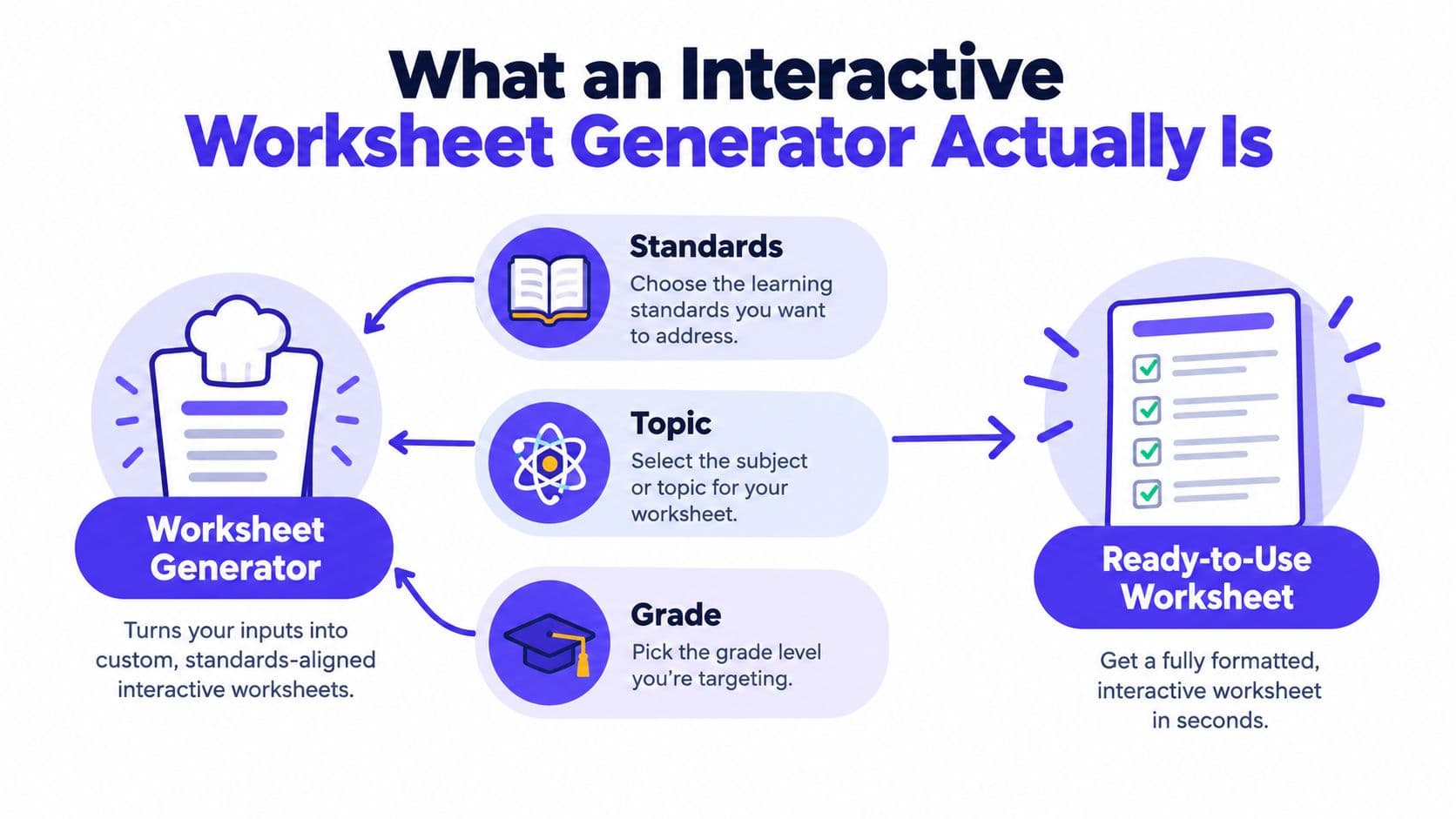
Think of a generator as a recipe card for instruction. You name the dish, meaning the standard, topic, and grade level. It assembles likely ingredients, such as question types, layout, visuals, and an answer key. You taste, swap, and adjust before anything reaches students.
The visual below maps that simple flow from your planning inputs to a finished, usable activity.
How It Differs From a PDF or Quiz App
A static PDF is fixed once you print it. A generic quiz app usually starts from questions and works backward. An interactive worksheet generator starts from your lesson intent and builds a structured activity students can complete on paper, on a device, or both.
The moving parts are straightforward:
- Content input: A prompt, topic, text excerpt, or existing lesson you want converted.
- Question assembly: Multiple choice, short answer, matching, labeling, sequencing, or open response.
- Feedback rules: Correct answers, hints, explanations, and retry options where the format allows them.
- Export choices: Printable pages, shareable digital versions, answer keys, and sometimes rubrics.
This isn't a sudden invention, either. The logic comes from decades of classroom technology, from structured spreadsheet cells and reusable templates to learning platforms that collect student responses. The tools we used for grade books, templates, and online assignments were already teaching us to build once, adjust quickly, and reuse what worked.
If you want to see that input-to-worksheet flow in motion before you try it with your own lesson, this short walkthrough helps make the process concrete.
The teacher still decides what counts as evidence of learning. The generator handles assembly and formatting. That division of labor is the whole point, and it's where the time savings become instructional rather than just convenient.
The Building Blocks That Make Them Work in K–12
A long feature list doesn't tell you whether a tool will survive period three. These capabilities do, because each one solves a problem you'll recognize from real planning.
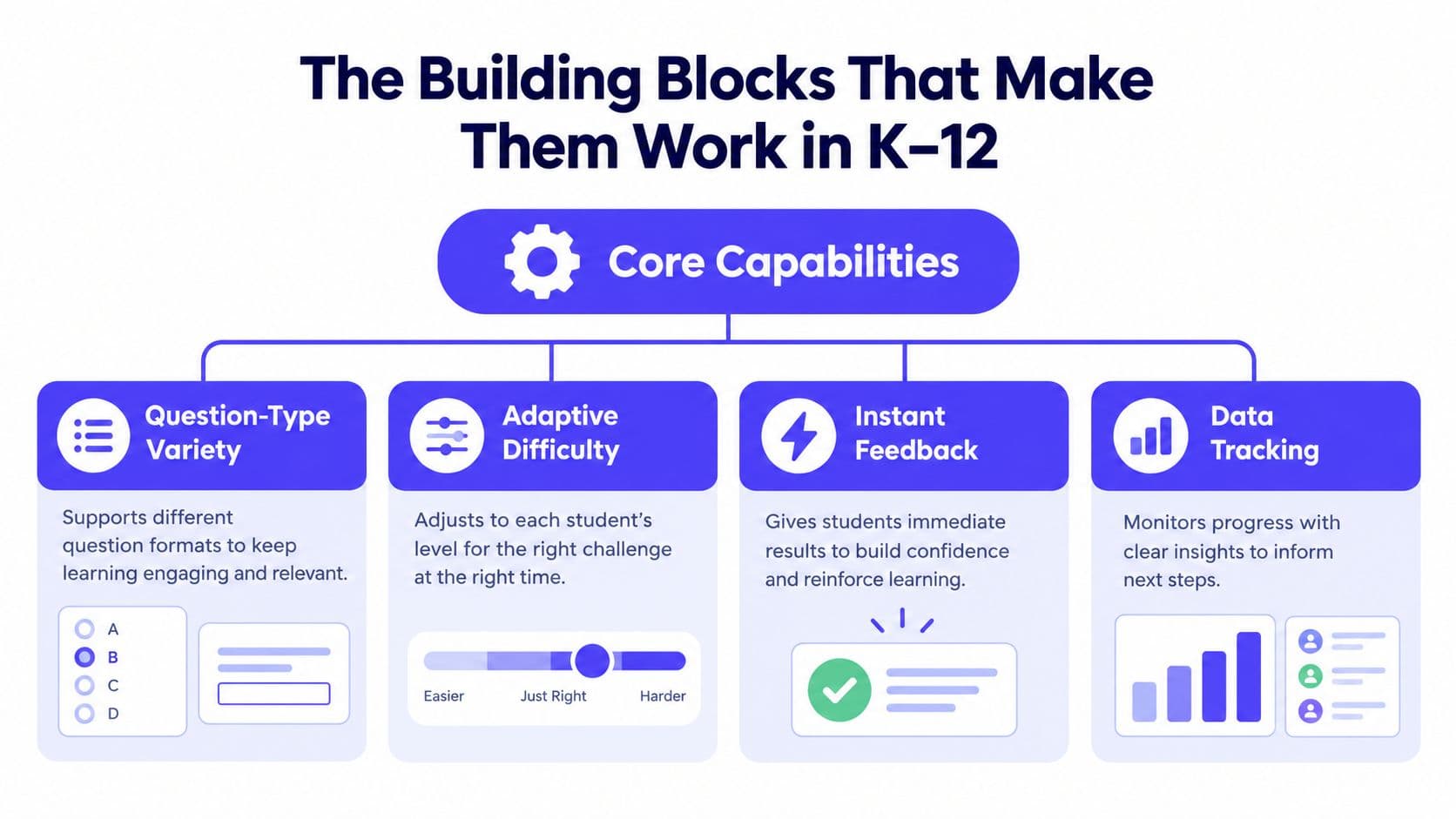
This framework groups the essentials you'll want to test before you commit to any platform.
Variety That Matches the Objective
Question-type variety matters only when it fits the thinking you want. Matching works for vocabulary, labeling works for a plant cell diagram, and short answer works when students need to explain why an answer makes sense. If every task becomes multiple choice, you've gained speed and lost information.
Variety can also invite play without lowering the bar. When I'm planning language practice, I sometimes find learning games in Hong Kong for ideas about movement and turn-taking, then translate the mechanic into a worksheet task my students can complete and I can check.
Immediate feedback is the second building block. A useful hint points to the misconception, such as confusing numerator and denominator, instead of just marking an answer wrong. Standards alignment keeps that feedback tied to the target you have to teach.
Differentiation is where many teachers feel the daily pressure. Reading level, scaffolding, number of items, and optional worked examples let you keep one target while changing the route. Visuals belong here too, but only when a diagram or image carries part of the lesson rather than decorating the margin.
Personalization is not accessibility: Making a question easier doesn't help a student who can't operate the controls, read the contrast, or use the page with a screen reader.
That distinction is easy to miss. In 2025, 57% of U.S. K–12 teachers believed AI could improve learning-material accessibility for students with disabilities, yet accessibility was reported as a major support need rather than a solved capability, according to the Walton Family Foundation teacher AI report. Treat keyboard navigation, alt text, readable contrast, and non-color cues as requirements, not bonuses.
Finally, look for item-level data you can act on. Knowing that most students missed the same comparison question is useful. A colorful completion score with no clue about why is not.
Building a Worksheet Step by Step
Start where good lessons start. Write the learning target in language students could understand, then decide what success looks like before you generate a single question. If that target is fuzzy, the worksheet will be fuzzy faster.
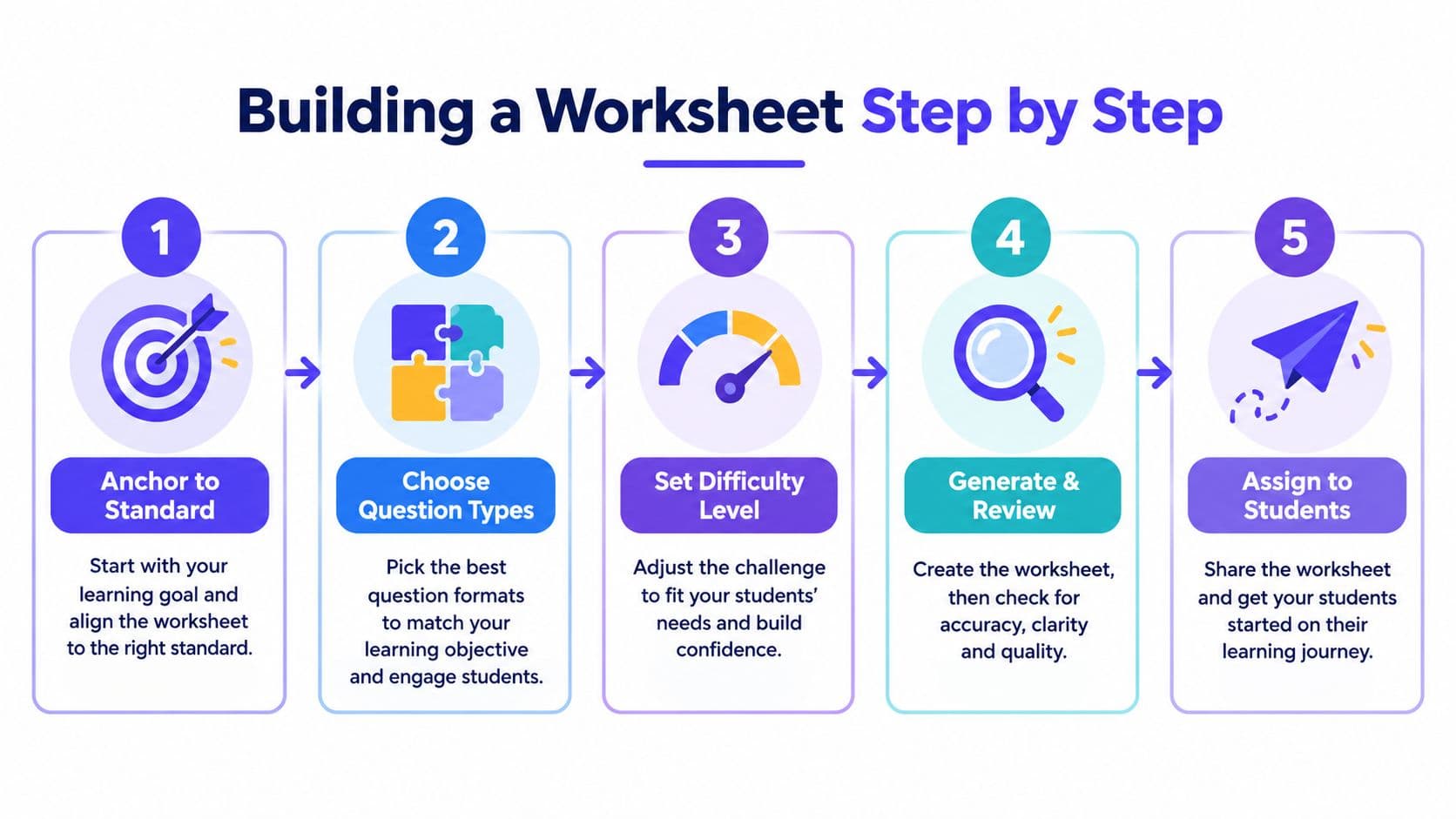
These five stages keep the workflow anchored from first prompt to student assignment.
For a refresher on tightening that first step, I keep guidance on learning intentions and success criteria open during unit planning. It stops me from asking for ten questions when I really need four questions that reveal different misconceptions.
From Target to First Draft
- Anchor to one standard: Name the grade, topic, and exact skill, such as comparing fractions with unlike denominators.
- Choose the question mix: Pair recognition items with at least one explain-your-thinking prompt.
- Draft from your lesson: Use your examples, vocabulary, and sequence so students aren't decoding a stranger's lesson.
- Add purposeful visuals: Include a number line, diagram, or data table only if students must use it to answer.
Then build the versions. Keep the core questions common across groups so you can compare learning fairly. Change supports around them, such as a word bank, partially completed model, larger response space, or extension prompt.
Review, Export, and Learn From It
Read every generated item as if you're a student seeing it cold. Check the answer key, look for ambiguous wording, test any drag-and-drop action with a keyboard, and make sure images have useful descriptions. AI can produce a plausible question with a wrong key. Your review is what makes it classroom-ready.
Export for the setting you've got. Print when devices are shared, assign digitally when you need instant scoring, and keep an equivalent paper version for absences or access needs. After students finish, sort errors by item rather than by total score.
That last habit takes minutes and changes tomorrow's warm-up. If students chose the same wrong option, you don't need more practice. You need to address the idea behind that option.
Three Classroom Stories That Show the Difference
Ms. Alvarez teaches fourth grade math, and fractions were splitting her class in two. Some students could shade a model but couldn't explain it in words. Others could recite the rule and still place fractions incorrectly on a number line.
She generated one activity that moved between representations. Students matched symbolic fractions to shaded models, placed values on a number line, then wrote one sentence explaining a comparison. Because the same idea appeared visually, numerically, and verbally, she could see where each student's understanding broke down during the lesson, not after it.
Real Data in Middle School
Mr. Chen wanted his middle school students working with evidence instead of copying textbook conclusions. He built a worksheet around state population data, asking students to compare growth, read a chart, and defend a claim about regional change.
The shift was subtle but important. Students weren't answering questions about a paragraph someone else had interpreted. They were noticing patterns, arguing about what counted as rapid growth, and citing numbers from the table. The generator helped him turn a dataset into prompts and comparison tasks without spending an evening formatting tables.
Two Routes Into the Same Analysis
In high school English, Ms. Okafor used one short story and two versions of an analysis task. One version included sentence stems and a short evidence bank. The other asked students to select and justify their own evidence in an open response.
Both groups discussed the same theme the next day. The supported group arrived with claims they could voice, and the extension group brought competing interpretations. Differentiation didn't separate the class into different lessons. It gave more students a way into the same conversation.
Results like these are plausible, but don't oversell them. A classroom-action study of 38 upper-secondary students using e-worksheets reported learning outcomes rising from 50% before the intervention to 79% in the first cycle and 89% in the second, with student activity climbing from 79% to 89% and teacher activity rising to 100%. That's encouraging, and it's still one small, local study. Your own item data should carry more weight than a headline.
How to Evaluate Any Worksheet Generator
Don't evaluate a tool with a topic you don't teach. Bring next Tuesday's lesson, generate a worksheet, and run it through the same checks you'd apply to anything going in front of students.
I keep practical formative assessment examples nearby during trials because they remind me to test whether each question produces usable evidence. If an item looks polished but tells you nothing about student thinking, it fails the classroom test.
Seven Criteria for Choosing a Worksheet Generator
| Criterion | What to Test For |
|---|---|
| Standards alignment and accuracy | Correct keys, grade-appropriate vocabulary, and items tied to your stated target |
| Question-type range | Matching, labeling, short answer, multiple choice, and open response without clumsy workarounds |
| Differentiation depth | Reading level, scaffolds, item count, and extensions that preserve the same objective |
| Accessibility safeguards | Keyboard operation, alt text, contrast, visible focus, and a usable print equivalent |
| Visual quality | Diagrams and images that match the lesson and remain clear when printed |
| Export and sharing | Clean print layout, digital assignment, editable files, answer keys, and rubrics |
| Privacy and governance | District-approved use, no student identifiers in prompts, and clear revision history |
Test accessibility yourself. Tab through the activity, enlarge it, print it in black and white, and check whether color is doing any job alone. Then try the differentiation controls on the same worksheet. If the easier version removes the learning target, that's not support. It's substitution.
Kuraplan is worth including in a shortlist. It lets teachers build standards-aligned lesson plans and convert a lesson into printable or shareable worksheets with varied question types, educational visuals, differentiated prompts, and rubric support. Judge it by the same seven criteria, using your own lesson rather than a sample.
The best trial question is simple. Would I trust this output after one careful teacher review, and would I know what to teach next from the results?
If the answer is yes on both counts, you've found something more useful than a faster way to fill a page.
Making It Work Without Losing the Human Part
Keep two habits firmly in place. First, anchor every worksheet to one clear learning target. Second, review items, images, keys, and accessibility before sharing. Faster generation doesn't remove your judgment. It gives that judgment more time to work.
Protect student information while you're at it. Don't paste names, grades, or identifying details into prompts, use district-approved accounts, and keep a simple record of versions you've revised. Colleagues and families should be able to tell what students practiced and why.
For younger learners in your building or at home, you can also explore numeracy activities for toddlers to see how early number ideas grow through play before formal worksheets enter the picture. That perspective helps keep screen tasks in their proper place.
When you need fresh ways to vary supports without lowering expectations, revisit differentiation teaching strategies that keep one target intact. Tomorrow, pick one lesson, generate one activity, review it hard, and use the results to plan your next ten minutes of teaching.
Turn tomorrow's lesson into a standards-aligned, differentiated worksheet with visuals, varied questions, and assessment support already built in. Visit Kuraplan to try the lesson-to-worksheet workflow with a topic you're teaching this week and see how much of Sunday night you get back.