It's often the same part of the week. The lesson is planned, the slides are finished, and the students are going to need a quick check for understanding. Then the major time sink starts. You need five or ten multiple-choice questions that are genuinely good, not just answerable.
That's the part people outside teaching often miss. Writing one solid multiple-choice item is manageable. Writing a full set with clean wording, one defensible correct answer, and distractors that don't give the game away can eat an entire evening. A multiple choice question generator helps, but only if you use it as a teaching tool, not a shortcut.
The shift is already happening in schools. The adoption of AI-generated multiple-choice question tools in K–12 has surged by 68% since 2022, and teachers report a 73% reduction in time spent on test creation, reclaiming up to 5 hours per week for student-facing work, according to TeachQuill's overview of multiple-choice question generators. The important part isn't just speed. It's what you do with the time and whether the questions still measure real understanding.
Why Every Teacher Needs to Rethink Quiz Creation
A lot of quiz writing still happens the old way. You open a document, pull from notes, rewrite a textbook question so it sounds original, then spend twice as long trying to invent three wrong answers that look believable. By the end, the hardest part isn't the content. It's the mental fatigue.
That's why teachers are giving this work to AI first, then editing. The draft appears fast, and that changes the whole workflow. Instead of building each item from scratch, you're reviewing, improving, and aligning.
The real bottleneck isn't the question stem
Most teachers can write a decent question stem quickly. The drag comes from the rest:
- Distractors: They need to be plausible, but still wrong.
- Alignment: The item has to match what you taught, not just the topic.
- Variety: A short quiz can't be five versions of the same recall question.
- Formatting: If you're turning it into a worksheet, that's another task entirely.
A good multiple choice question generator takes the first pass at all of this. That's useful on its own. It becomes much more useful when you pair it with your own judgment about misconceptions, standards, and student readiness.
Practical rule: If the tool saves time but creates weak distractors, you haven't really saved time. You've just moved the work to the editing stage.
There's also a mindset shift here. A generator shouldn't replace assessment design. It should remove low-value labor so you can spend more attention on the part that actually matters: what the question is asking students to think about.
Better prep starts with better practice materials
This is also where digital practice can support classroom assessment. If you want students to encounter more quiz-style retrieval outside your printed tests, MasteryMind's practice quizzes are a useful example of how structured practice can reinforce the same skills you're checking in class.
That broader ecosystem matters. Students benefit when classroom quizzes, homework review, and revision practice all use clear, focused item design. Teachers benefit when they're not reinventing every question set from scratch.
Choosing Your AI Tool and Generating Your First Questions
The first decision isn't which tool has the flashiest interface. It's whether the tool understands school context. Plenty of generators can turn a paragraph into quiz items. Fewer can help you build something that fits a grade level, a learning target, and a classroom routine.
In 2026, the global market for AI-powered quiz generators reached $1.8 billion, and 75% of educators using these platforms reported improved student performance on standardized tests, according to Wayground's summary of AI quiz generator adoption. That doesn't mean every tool is equally useful in K–12. It means teachers are finding real value, and the details of implementation matter.

What to look for first
When I'm evaluating a tool for classroom use, I care about five things more than anything else:
| What to check | Why it matters in class |
|---|---|
| Grade-level control | A question that's technically correct can still be unusable if the reading load is too high |
| Standards connection | You need items tied to what you're accountable for teaching |
| Export options | If it won't move easily into your lesson materials, it creates extra work |
| Editing speed | You should be able to fix a weak item quickly |
| Mixed question formats | It helps to build beyond multiple choice when needed |
If you want a tool built around classroom planning rather than generic prompting, Kuraplan's quiz maker is one example worth looking at. It sits closer to the lesson and worksheet workflow than many standalone generators.
A simple first run
Start with one small, concrete task. Don't begin by asking for a district assessment bank. Ask for five questions.
For example, try a prompt like this:
- Topic: 4th grade science
- Focus: water cycle
- Request: five multiple-choice questions
- Constraint: one correct answer, three plausible distractors
- Goal: check whether students can identify evaporation, condensation, and precipitation
That first batch doesn't need to be perfect. It needs to show you what the tool tends to do well and where it needs teacher correction.
If you want a short walkthrough on turning source material into quiz content, AI Academy's course on how to master AI quiz creation is a practical starting point.
Start small. One lesson, one objective, one quiz. You'll learn more from editing five generated questions than from generating fifty at once.
Writing Prompts That Produce Perfect Questions
Weak prompts produce generic items. That's the pattern every teacher notices within the first ten minutes of using a multiple choice question generator. If you ask for “questions on fractions,” you'll get something usable only after revision. If you specify the standard, grade level, misconception, and target skill, the quality jumps.
A strong prompt gives the tool the same information you'd give a student teacher helping with assessment prep.
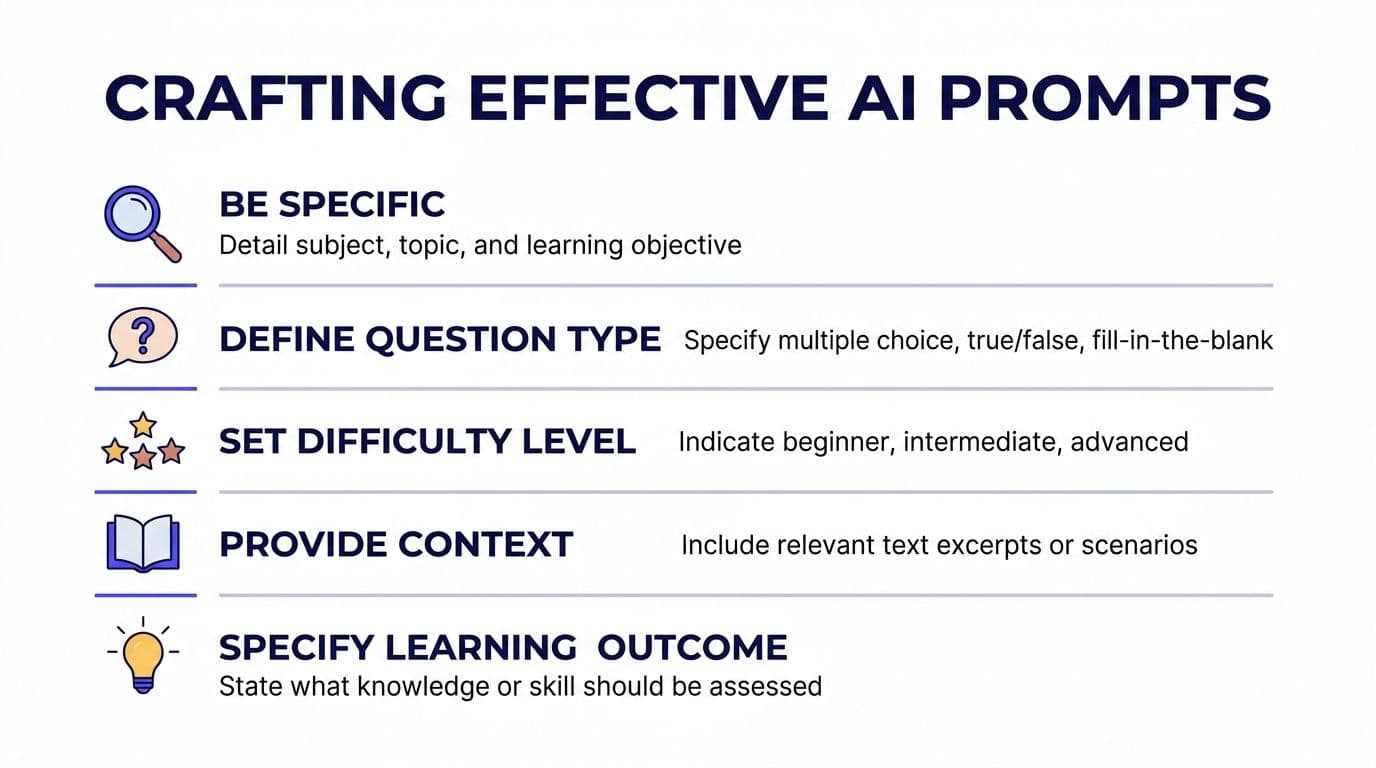
A prompt formula that works
Use this structure:
- Grade level and subject
- Topic or standard
- Number of questions
- Question type
- Cognitive level
- Known misconceptions to use in distractors
- Reading level or support needs
- Output format
Here are three copy-ready examples:
- Elementary science: Generate 5 multiple-choice questions for 4th grade on the water cycle. Focus on evaporation, condensation, and precipitation. Use simple language. Make distractors based on common confusions between stages.
- Middle school math: Write 6 multiple-choice questions for 7th grade on solving one-step equations. Include one question that checks for the common mistake of adding instead of subtracting.
- High school biology: Generate 5 multiple-choice questions for 9th grade biology on mitosis. Include distractors based on common student misconceptions about the order and purpose of each phase.
Use richer inputs when you have them
The biggest jump in quality happens when you stop prompting from memory and start prompting from your own materials. A chapter note, worked example set, or lesson objective usually gives the generator enough context to produce questions that feel closer to what you taught.
That scale matters, especially for teams building larger item banks. AI question generators can produce up to 2,000 unique items per session from a single input, such as a chapter note or unit objective, according to Kuraplan's platform information. For district assessment work or intervention rotations, that kind of volume is useful only if the prompt is precise.
A short demo can help if you're building your own prompt habits:
Prompt test: If your request doesn't mention who the students are, what they just learned, and what misconception you want to surface, the generator is guessing.
Moving Beyond Recall with Smarter Question Design
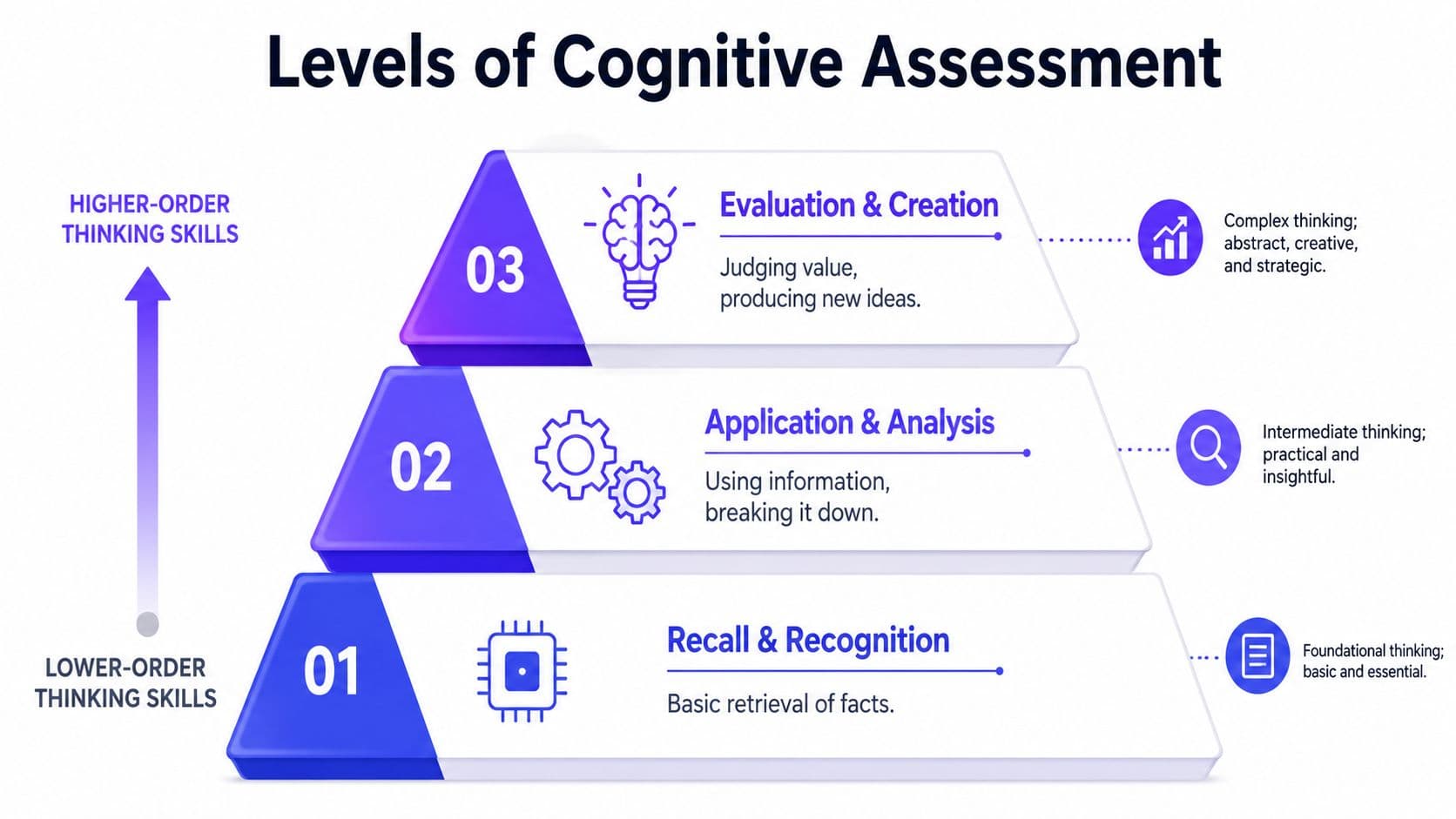
The fastest way to waste a powerful tool is to use it only for recall questions. If every generated item asks students to identify, define, or name, you're checking memory, not understanding. That has its place, but it can't be the whole quiz.
Good item design starts with the thinking move you want. Then the wording follows.
The difference between a quick item and a strong item
Compare these two approaches:
| Weaker question | Stronger question |
|---|---|
| What is photosynthesis? | Which classroom scenario best shows why sunlight is necessary for photosynthesis? |
| What is the main idea? | Which sentence best explains why paragraph 3 changes the author's argument? |
| What is 3/4 as a decimal? | A student says 3/4 is 0.34. Which explanation best identifies the mistake? |
The second version in each row asks students to apply, analyze, or diagnose. That's where multiple-choice questions become more useful than many teachers give them credit for.
Distractors do most of the assessment work
This is also where many generators fall short. A study by the National Education Association found that 68% of generic AI-generated multiple-choice items contained distractors that were too easy to eliminate, reducing assessment validity by up to 40%, as discussed in Kuraplan's article on using AI to create worksheets.
That finding matches classroom experience. If two options are obviously wrong, you're no longer measuring the target skill very well. Students can back into the answer.
For a deeper breakdown of what makes a solid item work, Kuraplan also has a useful explainer on multiple-choice questions in classroom assessment.
What works better:
- Misconception-based distractors: wrong answers tied to real student errors
- Parallel structure: all options look grammatically and visually plausible
- Single focus: the stem tests one idea cleanly
- No accidental clues: avoid one answer that is noticeably longer, more precise, or more technical than the others
A plausible distractor shouldn't be random. It should sound like the answer a partially informed student would pick.
Integrating AI Quizzes into Your Lessons and Worksheets
Once the questions are written, the next problem appears fast. You still have to get them into students' hands. That's where many teachers lose the time they thought they saved.
If the workflow involves copying from one tab, pasting into another, reformatting spacing, adding directions, and rebuilding the page layout, the quiz generator helped only halfway.

What seamless integration looks like
The strongest classroom workflow looks like this:
You finish a lesson on ecosystems. You need three products from the same content: a bell ringer for tomorrow, an exit ticket for today, and a printed homework sheet for students who need extra practice. You don't want three separate prep sessions.
An integrated tool lets you move the same question set into each format with minimal editing. That's why worksheet generation matters almost as much as quiz generation. If you're evaluating workflow tools, look at how worksheet generation fits into the rest of the planning process.
Why alignment and differentiation still decide whether the quiz is usable
This is the practical issue many teachers run into with generic AI tools. A 2025 report revealed that 82% of teachers reject AI-generated quizzes because they lack explicit standard codes and fail to adjust cognitive load for diverse learners, as noted in Kuraplan's review of AI tools for lesson materials.
That rejection makes sense. In an actual school setting, a quiz isn't useful just because it looks polished. It has to fit the standard, match the instructional level, and work for the students in front of you.
A few examples of where integration helps:
- Exit tickets: Pull two or three generated items that match the day's objective.
- Small-group reteach: Regenerate the same concept at a simpler reading level.
- Homework sheets: Mix multiple choice with short answer so students explain one response.
- Intervention folders: Build parallel forms on the same skill without rewriting everything.
The best use of AI here isn't replacing teacher judgment. It's making it easier to turn sound assessment decisions into ready-to-use materials quickly.
How to Validate and Refine Your AI-Generated Quiz
AI can draft quickly. It can't take responsibility for what your students see. That part is still yours.
Before a generated quiz goes live, I'd run every item through a short review routine. It doesn't need to be elaborate. It just needs to be consistent.
A five-point classroom check
Use this checklist before printing, posting, or assigning:
Accuracy
Is the key unquestionably correct, and is every distractor clearly incorrect in the specific context of the question?Clarity
Does the stem use language your students can read without tripping over unnecessary wording?Distractor quality
Are the wrong answers plausible enough to reveal misunderstanding, not so weak that students can guess by elimination?Bias and accessibility
Is the phrasing culturally neutral, free of unnecessary complexity, and appropriate for the intended learners?Objective match Does the item test the skill or knowledge you meant to assess?
What to revise first
Research indicates that when AI-generated distractors fail to achieve a high semantic similarity to the correct answer, student success rates can be artificially inflated by up to 22%, making the assessment invalid for true mastery, according to GradeWithAI's discussion of distractor quality in multiple-choice quiz generation.
That's why distractors are usually the first thing to fix. If a question feels too easy, don't just make the stem harder. Improve the alternatives.
A quick revision table can help:
| If you notice this problem | Revise this way |
|---|---|
| One wrong option is silly or unrelated | Replace it with a common misconception |
| The correct answer is longer than all others | Rewrite options so they are more parallel |
| Two answers could both be defended | Narrow the stem or replace one distractor |
| The item feels off-grade-level | Simplify syntax before changing content |
| The question checks trivia, not understanding | Shift it toward application or explanation |
Final check: If a student misses the item, you should learn something about their thinking. If you learn nothing, the question needs work.
Teachers don't need perfect automation. They need a reliable draft, a short quality-control routine, and a workflow that respects planning time. If you want that process connected to lesson planning, standards alignment, and printable classroom materials, Kuraplan is worth exploring.