One Worksheet, Three Very Different Readers
The passage is on every desk. One student is still decoding the first paragraph, another is ready to argue with the author, and a third is waiting to see whether the page is worth opening at all. Handing all three students the same blank organizer rarely creates equal access. It often creates three different problems.
The same graphic organizer can serve all three, but its structure, language, and choices need to change. A partially completed frame can help one student enter the task, while a blank version gives another room to organize independent thinking. The six approaches below keep the learning objective visible while changing the work students do to reach it. Kuraplan's lesson planner can produce a differentiated starting point and convert a lesson into a printable worksheet, which you can then adapt to your own students.
1. Tiered Graphic Organizers
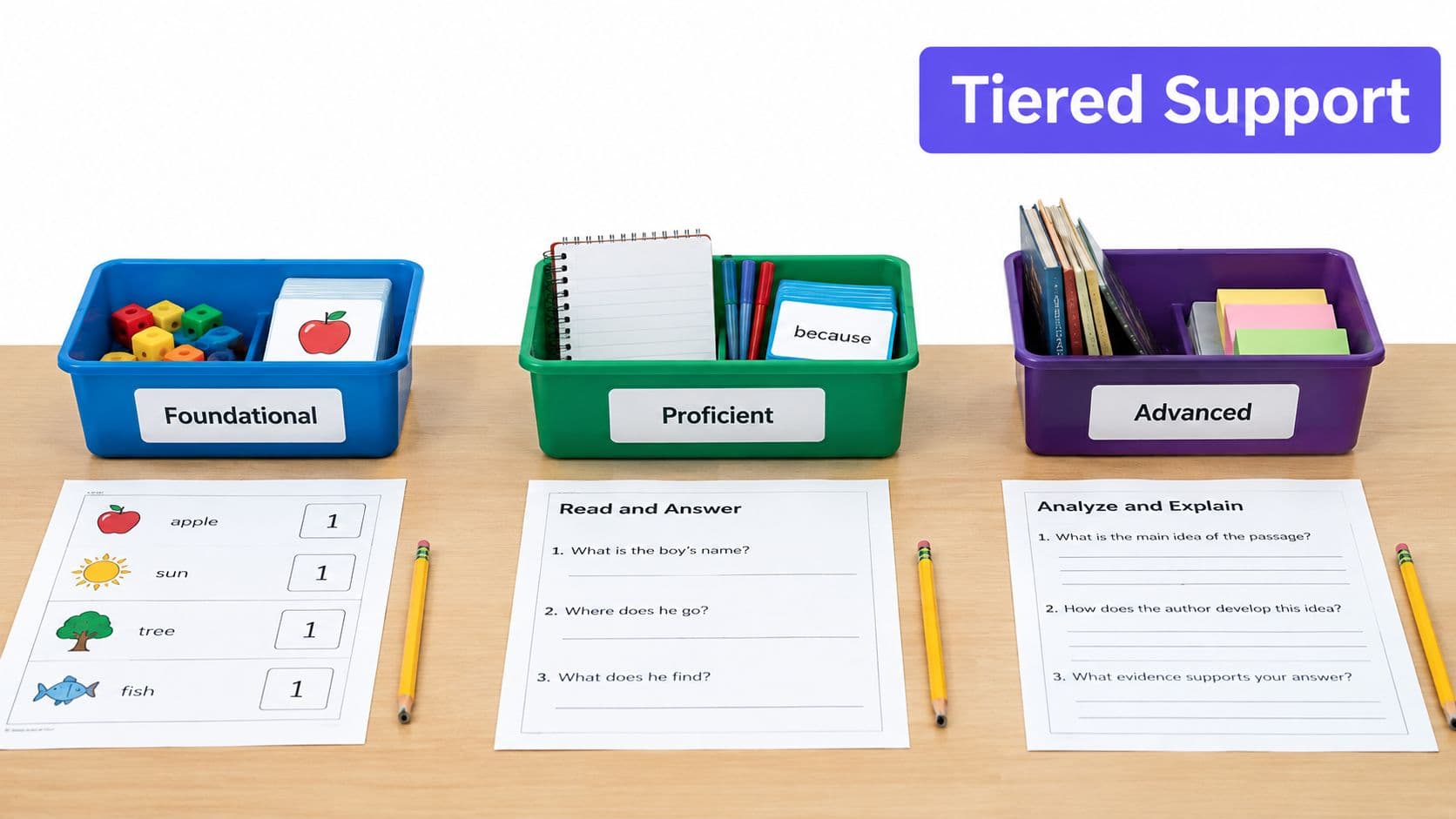
Tiered organizers keep the content and learning objective common while changing the level of support and complexity. I usually build one skeleton with three versions: foundational, proficient, and advanced. Students aren't completing unrelated tasks. They're thinking about the same concept with different levels of prompting.
For a fraction lesson, the foundational version might show pizza visuals and ask students to match shaded parts to fractions. The proficient version could connect visual models with numerical representations. The advanced version might ask students to manipulate fractions algebraically and explain why the operations work. In reading, one shared story-analysis frame can move from identifying characters, to analyzing plot development, to exploring themes. A science ecosystems organizer can similarly progress from naming living and nonliving elements to tracing relationships and evaluating changes in the system.
Keep the layout, colors, and key vocabulary consistent across all three versions. That helps students recognize the shared work instead of feeling that one group has received a completely different assignment.
Build movement into the tiers
Use Bloom's taxonomy as a planning check, not as a rigid label. The foundational version may focus on identifying and describing. The proficient version can ask students to apply and analyze. The advanced version should require explanation, evaluation, or synthesis, rather than just adding more boxes to fill.
Test each version with real student work before you print a class set. If the “advanced” organizer produces short answers because the prompt is vague, revise the prompt. If the foundational version gives away the thinking, remove a cue. Allow students to move between versions as their work shows readiness, and use flexible grouping without treating any tier as a permanent placement.
Practical rule: Tier the amount of thinking support, not the importance of the objective.
A useful differentiation teaching strategies guide can help you connect these organizer choices to grouping, scaffolding, and lesson planning.
2. Choice Board Graphic Organizers
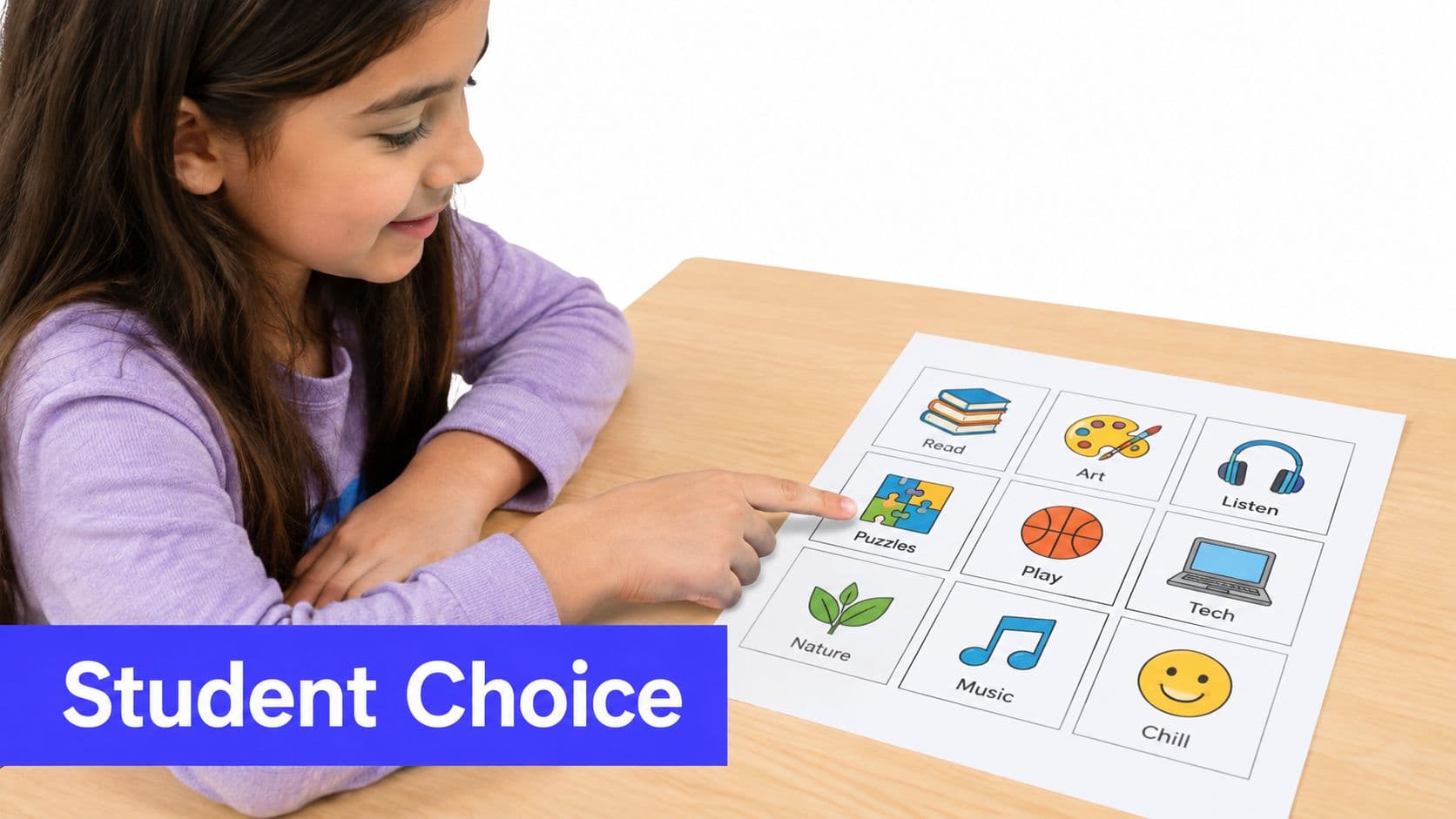
A choice board works best when students need to demonstrate the same understanding through different thinking tools. Instead of handing out a Venn diagram to everyone, offer a controlled menu that might include a Venn diagram, concept map, flowchart, mind map, or comparison matrix. The students choose the structure, but the success criteria stay fixed.
In literature, students might choose a character map, plot diagram, thematic organizer, or dialogue-analysis frame. In social studies, they could use a timeline, cause-and-effect chain, comparison matrix, or perspective organizer. A STEM task might offer a circuit diagram, labeled illustration, data table, or scientific-method flowchart. The format changes, but each option should require students to show the relationships or reasoning the lesson assesses.
Put a small visual example beside each option. A student who has never used a concept map may choose it because the name sounds familiar, then spend the whole lesson figuring out the format instead of analyzing the content.
Make choice teachable
Keep the menu manageable. Six to eight options can give students genuine control without turning the opening minutes into a decision-making exercise. Group choices by complexity or purpose, but don't label them “easy” and “hard.” A student may need a flowchart for one task and a matrix for another.
Use a simple rule such as, “Your organizer must show causes and effects,” or, “Your organizer must compare both perspectives with evidence.” Ask students to write one sentence explaining why their chosen format fits the task. That short explanation prevents choice from becoming decoration.
Graphic-organizer guidance often recommends familiar formats such as Venn diagrams, flowcharts, and mind maps, but the more important decision is when each format helps students think. A comparison task needs a structure that makes similarities and differences visible. A process task needs sequence. A reasoning task needs space for claims, evidence, and connections.
Rotate the available formats so students gradually learn to select tools independently. Don't assume a choice board automatically differentiates. Without clear criteria, it can just give students several attractive ways to avoid the hardest thinking.
3. Anchor Chart Graphic Organizers
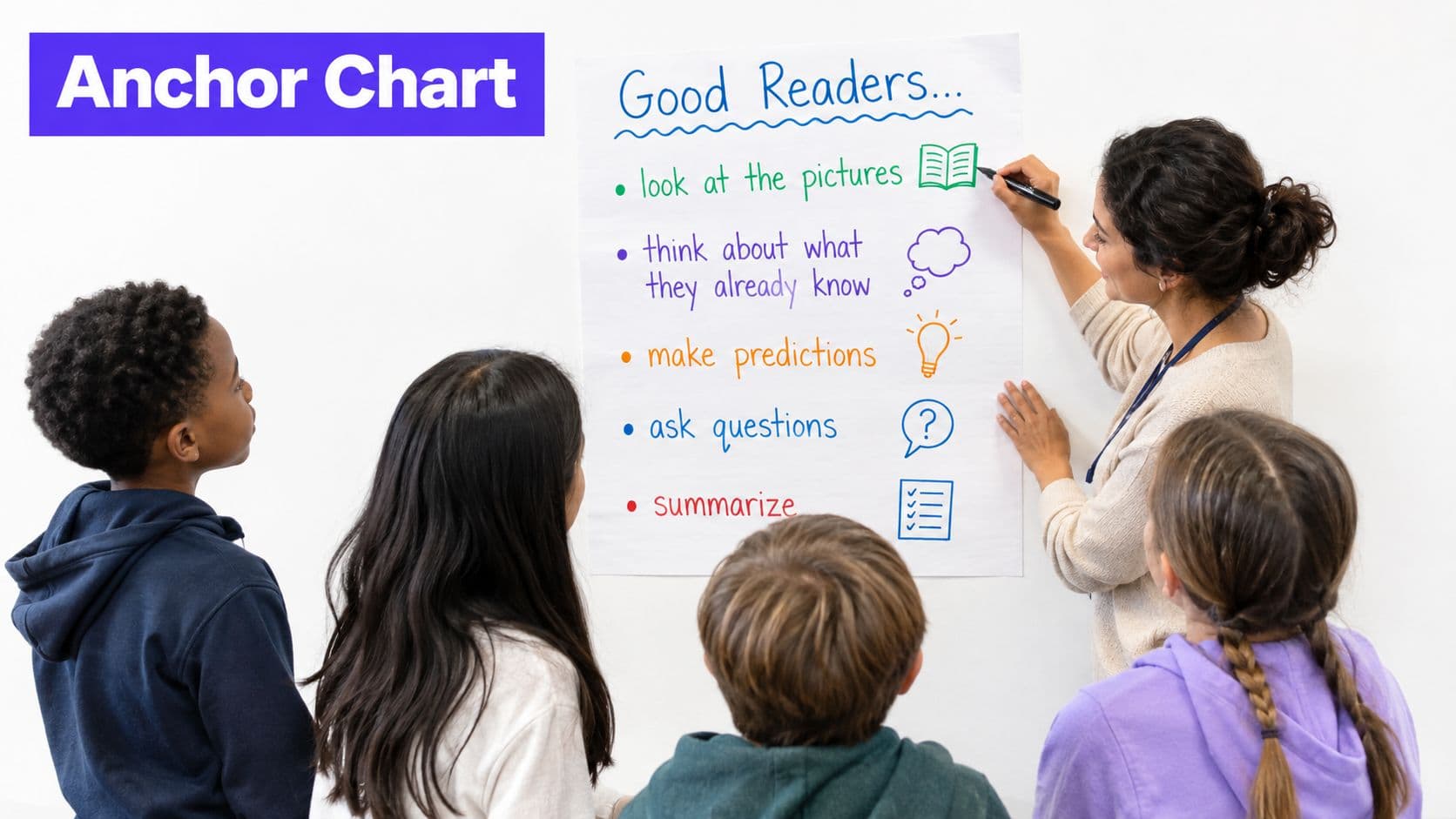
An anchor chart becomes more useful when it stays alive after the day it's created. Instead of displaying a finished poster that students admire once and ignore, build the organizer with the class and return to it whenever the same thinking process appears.
During a writing unit, students can help construct a story-structure chart, then refer to it while drafting independently. In math, a problem-solving process can remain posted during a multi-step equation unit. A character-analysis framework can support several literature selections, while a scientific-method flowchart can sit near lab stations and prompt students to record observations before jumping to conclusions.
The chart needs to be readable from across the room. Use a small, consistent set of colors and symbols. For example, a blue box might always indicate evidence, while a green arrow shows a connection. Students who are still learning the language of the subject can use the visual pattern while they're developing the vocabulary.
Keep the scaffold from becoming wallpaper
Co-creation gives students a reason to look back at the chart. When a class identifies the steps for analyzing a character, record their language first, then add precise academic terms. This lets students see how everyday observations connect to disciplinary vocabulary.
Photograph the completed chart and place the image in your digital classroom materials. Students who were absent, students working at home, and students who need a closer view can access the same reference. A digital copy also helps when you want to provide an enlarged version or add audio explanations.
Limit the number of charts displayed at once. Rotate older ones out as the class becomes more independent, and keep a small reference folder for students who still need them. The point isn't to cover every wall. It's to make the most useful thinking routines easy to retrieve.
A reference tool only supports independence when students know when to consult it and when to work without it.
For multilingual learners and students with disabilities, pair the chart with accessible prompts, sentence stems, icons, audio, or enlarged text when those supports remove an access barrier. Keep the intellectual task intact. A character chart can still ask students to infer motives and cite evidence, even when the labels and directions are made easier to read.
4. Preference-Based Organizers
Preference-based organizers can help students enter a task through a modality that feels familiar, but they work poorly when teachers turn preferences into permanent learner categories. A visual student may benefit from a color-coded concept map during a photosynthesis lesson. Another student may understand the same content through a structured listening guide with vocabulary and questions. A third may use a detailed text outline or Cornell notes template.
A kinesthetic option might involve building and labeling a model with manipulatives. That option only counts as meaningful differentiation if students must explain the science represented by the model. Moving pieces around without naming relationships can feel active while producing very little evidence of understanding.
Use preference as an entry point
Offer choices when the lesson objective allows them, then teach students how each organizer supports transfer. A listening guide should help students extract ideas from spoken information. A concept map should help them connect concepts. A hands-on model should help them represent and explain a system. The organizer isn't successful because it matches a preference. It's successful because it makes the target thinking visible.
You can combine this approach with a choice board so you don't have to create a completely separate task for every student. Provide two or three well-designed routes, then vary the level of prompting within each route. A student might choose a visual map but still receive a word bank, while another uses the same map with only the central concept supplied.
Avoid allowing comfort to replace productive challenge. If students always choose the format that requires the least language, they may miss opportunities to develop language. If writing is the actual objective, a voice recording alone won't assess it. Be clear about which skills are flexible and which the lesson is deliberately building.
In an inclusive classroom, labels can also be bilingual when that supports access, and directions can include sentence stems, icons, audio, or enlarged formats. Those supports should open the task, not shrink it. A multilingual learner can use a bilingual organizer and still compare evidence, explain causes, or defend an interpretation.
5. Process-Based Graphic Organizers
The strongest differentiation often changes the amount of structure, not the content. Start with one base organizer, then decide what each student needs to use it successfully. One version might include vocabulary, sentence frames, and several completed examples. Another might show only the major headings. The most independent version might be blank except for the learning objective.
For essay planning, a scaffolded frame can prompt a claim, evidence, explanation, and conclusion. A more advanced student might receive the same sequence as headings and decide how to organize the argument. In data analysis, one group could receive a partially completed chart, while another works from raw data and decides which relationships matter. In argument writing, some students might begin with guided claim starters, while others structure the argument independently.
Fade support deliberately
The first attempt tells you more than the plan does. If students stare at a blank organizer, add a model or complete one section together. If students fill every box without understanding the relationships, slow down and model the reasoning behind each connection. If students copy the sentence frame without adding their own idea, reduce the frame and ask for an explanation.
Use color-coded versions so students can identify the appropriate level without public labels. Model the scaffolded version, then show how the support is removed. Over successive uses, take away word banks, prompts, examples, or prefilled headings. The destination is not a blank page for its own sake. It's independent organization of ideas.
Watch the stall, not just the finished sheet. The moment a student gets stuck tells you which support to add or remove.
A graphic organizers guide can help you choose a base structure and adapt it for reading, writing, math, or content-area lessons. Kuraplan's editable worksheet approach is also useful when you want one lesson to produce several printable versions without rebuilding every box by hand.
A 2026 study of 30 Grade 3–8 teachers found that teachers favored premade organizers for efficiency, while co-created organizers helped manage mental effort, and independent student generation could create confusion and distraction. The authors identified matching organizer completeness to reading level and text complexity as a priority for future research, as reported in the study of teacher use of graphic organizers. That trade-off matches classroom experience. A blank organizer looks flexible, but it can place too much organizational work on a student who is already using most of their attention to understand the text.
6. Technology-Enhanced Interactive Organizers
Digital organizers earn their place when they make support available at the moment students need it. A Google Slides template can include headings, movable text boxes, and linked definitions. An interactive PDF vocabulary map can provide definitions through embedded support. A digital whiteboard can let students drag concept cards into a Venn diagram before writing an explanation. Canva can help you customize a visual organizer with images and age-appropriate text.
Start with a simple Google Slides file before building hidden layers and complex interactions. Students still need explicit instruction in how to duplicate a slide, move an object, type in a box, and submit work. Don't mistake device familiarity for knowledge of the tool you've chosen.
Build for access and monitoring
A digital organizer can provide different layers of support without handing each student a visibly different worksheet. Definitions, examples, audio, or sentence stems can sit behind links or expandable sections. Students can open the support when they need it and leave it closed when they don't.
Set sharing permissions carefully. Some students need edit access, while others may benefit from commenting first. Keep an offline version ready for a weak connection, a dead battery, or a platform failure. The paper version should preserve the thinking task, not just serve as an emergency filler.
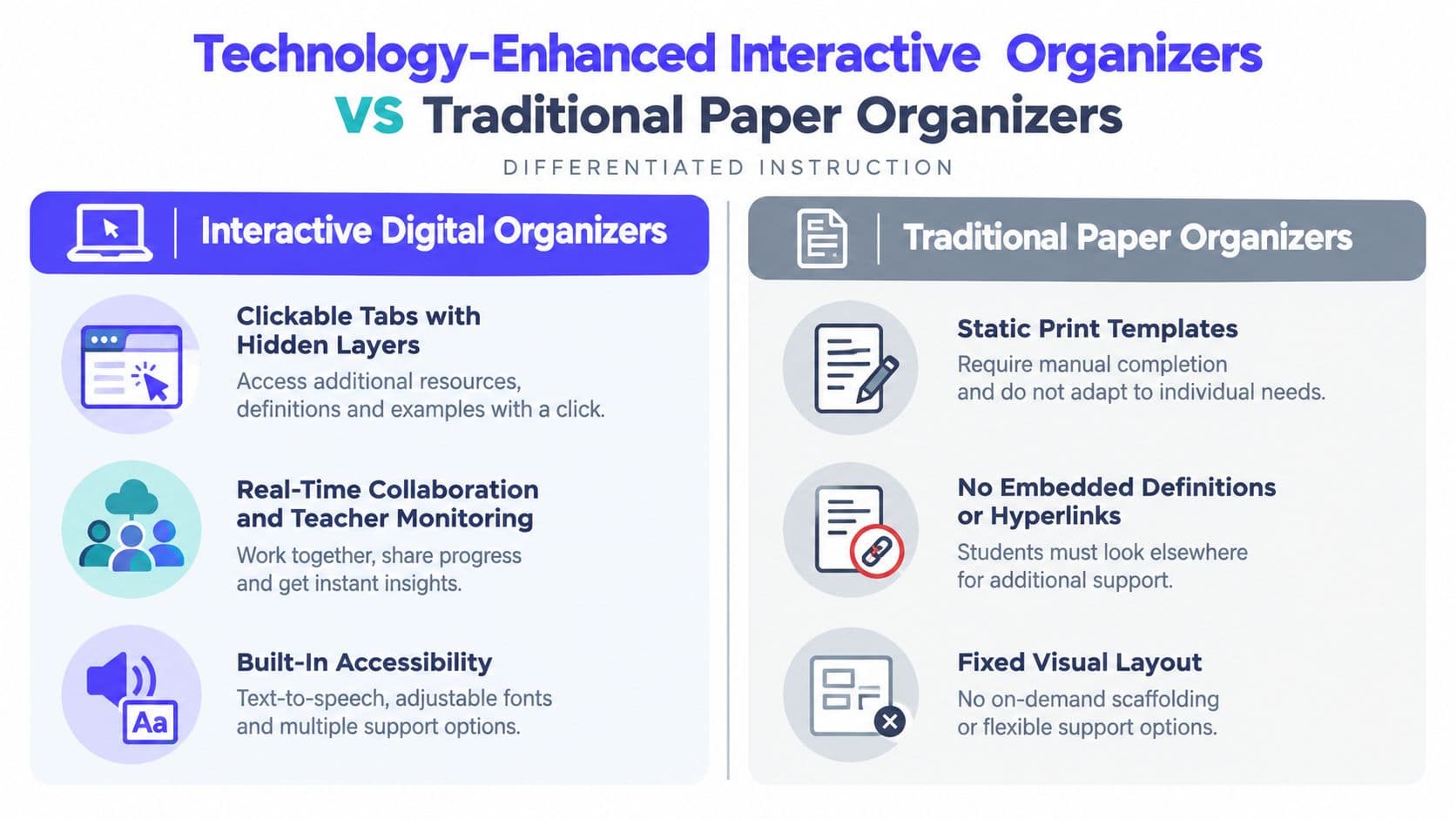
A digital organizer also gives you a useful view of unfinished thinking. You can see which students haven't moved beyond the first box, which vocabulary link they opened, or where several students made the same connection incorrectly. That information can shape a quick small-group lesson instead of waiting for completed work.
Digital scaffolds should make the thinking easier to access, not make the thinking optional.
For a classroom example, students analyzing a historical cause-and-effect chain might drag event cards into sequence, open definitions for unfamiliar terms, and then write an explanation in their own words. A student who needs language access can use audio or translated labels, while the final task still requires causal reasoning.
If you want to adapt a passage before building the organizer, Kuraplan's differentiate text tool can support a starting point for accessible lesson materials. Use the result as draft material, then check the language, content accuracy, and level of challenge yourself. Technology saves time only when the teacher remains responsible for the instructional decision.
7. Interest-Based Content Organizers
Interest-based differentiation changes the context, not the thinking. Every student can use the same persuasive-writing organizer while arguing for a different community project. One student may propose a sports facility, another a library space, and another a garden. Each student still needs a claim, relevant reasons, evidence, and a response to an opposing view.
A character-analysis framework can work with a comic-book character, historical figure, athlete, or musician. A problem-solving organizer can ask students to design solutions for different real-world problems, from reducing food waste to improving a school arrival routine. The examples become more inviting, but the organizer keeps the cognitive demand visible.
Start with an interest inventory or a short conversation. Students' interests can connect to culture, family experience, hobbies, local issues, or future goals. Don't assume that a student who likes drawing wants every assignment turned into art. Ask what kinds of examples help the concept feel worth examining.
Keep the thinking equivalent
The main risk is giving one group an easier topic. Compare the evidence students must use, the complexity of the decisions they must make, and the quality of explanation expected. If one student argues about a familiar topic and another investigates an unfamiliar one, the task may not be equally demanding even when the organizer looks identical.
Students with shared interests can work together, but parallel organizers should remain individual when you need to assess each student's reasoning. Rotate topics so the same student isn't always assigned the “fun” context or treated as the class expert on one interest.
A social-studies organizer can ask students to compare perspectives on a local decision, while a science organizer can connect the same system model to different environmental situations. The content changes, but the success criteria stay stable. Tell students directly, “The examples are different, but the thinking is the same.” That distinction helps them see relevance as a route into rigorous work, not a reward for finishing early.
7-Point Comparison: Differentiated Instruction Graphic Organizers
| Organizer | Core Features | Best For 👥 | Unique Selling Point ✨/🏆 | Ease & Value ★ / 💰 |
|---|---|---|---|---|
| Tiered Graphic Organizers (Three-Level Differentiation Model) | Three parallel complexity levels; scaffolded vocab; visual consistency | Heterogeneous classrooms; standards-based instruction 👥 | Balances access + challenge; low-stigma differentiation 🏆✨ | ★★★☆☆ / 💰💰💰 |
| Choice Board Graphic Organizers (Menu-Based Differentiation) | 6–9 organizer options; same objective; multiple modalities | Building student agency; diverse learning preferences 👥 | Increases engagement through choice; builds metacognition ✨🏆 | ★★★★☆ / 💰💰 |
| Anchor Chart Graphic Organizers (Scaffolded Reference Tools) | Large co-created references; modeled steps; unit-long visibility | Multi-week units; classroom routines; early grades 👥 | Durable classroom scaffold that builds ownership and automaticity 🏆 | ★★☆☆☆ / 💰💰💰 |
| Preference-Based Organizers (Learning Style & Modality Differentiation) | VARK-formats (visual/auditory/reading-kinesthetic); same content | Inclusive classrooms; ELs; neurodiverse learners 👥 | Honors modality strengths and accessibility ✨ | ★★☆☆☆ / 💰💰 |
| Process-Based Graphic Organizers (Task Complexity Variation) | Scaffolded→open-ended versions; fading supports; sentence frames | Developing independence; writing & analysis tasks 👥 | Fades scaffolds to build metacognition and autonomy 🏆✨ | ★★★☆☆ / 💰💰💰 |
| Technology-Enhanced Interactive Organizers (Digital Differentiation) | Clickable layers, embedded supports, real-time collaboration, accessibility | Tech-integrated / remote classrooms; accessibility needs 👥 | On-demand scaffolding + teacher monitoring and data ✨🏆 | ★★★☆☆ / 💰💰💰 |
| Interest-Based Content Organizers (Relevance Differentiation) | Same organizer; varied culturally/relevant content options | Increasing motivation; culturally responsive teaching 👥 | Keeps cognitive rigor while boosting relevance and identity ✨🏆 | ★★★☆☆ / 💰💰 |
Pick One Organizer and Test It on Monday
Choose one organizer from this list and match it to a unit you're already teaching. Don't redesign the entire month. Build one tiered or modified version for a single lesson, then watch the first real attempt closely.
Look for the moment students stall. Does one group need a word bank, a completed example, or a clearer visual sequence? Look for coasting too. Does another group complete every box without explaining the relationships? Remove support where students no longer need it, and add support where the structure is hiding the thinking rather than helping it.
The goal isn't to make every worksheet look different. The goal is to give students an appropriate route into the same worthwhile learning. Sometimes that means three tiers. Sometimes it means one shared anchor chart with different prompts. Sometimes it means letting students choose a format, then requiring them to justify the choice.
Keep the version that works. Save the revision with a note about the students and task it supported, so you can reuse the structure without treating it as a permanent template. A 2026 social-studies intervention with multilingual and monolingual learners reported reading-comprehension gains among English learners from an average of 49.3% to 78% when organizers were embedded in comprehension and critical-thinking instruction, as described in the social-studies intervention research. The practical lesson is not that every organizer produces the same result. It's that the organizer needs to support analysis, comparison, causal reasoning, and evidence use, rather than reducing the lesson to recall.
Kuraplan can turn a planned lesson into a printable worksheet, so your adapted organizer is ready to hand out without extra formatting time. Start with the learning objective, adjust the structure for the students in front of you, and let the first lesson show you what to change next.
Kuraplan helps K–12 teachers create standards-aligned lesson plans, differentiated worksheets, and educational visuals, including editable graphic-organizer formats for classroom use. Turn your next lesson into a printable starting point, adapt it for your learners, and visit Kuraplan to try it.