You're in a grade-level meeting, comparing plans that seemed perfectly reasonable in isolation. Then someone notices that fourth grade spends weeks on equivalent fractions, fifth grade starts the same work from scratch, and sixth grade assumes students can apply it independently. Nobody intended to create that gap. Each teacher planned responsibly, but no one had a shared view of the whole journey.
That's the problem the curriculum mapping process is built to address. A map makes intended learning, sequence, instruction, assessment, and resources visible across classrooms and grade levels. It isn't a script for every lesson. It's a working picture that helps teachers decide what students should learn, when they should encounter it, and how the team will know whether the learning happened.
What Curriculum Mapping Actually Solves in Real Classrooms
A curriculum map earns its keep when it changes a planning conversation. Instead of saying, “I think we covered that,” teachers can point to where a skill appears, what students were expected to do, and which assessment provided evidence.
At its simplest, curriculum mapping documents the learning path across a course, grade, subject, or program. The modern process grew from early curriculum theory, while Heidi Hayes Jacobs popularized the term as a formal process in the early 1990s for indexing or diagramming what schools teach so teams can find gaps, redundancies, and misalignments. This overview of curriculum mapping's development and alignment role describes the shift from informal planning toward a documented process connecting curriculum, standards, classroom practice, and assessment.
The problems become visible
A useful map helps a team find four common classroom problems:
- Gaps: A skill appears in the standards but nowhere in the actual sequence.
- Redundancies: Several grades teach the same content without increasing the level of complexity.
- Uneven pacing: Classes in the same grade reach major learning experiences at very different points.
- Weak handoffs: One teacher assumes students learned something that the previous teacher introduced only briefly.
Consider a writing program. Grade 3 students may identify a main idea and supporting details, while grade 4 moves directly into evidence-based paragraphs. If the map doesn't show how those skills develop, teachers may repeat familiar work or skip the bridge students need.
The map also supports daily work that rarely gets mentioned in glossy explanations. A substitute can see the current unit and essential outcomes. A new teacher can understand the course without reconstructing years of shared knowledge from old folders. A parent conference becomes easier when teachers can explain how a skill develops over time rather than describing one isolated assignment.
Practical rule: If a map doesn't help a teacher make a decision about tomorrow's instruction, it needs less decoration and more usable information.
The strongest maps are shared planning documents, not private files owned by the person who created them. Teams can use learning intentions and success criteria to make the expected outcome clearer for teachers and students, as shown in this practical guide to learning intentions and success criteria. The day-to-day difference is modest but important: teachers spend less time guessing what came before or what comes next, and more time responding to the students in front of them.
The Core Workflow Behind Curriculum Mapping
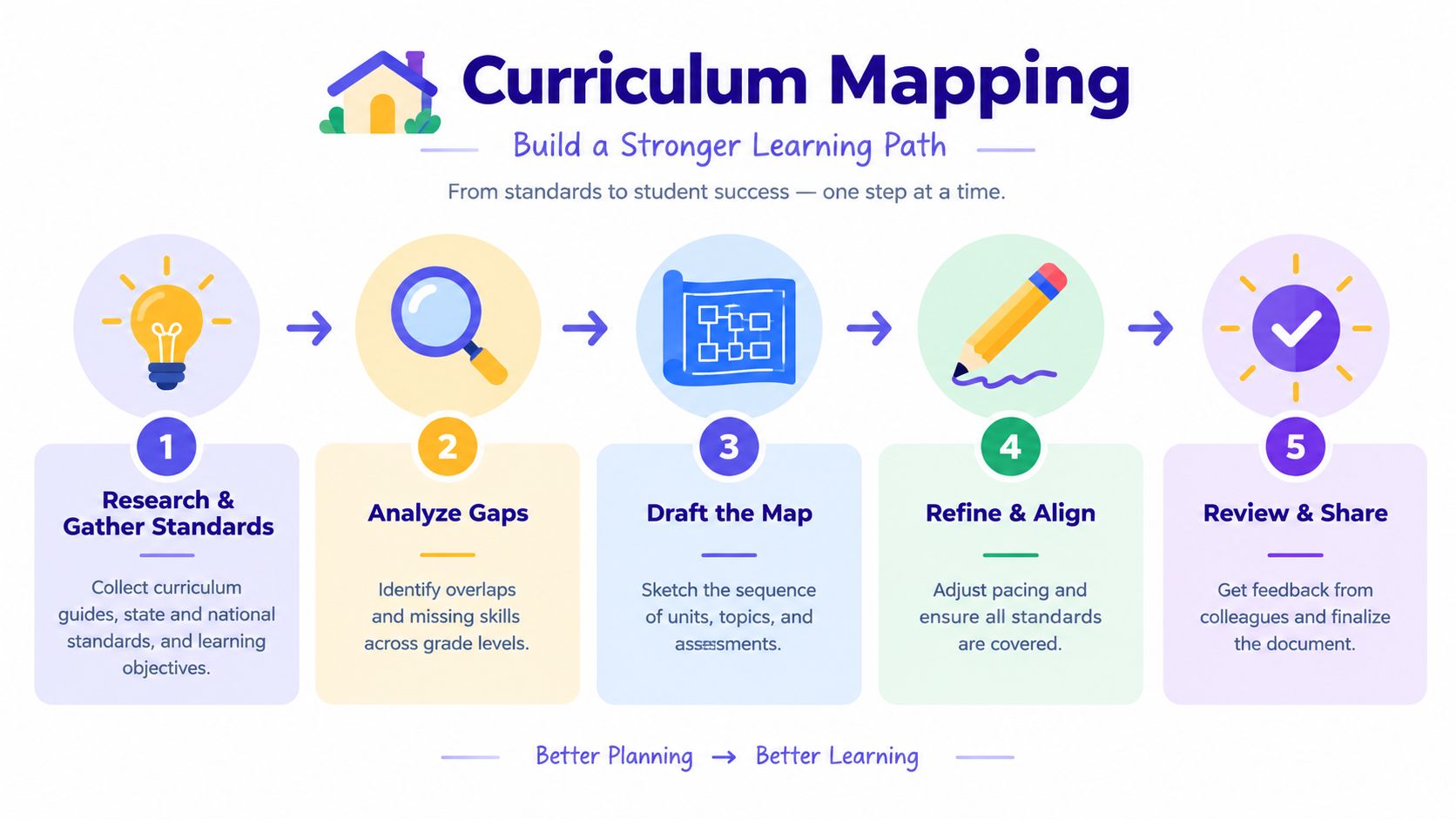
Think of the curriculum mapping process as building a house. You wouldn't choose curtains before checking whether the foundation can support the structure. Curriculum work follows the same logic: standards provide the foundation, scope and sequence provide the framing, pacing guides act like the wiring, and unit plans add the finishing work.
Start by gathering the materials that define the job. Collect curriculum guides, applicable standards, course requirements, existing pacing documents, common assessments, and current unit plans. The purpose isn't to treat every document as equally authoritative. It's to see what the school says students should learn and compare that with what teachers currently teach.
Build the structure before filling the rooms
Next, define the scope. Decide which grades, courses, subjects, and time period belong in the map. Identify priority outcomes and describe the knowledge and skills students should demonstrate. A map becomes difficult to use when it tries to record every worksheet, discussion, and classroom move, so begin with the elements that help teachers make planning decisions.
Then draft the map. Plot units, standards, learning objectives, major activities, assessments, resources, and approximate pacing. At this stage, resist the urge to make the document perfect. The first version should show the current reality, including uncertainty and disagreement.
The review pass does the important work. Teachers read the map individually, review it in mixed groups, and then examine it together as a larger team. This staged approach is designed to expose missing content, excessive overlap, and poor sequencing before the team finalizes decisions, as described in research on staged curriculum-map review.
Revise, then return to the evidence
After the review, revise the sequence, clarify labels, connect assessments to outcomes, and record decisions. The workflow loops because new evidence may reveal that a unit's placement, pacing, or assessment doesn't work as expected.
A digital unit-planning tool can help teachers turn an agreed sequence into usable plans. For example, Kuraplan's unit plan generation feature can support the move from mapped outcomes to unit-level planning, but the team still has to decide what belongs in the curriculum and whether the resulting plan matches classroom needs.
Vertical and Horizontal Alignment Explained
A map needs two viewpoints. Vertical alignment asks how learning develops from one grade or course to the next. Horizontal alignment asks whether students in the same grade receive a reasonably coherent experience across classrooms or subjects.
Take a literacy standard related to main idea and supporting details. A vertical review might trace how students identify the main idea in grade 3, support it with relevant details in grade 4, and use evidence to explain an author's message later in the sequence. The point isn't to force identical lessons. It's to make sure each grade adds something rather than restarting or skipping a necessary step.
Horizontal alignment addresses a different concern. Suppose two fifth-grade sections use the same mathematics curriculum, but one class finishes the year in a later chapter while the other spends much longer on earlier topics. Students may enter the next course with different experiences, even though they share the same grade-level expectations. A horizontal map helps the team discuss shared outcomes, reasonable sequencing, major assessments, and competing demands on instructional time.
| Lens | Question It Answers | Example | What It Catches |
|---|---|---|---|
| Vertical alignment | How does this skill develop over time? | Tracing main idea and supporting details from grade 3 into later writing work | Skipped prerequisites, repeated content, abrupt increases in difficulty |
| Horizontal alignment | Are students in the same grade working toward comparable outcomes? | Comparing fifth-grade fractions units across classroom sections | Uneven pacing, inconsistent assessments, conflicting resource use |
Use both lenses before drafting
Vertical review prevents a team from treating every grade as a separate island. Horizontal review prevents a school from assuming that a grade-level label guarantees a consistent experience.
The distinction matters in math as well. A vertical fractions review might show that students encounter equivalent fractions in grade 4 but aren't expected to connect that idea to comparison or operations until later. A horizontal review could reveal that one fifth-grade class assesses that connection through problem solving while another relies only on procedural exercises.
A year-at-a-glance view can help teachers see pacing and major learning experiences before they build a more detailed map. This year-at-a-glance template collection offers a simple planning format that can support that initial conversation. The map becomes useful when both lenses lead to decisions about what students will learn, how the learning will build, and what evidence will count.
An Eight-Step Mapping Process You Can Follow
Treat the following as a meeting checklist, not a theoretical model. Each step should leave something concrete behind. If the team finishes a discussion without an artifact, the work may be interesting, but it hasn't yet become a map.
Convene stakeholders. Bring together classroom teachers, specialists, instructional leaders, and representatives from adjacent grades or courses. Produce a stakeholder roster that records who contributes knowledge about standards, instruction, assessment, intervention, and student needs.
Name a map steward. Assign one person to maintain the working file, organize meetings, and record unresolved questions. The steward coordinates the process, but shouldn't become the only person responsible for the map.
Gather standards and requirements. Collect the relevant standards, curriculum guides, course expectations, and assessment requirements. The output is a standards coverage audit that distinguishes required outcomes from optional supporting content.
Inventory current content. List the units, skills, activities, assessments, resources, and approximate time frames teachers currently use. This unit-by-unit inventory should describe what happens, not what the team wishes happened.
Sequence the map. Arrange units and major topics in a logical order across the calendar. Produce a timeline grid that shows prerequisites, pacing windows, and important handoffs between grades or courses.
Align assessments. Match assessments to the learning objectives they measure. The populated map should identify formative checks, performance tasks, common assessments, or other evidence without pretending that every classroom must use the same lesson.
Identify gaps and duplication. Review the map vertically and horizontally. Produce an alignment gap report that marks missing skills, repeated content, weak prerequisite links, mis-sequenced units, and assessments that don't match the stated outcomes.
Publish and review. Share the usable version with the people who plan and teach from it, then schedule the next review. A review calendar turns the map into an operating document rather than an archive.
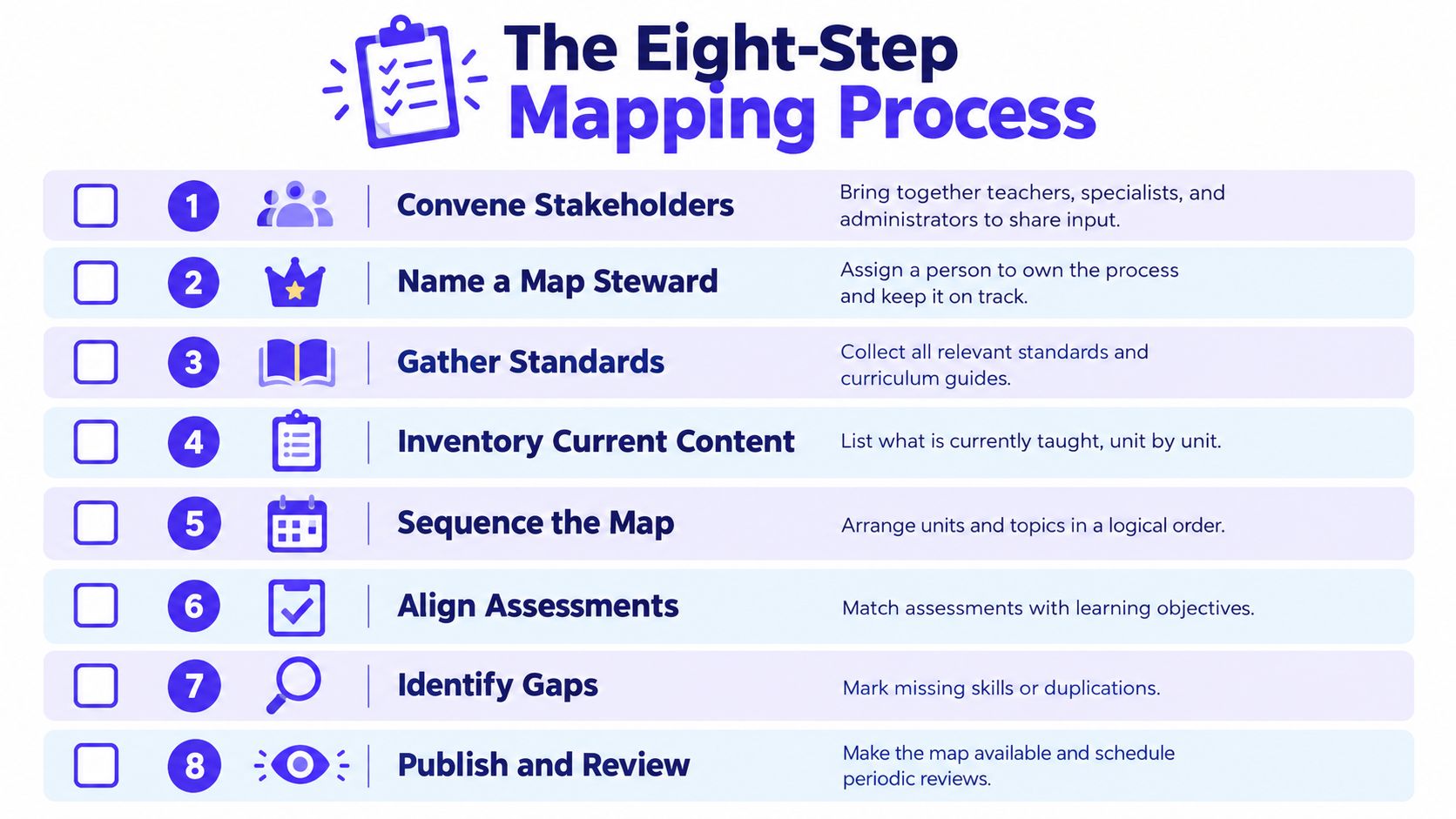
The exact format can vary, but the outputs matter. A team that names participants, records current practice, plots the sequence, and documents revision decisions has something it can inspect. A team that only talks about alignment leaves the work vulnerable to memory, turnover, and changing classroom conditions.
The process is also cyclical in higher education and applies well to K–12 teams. Instructors create maps, collate them, review them vertically and horizontally, identify misalignments, revise weak areas, and implement the changes, as described in research on cyclical curriculum mapping.
Mapping Tools, Templates, and Where AI Fits
A spreadsheet can be enough to begin. Many teams create a master Excel or Google Sheets file with tabs for standards, units, pacing, and assessments. One teacher or coordinator updates the document, sends it to colleagues, and reconciles changes during an annual planning period.
That workflow offers familiarity and control, but it has a predictable weakness: the map decays between review cycles. A teacher may add a new resource without updating the standards tab, change the order of units without changing the pacing view, or describe the same skill with a different label. The file still exists, but it no longer represents classroom reality.
AI-supported curriculum mapping tools change the comparison in three practical areas. They can help organize uploaded documents, connect objectives to standards codes, identify possible overlap, and keep shared planning work in one place. Those functions don't replace teacher judgment. They reduce the clerical work that makes teams postpone revisions.
| Dimension | Manual Spreadsheet | AI Mapping Tool |
|---|---|---|
| Revision time | A teacher must locate affected cells, update related tabs, and notify collaborators | The platform can help surface related objectives and planning elements for review |
| Standards alignment | Teachers manually enter codes and check whether descriptions match | The tool can assist with standards linking, while teachers verify the match |
| Collaboration | Multiple people may edit, but version control and naming conventions require discipline | A shared workspace can make current plans easier to access and coordinate |
| Accuracy | Depends heavily on careful entry and regular checking | Automation can reduce repetitive entry, but it can't guarantee an instructional decision is correct |
Kuraplan is one example of an AI-powered planning platform that supports standards-aligned unit plans, differentiated materials, and formative or summative assessments. Schools comparing options should focus less on feature counts and more on whether teachers can update the map, understand its labels, and use the information during planning.
Visuals also affect usability. A team may need to turn a dense curriculum document into a clearer diagram, handout, or student-facing resource, and this guide to enhancing education visuals with AI provides relevant context for that work. The best tool is the one that helps the team keep its map accurate, shared, and connected to instruction.
Real Examples of Curriculum Maps Before and After Revision
A fifth-grade fractions unit shows why revision matters. The first draft often looks acceptable because it has a title, a topic, a pacing guess, and a standards column. But a closer look reveals that teachers can't use it to coordinate instruction or check whether students are ready.
The rough first draft
| Unit title | Standards | Pacing | Assessments | Cross-grade note | Resources |
|---|---|---|---|---|---|
| Fractions | Fractions standards | Three weeks | Not listed | Grade 4 already covered equivalent fractions | Not listed |
This draft records a topic, not a learning plan. “Fractions standards” doesn't tell teachers which expectations matter. “Three weeks” may be a guess rather than a pacing decision. The note about grade 4 is useful, but it doesn't explain what students should already know or how fifth grade will extend that work.
The revised map
| Unit title | Standards and prerequisites | Pacing | Assessments | Cross-grade handoff | Resources |
|---|---|---|---|---|---|
| Comparing and Operating with Fractions | Coded CCSS standards, linked to grade 4 equivalent-fraction prerequisite | Four weeks | Pre-assessment, formative checks, post-assessment | Grade 4 develops equivalent-fraction understanding; grade 5 applies it to comparison and operations | Core text, visual models, practice tasks, intervention materials |
The revised version makes several decisions visible. The clear title tells teachers what students will do, not just the broad topic. The coded standards provide a shared reference point, while the prerequisite link connects the unit to earlier learning.
The pacing window changes from an unsupported estimate to a planning commitment. That doesn't mean every class must move at exactly the same speed. It gives the team a basis for discussing whether the time is realistic and what evidence would justify an adjustment.
The assessment column also changes the map's function. A pre-assessment can reveal whether the grade 4 handoff is secure. Formative checks can guide small-group instruction during the unit, and the post-assessment can show whether the intended outcomes were reached.
A strong revision doesn't make the grid busier for its own sake. It adds only the information teachers need to decide what comes next.
The resources column connects the plan to actual preparation. If a visual model or intervention task supports a stated objective, teachers can find it without searching through disconnected folders. The map now reflects alignment, assessment, pacing, and collaboration rather than merely listing content.
Why Curriculum Maps Often Fail and How to Keep Yours Alive
A finished map can still produce misalignment. The document may look polished while teachers continue planning from memory, using different terminology, or discovering missing skills halfway through a unit.
The first failure mode is the lone maintainer. One coordinator becomes the person who enters every change, answers every question, and carries the institutional memory. The signal is obvious: colleagues send updates by email, but few can explain how the map works. Rotate the scribe role during review cycles, and let the steward coordinate rather than perform every revision.
Inconsistent labels create a quieter problem. One team writes “argument writing,” another uses “persuasive writing,” and a third records “evidence-based response.” The map becomes difficult to search and compare. Create a shared glossary, agree on standard tags, and provide a short template with examples of acceptable labels.
Stale entries usually appear after a new standard, resource, or assessment enters the program. Teachers teach the revised content, but the map continues to describe the old sequence. Schedule a standards audit and require teams to record what was taught, not only what was planned.
Slow feedback loops create the most frustrating surprises. A team may notice that students lack a prerequisite only after the unit is underway, when the available response is emergency reteaching. Build short check-ins into team meetings so teachers can flag pacing problems, missing background knowledge, and assessment mismatches while changes are still manageable.
A map can also fail through data overload. If every cell contains every resource, activity, accommodation, and note, teachers stop using it. Keep the core view focused on outcomes, sequence, assessment, pacing, and essential resources. Store supporting detail elsewhere and link to it when needed.
Maintenance rule: The map should be easy enough to update during ordinary planning, or it won't stay current.
Building a Living Cycle Instead of a One-Time Document
Curriculum mapping works best as a repeating alignment cycle. The team checks the plan against standards, classroom experience, and student evidence, then makes a manageable revision instead of waiting for a major curriculum rewrite.
Use four checkpoints across the school year:
- Summer review: Re-examine standards, requirements, resources, and pacing before instruction begins. This is the right time to convene stakeholders, gather documents, and adjust the sequence.
- Fall check-in: After the first units, compare the map with classroom reality. Check whether the planned pacing, prerequisites, and assessments match what teachers are seeing.
- Winter mid-year audit: Review student performance against the planned objectives. Identify outcomes that need reteaching, assessments that aren't producing useful evidence, and units that need more workable pacing.
- Spring revision pass: Record lessons learned while they're fresh. Update the map before the next cohort begins, including changes to resources, handoffs, and assessment coverage.
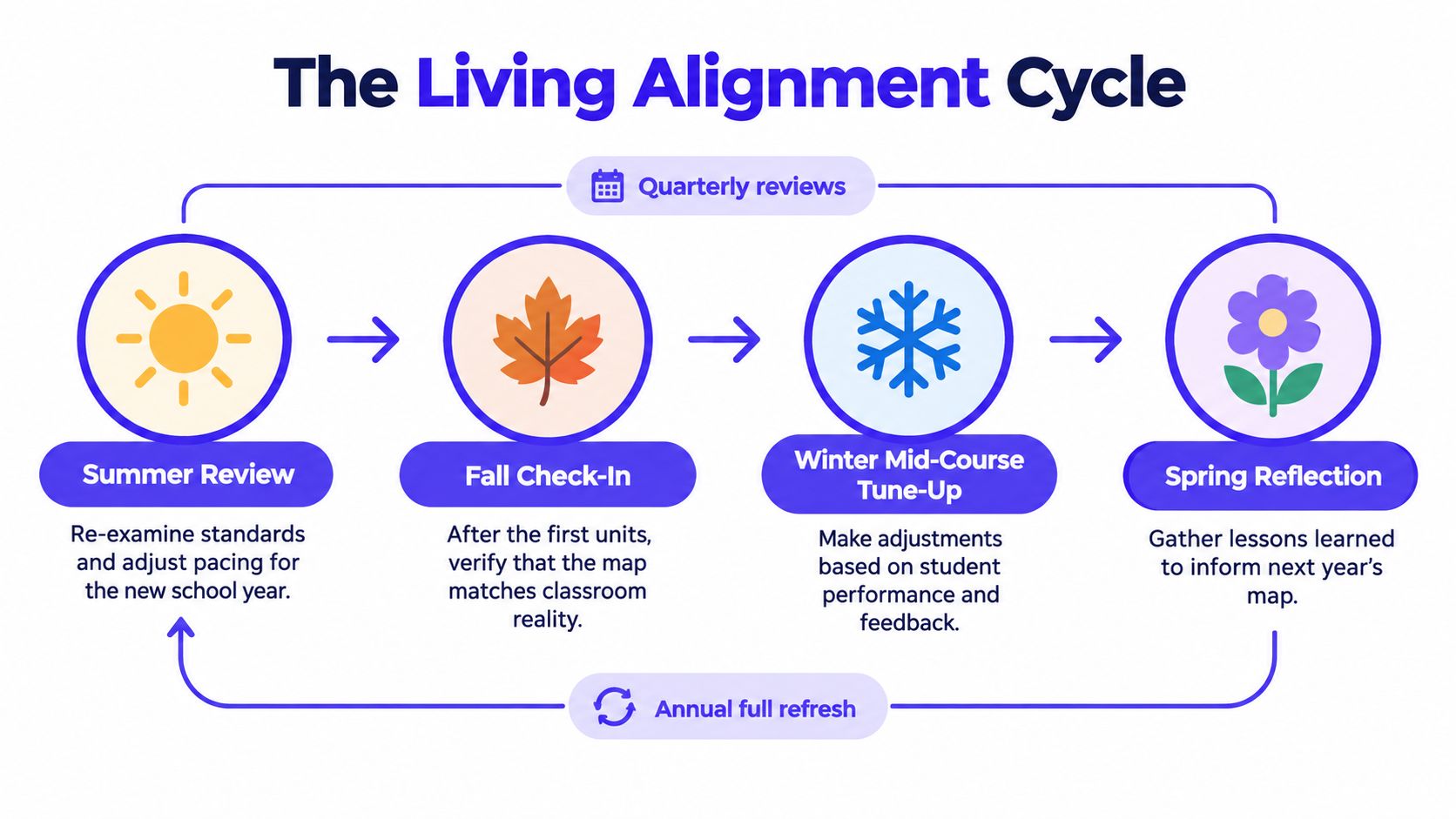
The cycle connects directly to the eight-step process. Stakeholders and standards anchor the summer review. Inventory and sequencing support the fall check-in. Assessment alignment and gap analysis guide the winter audit. Publishing and scheduled review make the spring revision visible and actionable.
You can start this week without mapping an entire school. Pick one course or grade-level map to audit, schedule the first checkpoint, assign a rotating maintainer, and choose one revision metric to follow through the next cycle, such as whether planned assessments cover the stated objectives. Keep the map small enough to use, honest enough to reflect instruction, and open enough to change.
Kuraplan helps educators turn mapped outcomes into standards-aligned unit plans, differentiated learning materials, and connected assessments in one planning workflow. Visit Kuraplan to explore a practical way to keep curriculum planning shared, current, and ready for classroom use.