A science lesson can look successful from the front of the room: the slides are ready, the reading is assigned, and students are busy. Then you notice that some are struggling to decode the text, a few aren't sure what the task is meant to teach, and others understand the idea but can't show it easily in writing. The content may be sound, but the design is working for only part of the class.
Universal Design for Learning (UDL) offers a practical way to plan for that variability before students get stuck. It doesn't mean preparing a separate lesson for every learner. It means making purposeful choices about how students engage with a goal, access information, and demonstrate what they know, while keeping the learning target clear. That's a useful distinction from differentiation strategies for teaching: flexibility should improve access to the same meaningful learning, not replace the goal with an easier one.
Why Your Current Lesson Plan Is Leaving Students Behind
Take a typical science lesson on how plants get the resources they need to grow. The plan is straightforward: students read a textbook passage, listen to a short explanation, then write a paragraph about what plants need. It works for students who can comfortably read the passage, follow the explanation, and organize their thinking in writing. But those steps bring extra demands that aren't necessarily part of the science objective.
A multilingual learner might understand the concept but need help with unfamiliar vocabulary. A student with a visual impairment may not be able to access a diagram on the slide. Someone with a fine-motor challenge might know what to say but find writing by hand slow and tiring. Another student may be ready to explain the concept aloud, but struggle to get started because the task's purpose and success criteria aren't clear.
The problem isn't that any one of these students needs a different academic destination. The problem is that one route to the destination has become the lesson itself. That's the planning shift UDL invites: identify what students need to learn, then look for barriers in the ways you're asking them to reach and show that learning.
A useful starting point: Keep the learning goal steady. Be willing to change the route, the materials, or the format students use to show what they know.
This isn't only a special-education strategy. Planning for varied language backgrounds, sensory access, attention, prior knowledge, confidence, and ways of communicating can make a lesson more usable for the whole class. UDL also doesn't mean offering a long menu of activities just to give students choices. A choice is helpful when it supports the learning goal; it's a distraction when students don't know what they're meant to learn or how they'll know they've succeeded.
The Iterative UDL Planning Workflow
A common planning trap is choosing an engaging activity first, then trying to attach a learning objective afterward. Start with the destination instead. CAST's UDL implementation criteria emphasize alignment among the goal, assessment, methods, materials, and learning environment, followed by redesign informed by learner outcomes.
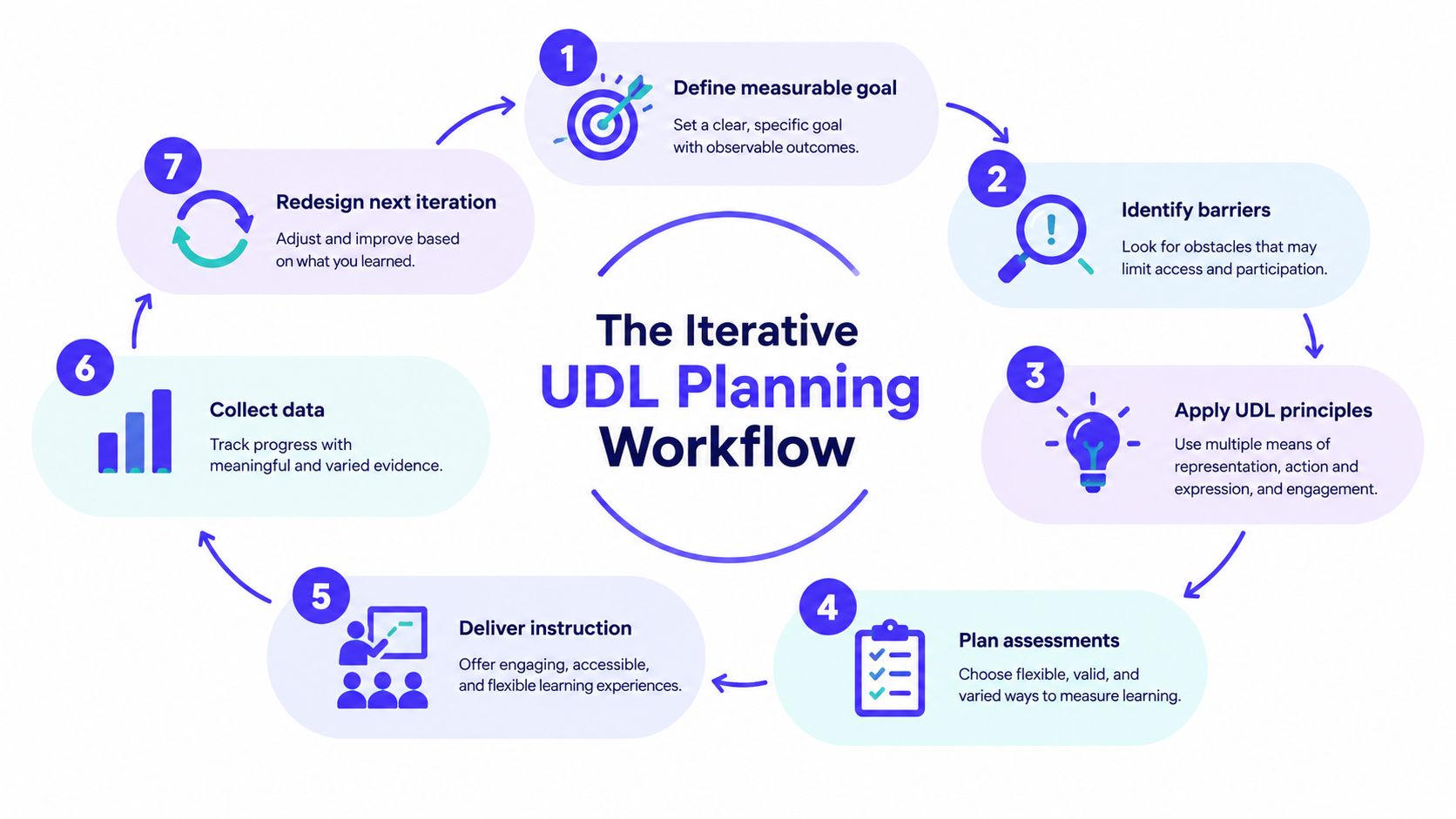
The workflow runs in a cycle, the way a good lesson observation does: plan, teach, look at what happened, adjust, and plan again. For the plant-growth lesson, work through it like this:
Define a measurable goal. Name what students will learn, not just what they'll do. For example: students will explain how a plant uses light, water, and air to grow. A clear learning intention and success criteria make the destination visible before you select activities; this guide on learning intentions and success criteria shows how to word them so students can tell when they've arrived.
Specify assessment evidence. Decide what would show understanding. Students might explain the plant's needs and connect them to growth. Planning this now helps you avoid mistaking task completion, reading fluency, or handwriting for science understanding.
Anticipate learner variability. Consider cultural and language backgrounds, social-emotional needs, cognitive load, perception, physical access, and sensory access. Ask who might struggle with the vocabulary, the visual model, the pace, or the response format.
Identify barriers. Check each part of the lesson: goal, assessment, teaching method, materials, and environment. Does the slide rely on color alone? Does the task require extended handwriting when handwriting isn't the target? Is there a quiet place to work?
Provide flexible options. Plan ways into the learning that preserve the goal. Students could access information through readable text, audio, a diagram with spoken explanation, or teacher modeling. They might show their reasoning through a written explanation, an oral response, or a labeled model.
Teach the lesson. Explain the goal, criteria, and available pathways. Give students enough guidance to choose an option that helps them do the learning, rather than picking the shortest task.
Use evidence to redesign. Review learner performance and engagement. If students completed the activity but couldn't explain the science idea, revisit the instruction or materials. If a response option made it easier to show understanding without changing the standard, consider keeping it.
Step 7 is the one most planning guides skip. The evidence you collect tells you which of your UDL decisions worked and which ones need another pass, which is what makes this a workflow rather than a checklist.
Quality check: Map every planned task to the objective. For each barrier, ask whether an optional pathway removes it while maintaining the same academic target. If an option lowers the goal, it may be a modification rather than an access route.
Applying the Three UDL Principles in One Lesson
UDL groups planning decisions under three principles: engagement, the “why” of learning; representation, the “what”; and action and expression, the “how.” CAST organizes these into nine guidelines, covering learner interests and identities, effort and persistence, emotional capacity, perception, language and symbols, knowledge-building, interaction, communication, and strategy development. You don't need to force every guideline into every lesson. You do need to consider whether each principle has a useful place in your plan.
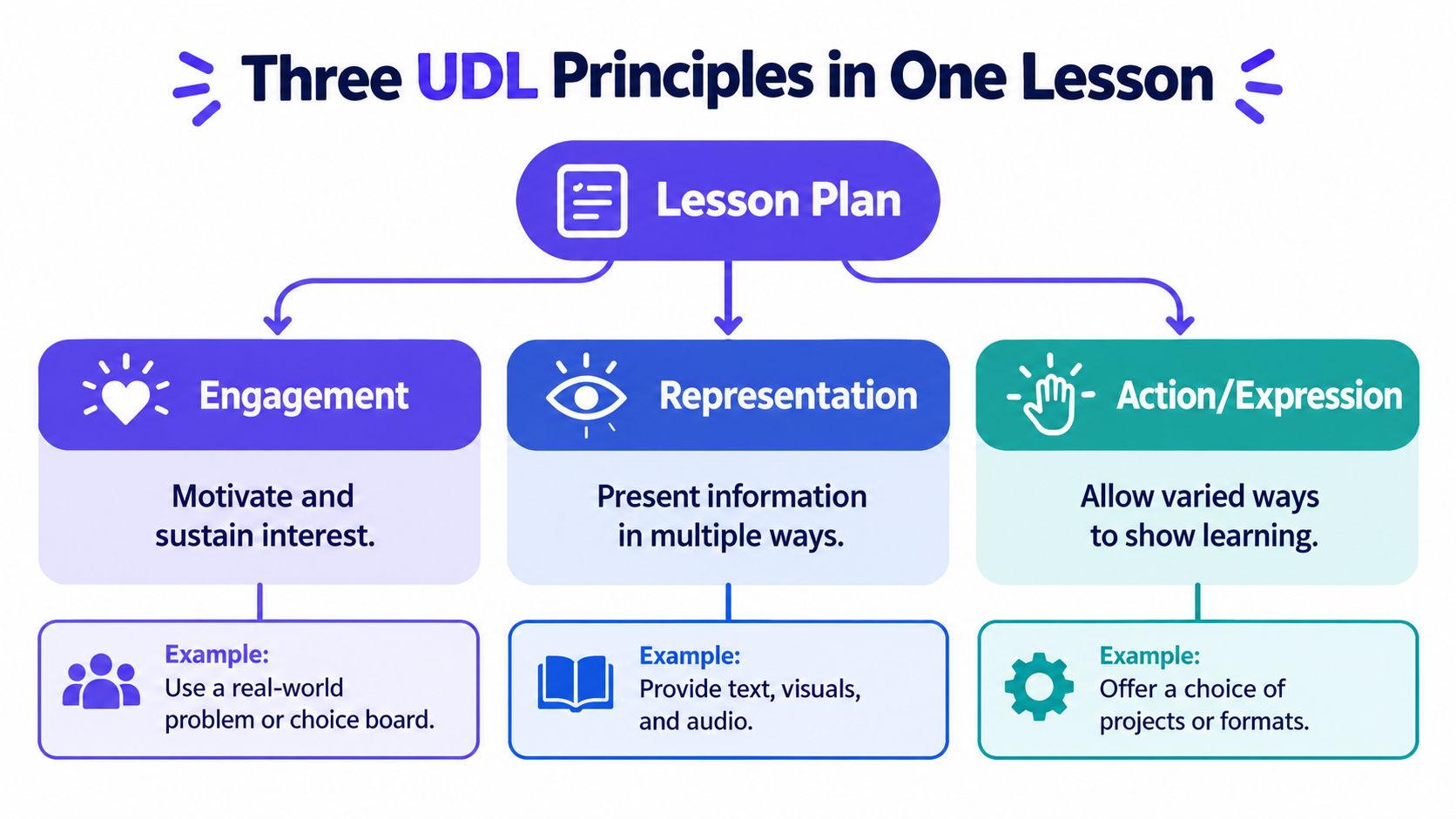
Engagement is about helping students connect to the work and keep going. In the plant lesson, students might choose whether to examine a garden plant, a houseplant, or a familiar crop, then work alone or with a partner. Keep the choice relevant to the science goal. If students need a video to understand the setup, accessible captions can support learners who are deaf or hard of hearing, as well as those who benefit from reading along; caption requirements for social video can help teachers check that captions are part of a usable viewing experience.
Representation means offering ways to access the important information. Pair a spoken explanation with a labeled plant diagram and clear text. Define key words such as “light” and “nutrients” in context, and describe important visual information aloud instead of assuming every student can see or interpret a diagram in the same way.
Action and expression means offering appropriate ways to communicate learning. A student might write an explanation, record an oral response, or create a labeled model. The formats differ; the science reasoning they need to show stays common.
Before teaching, run through this short check:
- Engagement: Have I made a meaningful choice or connection available?
- Representation: Can students access the key ideas in more than one way?
- Action and expression: Can students show the target knowledge without being blocked by an unrelated response demand?
The CAST UDL Guidelines offer a useful reference when you're deciding whether an option supports a learning purpose or adds another activity.
Designing Assessments That Measure Learning Not Barriers
Assessment belongs in the plan from the beginning. If the objective is to explain how a plant gets what it needs to grow, the assessment should measure that explanation, not how quickly a student writes or whether they can copy information from a board. A flexible response format can help remove those unrelated hurdles without changing what counts as understanding.
You might let students present the same explanation as a labeled model, a short written response, an oral recording, or a demonstration. The format only works if it gives you valid evidence for the objective. A model that names the plant's needs but doesn't explain their role may not provide the same evidence as an argument connecting those needs to growth. Decide what all acceptable responses must show before offering formats.
Make the criteria common
Write the rubric around the shared learning outcome. For example, the criteria might ask whether a student identifies the relevant resources and explains how they support growth. The rubric can then be applied consistently to an oral response, written explanation, or labeled model.
Build in support as students learn the task. First show an example or provide a checklist. Next, let students rehearse with guidance. Then ask them to demonstrate the learning independently when that's what the objective requires. The aim isn't to remove every challenge; it's to distinguish the challenge of learning the science from a barrier that isn't part of the goal.
A choice board alone won't solve the assessment problem. Without clear criteria, students may select a format that feels comfortable but gives you little evidence of learning. If students are comparing appropriate options for a class project, a resource on stream selection help for students may help them think through practical considerations, but the teacher still needs to make the learning criteria explicit.
After the lesson, use a brief formative check to see who can explain the concept and who needs another route into it. These formative assessment examples can help you choose a check that fits the lesson rather than adding an unrelated quiz.
Building a Reusable UDL Lesson Template
You don't need a complicated form to plan with UDL. A one-page template can hold the decisions that matter: what students will learn, how they'll demonstrate it, what might get in the way, and what you'll look for after teaching. Use the same structure across a unit, then adjust the details as lessons build on one another.
| Template Section | Purpose | Example |
|---|---|---|
| Learning goal | Name the shared outcome | Explain how a plant uses resources to grow |
| Assessment evidence | Define what mastery will look like | Connect a plant's needs to its growth |
| Anticipated barriers | Spot demands unrelated to the goal | Dense reading, unlabeled diagram, handwriting load |
| Engagement options | Make a relevant connection or choice available | Choose a familiar plant to examine |
| Representation options | Make information accessible in varied ways | Pair text with audio, a spoken explanation, or a diagram |
| Action and expression options | Allow flexible evidence of learning | Submit a written explanation, oral response, or labeled model |
| Post-lesson note | Record what happened and what to revise | Note which students explained the relationship independently |
Keep each entry short enough that you will use it. Before teaching, note the barrier you most want to remove and the evidence that will tell you whether the change helped. Afterward, jot down what students did, where they needed support, and what you would adjust next time.
That record makes planning more efficient over time. You won't have to solve the same access problem from scratch in every lesson, and you can carry forward an option that worked while dropping one that didn't. For project-based units, teachers can also look at free standards-aligned PBL resources for ideas, then check that each project activity and assessment still connects to the intended learning goals.
What the Research Really Says About UDL
UDL is promising, but its results aren't guaranteed or identical across settings. A systematic review of pre-K–12 research identified 13 qualifying studies, with outcomes for engagement, curriculum access, and academic or social measures ranging from small to large. The review also found variation in how closely interventions connected to specific UDL guidelines (systematic review).
A later systematic review and meta-analysis covered 13 studies and 771 participants. It reported Hedges' g = 3.56, with a 95% confidence interval of 1.03–6.08, but also substantial heterogeneity, with individual effects ranging from 0.33 to 13.18. Study samples ranged from 7 to 254, and many studies used one-group quantitative designs. Those limitations matter: an effect-size estimate isn't a classroom success rate, and a large pooled result doesn't establish that every UDL change will cause better outcomes in every setting.
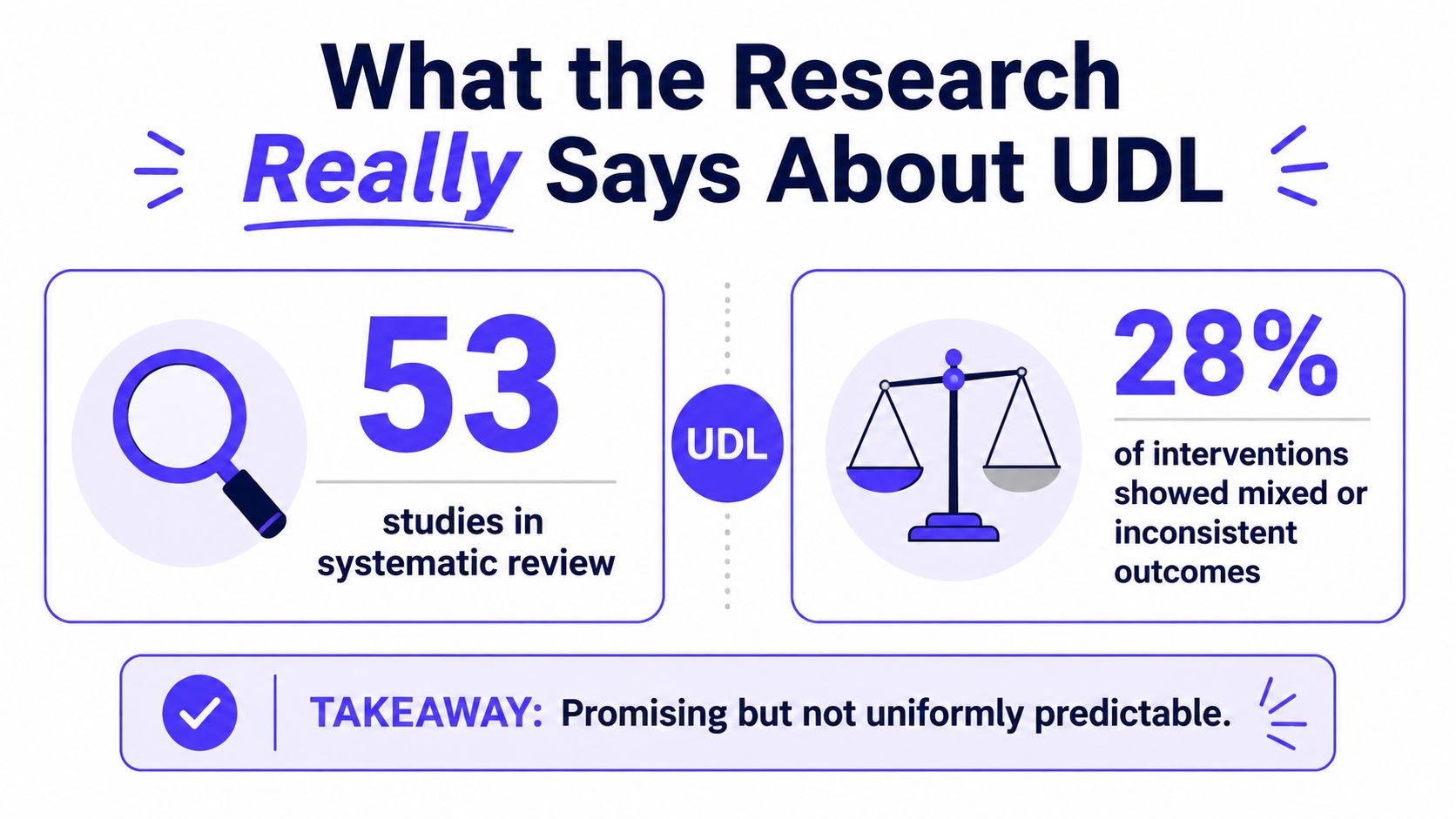
A policy review likewise noted that UDL studies often lack control groups, pre- and post-measures, demographic analysis, and comparisons with alternative interventions. That makes it harder to know which design choices helped which learners. More access options don't automatically mean more learning; a visual can add cognitive load, and a choice can leave a student unclear about the purpose.
Pilot before you scale
Start by recording a baseline for the lesson or unit. Then pilot one change, such as adding an audio route to a dense reading, and track achievement, participation, task completion, and student independence. Where appropriate, compare results across learner groups, ask students what helped, and revise barriers before expanding the approach.
A policy review also points to the need to distinguish universal design from individualized supports. In a 2025 teacher study, 65.9% of respondents believed UDL was insufficient on its own, while 71.0% said individualized speech-and-language interventions remained essential (policy review and teacher study). Flexible classwide design and specialist support can work together; one doesn't replace the other.
Finally, don't mistake early implementation for a finished schoolwide shift. Implementation guidance describes full implementation as a continuous process that can take 3–5 years. In the classroom, a modest pilot with honest review is more useful than promising instant transformation.
Practical Tips for Getting Started Tomorrow
You can make a lesson more accessible without new devices or a complete rewrite. Read a key passage aloud, invite partner reading, sketch a simple diagram, and describe its important details as you draw. Those small choices can open another route to the same content.
AI lesson-planning tools can help draft standards-aligned plans, differentiated activities, worksheets, visuals, and assessment rubrics. Kuraplan is one option for generating and adapting those materials; review every draft for accuracy, accessibility, cultural relevance, privacy, and academic rigor. AI can speed up preparation, but it can't replace your judgment, student feedback, or specialist review.
A video can offer another perspective on lesson planning:
Choose one lesson you're already teaching. Identify one barrier, make one change that preserves the learning goal, and note what students do with it. That's a manageable first step toward planning lessons more deliberately around the learners in front of you.
Kuraplan helps teachers create standards-aligned lesson and unit plans, worksheets, visuals, and assessment rubrics, which can support the practical planning decisions in this guide. Try it for a lesson you're refining, and visit Kuraplan to explore the planning tools.