Computer Parts and Basics
💻 Part 1: Multiple Choice
Choose the best answer for each question.
1. What is the "brain" of the computer called?
Monitor
CPU
Keyboard
Mouse
2. Which part of the computer displays information on the screen?
CPU
Keyboard
Monitor
Mouse
3. What do you use to type letters and numbers into the computer?
Mouse
Monitor
CPU
Keyboard
4. Which finger should be placed on the "F" key in home row position?
Thumb
Index finger
Middle finger
Ring finger
5. Microsoft Word is primarily used for:
Playing games
Writing documents
Drawing pictures
Listening to music
🔍 Part 2: Identification
Write the name of each computer part described below.
6. This part processes all the information and instructions in a computer.
7. This input device has buttons with letters, numbers, and symbols.
8. This device lets you point and click on things on the screen.
9. This part shows you pictures, text, and videos on the screen.
10. The row of keys where your fingers rest when typing is called the _______ row.
✓ Part 3: True or False
Write T for True or F for False.
11. _____ The CPU is the most important part of a computer.
12. _____ You can type without looking at the keyboard if you know proper finger placement.
13. _____ The mouse is used only for playing games.
14. _____ Microsoft Word was created by Apple.
15. _____ The monitor is an output device.
16. _____ Your thumbs should rest on the space bar in home row position.
17. _____ The keyboard is an input device.
18. _____ Microsoft Word can only be used to write letters.
19. _____ The CPU stands for Central Processing Unit.
20. _____ You should use only one finger to type all the keys.
📝 Part 4: Enumeration
List the items requested for each question.
21. List the 4 main parts of a computer:
1. _________________________
2. _________________________
3. _________________________
4. _________________________
22. List 3 things you can create using Microsoft Word:
1. _________________________
2. _________________________
3. _________________________
23. List the 4 fingers (not thumb) and their home row keys for the left hand:
1. Pinky finger: ___________
2. Ring finger: ___________
3. Middle finger: _________
4. Index finger: __________
24. List 3 places where Microsoft Word is commonly used:
1. _________________________
2. _________________________
3. _________________________
25. List 2 input devices and 2 output devices:
Input devices:
1. _________________________
2. _________________________
Output devices:
1. _________________________
2. _________________________
🎨 Part 5: Labelling Activity
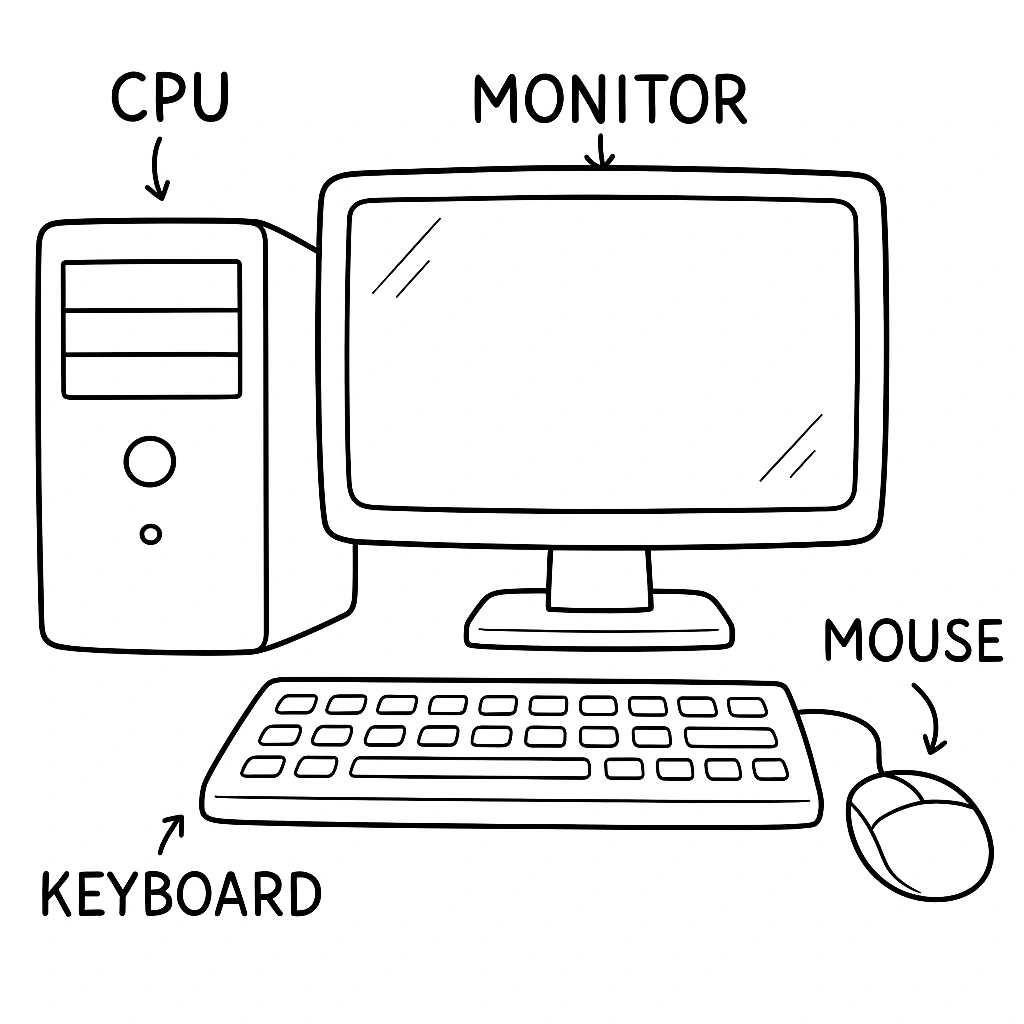
Look at the computer setup below and label each part.
26. Label the computer parts in the diagram:
Parts to label: CPU, Monitor, Keyboard, Mouse
27. Draw and label the home row keys on a keyboard:
28. Explain what the CPU does in your own words:
_________________________________________________
_________________________________________________
_________________________________________________
29. Explain why proper finger placement is important when typing:
_________________________________________________
_________________________________________________
_________________________________________________
30. Write a short paragraph about how Microsoft Word helps students in school:
_________________________________________________
_________________________________________________
_________________________________________________
_________________________________________________
_________________________________________________